Which Software to Use for Playing MAME on macOS?
On Mac, there are currently three software programs based on MAME:
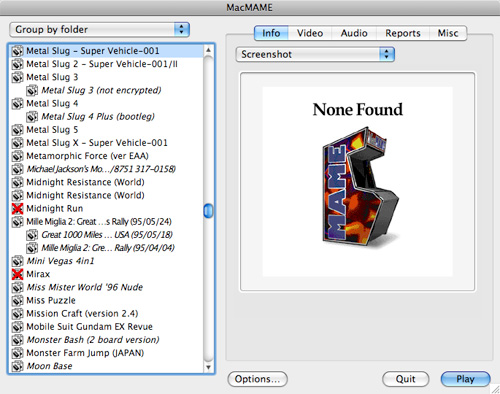
- MacMAME has been the reference on Mac for years, during the era when Mac OS 8 was the leading operating system on Apple machines.
Its main advantage is being truly optimized for Macs with PowerPC processors.
Its developer not having much time to dedicate to it, MacMame has not evolved for nearly two years. It is therefore not natively compatible with MacIntels and is based on a very old version of MAME. Compatibility with games is thus limited compared to other versions of MAME.
We still hope for a hypothetical update for this excellent emulator that has brought joy to arcade fans over the past years.
> The official MacMame website (dead link)
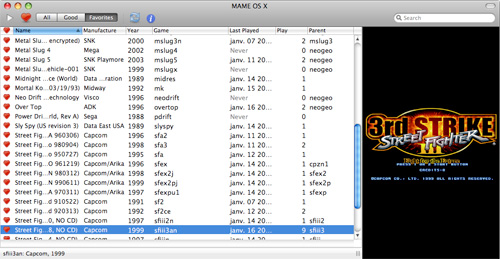
- MAME OS X is a newcomer. It takes advantage of the new technologies offered by Mac OS X such as Core Video or Core Image. It is available with a pleasant graphical interface in the style of Mac OS X. Well-designed, it allows grouping your functional ROMs and your favorite ROMs under two distinct tabs.
It is constantly evolving, offering new features with each new "build" of MAME specific to this software dedicated to Mac. It is quite frequently updated, following the versions of MAME.
> The official MAME OSX website
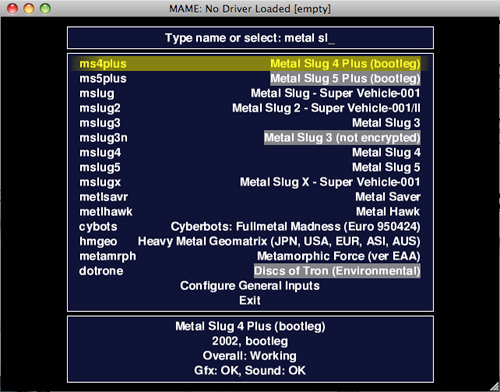
- SDLMame is a version of MAME based on the SDL library. It is not specific to Mac; it can be used on all operating systems supporting the SDL library (including Mac OS X). SDLMame is aimed at users who are not afraid of using the terminal. Installation is very simple; it only requires installing the SDL library framework and having Xcode 2.3 (or higher) installed. Without a graphical interface, it is usable only via the command line and must be compiled by the user.
As a result, it is optimized for your Mac.
We recommend reading the SDLMame.txt file provided with the sources, as it contains a lot of information about MAME and tips for optimizing compilation on your Mac.
SDLMame is updated with every version and every MAME fix.
> The official SDLMame site (dead link)
Several graphical user interfaces (GUI) are compatible with these three emulators. They will be more useful with SDLMame than with the other two, which already come with their own interface.
> MameTunes (dead link)
> EMULauch
> Mame Library (dead link) (works only with MAME OS X)
Some information to know about Mac regarding MAME, and therefore about the three emulators we just mentioned:
MAME is multithreaded, meaning it can use multiple processors or cores to increase emulation speed. Unfortunately, this option is not recommended for Mac OS at the moment, and it is not even enabled in MAME OS X.
We can hope that this issue will be resolved soon to take advantage of even better performance on multi-processor and/or multi-core systems.
Another issue related to MacPPC is that they are currently unable to emulate PowerPC processors, which are used in some arcade cabinets. This is due to programming based on Big-Endian architecture, a concept that will only interest C programmers; for others, just remember that this does not work at the moment.
- If you limit yourself to NeoGeo games, we remind you of the existence of GnGeo, which we had already discussed, and which is the most optimized emulator for this type of arcade cabinet. It requires compilation and use via the command line. This emulator is not based on MAME, so it behaves differently from the other emulators. Its optimization allows playing at full speed on a G3 300MHz for most NeoGeo games. A test for owners of old machines.
In summary, if your Mac is based on a PowerPC processor, and you want to play old games at full speed, use MacMAME. It perfectly runs older games like Metal Slug (1 to X), Garou, Street Fighter (from the first to Alpha 3, excluding the Movie version), and many others.
If you own a MacIntel or want to play recent games on a MacPPC, you will need to switch to MAME OS X or SDLmame. SDLmame will be more performant but will require more in-depth setup before playing. MAME OS X is much easier to use, with its user interface.
With a MacPPC, do not attempt these two emulators with older Mac models. They are better optimized for Intel than for PowerPC. For example, while the first Metal Slug runs at full speed on a 500MHz G4 with MacMAME, there will be lags in the game on a 1.4GHz G4 with MAME OS X.
These two emulators allow you to play games like Metal Slug 4&5, Virtua Racing, Dead or Alive ("++" version), and many other relatively recent games. You can also find early 3D emulation of games like Call Emergency Ambulance, GTi Club, the Tekken series, and the beginnings of CPS-3 emulation.
If you have the time, we recommend testing GnGeo, for which we wrote a detailed article on this site.
In any case, you can also install all of them and use the one that suits your current needs. You can create aliases for each emulator in your ROMs folder and easily share them.
We hope this article will help you see more clearly.
⚠️ This guide is flagged as obsolete.
Related software
Reply on the forum
A question or a hands-on report? Open the discussion on the forum.