NX Play
Enveloppe macOS de NXnative : bibliothèque de jeux, mode console et synchronisation des sauvegardes.
NX Play est une application macOS qui s'appuie sur NXnative pour lancer les jeux Switch nativement sur le Mac ou sur un iPhone/iPad. Elle construit chaque jeu une fois, puis le relance immédiatement, et propose un mode console plein écran piloté à la manette.
Elle gère les sauvegardes entre le Mac et l'appareil, avec sauvegarde dans un dépôt Git privé, et peut récupérer les correctifs de NXnative avant une partie. Il faut ses propres jeux et ses prod.keys : rien n'est fourni.
Dernière mise à jour :
Architecture
 Mac OS X - macOS
 Apple Silicon
Téléchargement et liens
- Télécharger NX Play
- Code source 243 étoiles sur GitHub
- Licence : MIT
Historique des versions
2.1.1
- Correction des jeux dont le dossier _build est un lien symbolique vers un autre volume (ex. APFS) pour éviter l'affichage "Not extracted".
- Affichage et gestion des liens symboliques : suppression et libération d’espace ciblent désormais le dossier pointé, pas seulement le lien.
- Alignement des notes dans What’s New in Settings › Updates : texte justifié à gauche avec des puces cohérentes, comme dans la bannière de mise à jour.
Fixed
- A build folder linked from another volume (#32): a game whose
_buildis a symbolic link, such as one kept on an APFS disk image because its games folder is on exFAT, showed as Not extracted. It's now the game's build, and Remove Game and Free Up Space empty the folder it points to, not just the link. Thanks to @heyflorin for the report and the fix. - What's New in Settings › Updates: the notes were right-aligned, with ragged lines and bullets. They now read from the left, as in the update banner.
2.1.0
- Ajout d’une fenêtre unifiée pour l’installation et la création d’IPA, regroupant les options (dispositif, fichier IPA, emplacement des fichiers, signature).
- Extraction des fichiers de jeu séparément (RomFS) pour réduire la taille et accélérer les réinstallations après rebuild.
- Support de la signature d’IPA via un certificat .p12 et un provisioning profile, sans Apple Developer Account.
- Intégration du mot de passe du certificat dans le Keychain macOS pour éviter la saisie répétée.
- Option --without-game-files pour omettre les fichiers de jeu dans les commandes CLI (--ipa ou --device).
Added
- Install & IPA window: Install on Device… and Build IPA… open one window for the game, which starts from your last choices: install on a device or make an IPA file, the game files in the app or copied on their own, and how it's signed.
- The game files copied on their own (#30): the app or IPA leaves the game's RomFS out, so it's a fraction of the size and quick to reinstall after a rebuild. Installing on a device, NX Play copies the game files into the app's folder once per game version (over USB, or over Wi-Fi for a smaller game) and skips the copy when the device has them. For an IPA file, Finder shows the game's
RomFS.imgbeside it, to copy to the device yourself. Innxplay:--without-game-files, with--ipaor--device. - Signing with a certificate (#31): a
.p12certificate and its provisioning profile sign the IPA, as sideloading tools do, without an Apple account in Xcode, and NX Play can install it on a device the profile lists. The window checks the password and shows the profile's team, app ID, devices and expiry; the password is kept in the login keychain. Innxplay:--sign-p12,--sign-profileand--install-on.
2.0.2
- Ajout du pairing par QR code depuis iPhone/iPad pour accéder au Mac via Tailscale ou Bonjour, avec vérification sécurisée et suppression après 3 minutes.
- Intégration de Tailscale dans les adresses du QR code et des paramètres, permettant un accès distant via le réseau personnalisé sans modifier ses configurations.
- Affichage des adresses IP (v4/v6), .local et Tailscale dans les paramètres, avec un champ personnalisable pour le port si nécessaire.
- Correction de la détection Bonjour après remplacement du logiciel, avec vérification active et affichage des erreurs si le service tarde à s’initier.
- Maintien du pairing mobile lors de déplacements du Mac, en testant les adresses alternatives avant de déclarer l’appareil hors ligne.
- Adaptation automatique des noms de Mac longs ou contenant des emojis pour éviter les erreurs de génération du QR code.
Pair your iPhone or iPad by scanning a QR code, and reach the Mac over Tailscale from anywhere. Thanks to @saphid for this one (#29).
Added
- Pair NX Play for iPhone and iPad with a QR code: Settings › Devices › Show QR Code… shows a code with the Mac's addresses and the pairing code; Scan QR Code on the device pairs in one step (the camera app opens it too, and Copy Link pastes through Universal Clipboard). The device asks first, and sends the code only to an address that answers as NX Play on that Mac. The QR window stays out of screenshots and screen sharing and closes after three minutes; the device keeps the code in its Keychain.
- Tailscale: the QR code and Settings › Devices include the Mac's Tailscale name and addresses when Tailscale runs, so the device reaches the Mac from anywhere on your tailnet. NX Play only reads Tailscale's status and changes none of its settings. Bonjour still finds the Mac only on the same local network.
- Settings › Devices lists the Mac's real addresses (IPv4, IPv6,
.local, Tailscale), folded under Addresses (N available) until you open it, and a Port field for when another app has 47474. The device takes any of them, IPv6 in brackets included.
Fixed
- The iPhone didn't find the Mac: after NX Play was replaced, macOS could hold back its Bonjour service for half an hour while it applied its local network rules to the new copy, with the server listening all along. NX Play now watches for Bonjour to confirm the service, says in Settings when it hasn't, and registers it again until it's visible. On the device, the Macs found are resolved to the address they answer at, a Mac on two networks shows once, Local Network access turned off says so instead of looking forever, and a failed search starts again.
- The device keeps its pairing when the Mac moves: it tries the Mac's other confirmed addresses before calling it offline; a failed pairing attempt leaves the current pairing as it was. When Bonjour sees the Mac's ID at a new address, the library offers to pair again instead of sending the saved code there (the ID is public, so anything on the network could claim it). Requests go straight to the Mac: no proxy, no redirects. Cancel and Unpair now stop a pairing under way, and an old reconnect or refresh can't overwrite a newer pairing. Errors say what to check (Wi-Fi, Tailscale, Local Network access, the port).
- A long or emoji Mac name could make a QR code the device refused as too long or damaged; the Mac now shortens the name to fit, and lists any address it had to leave out.
- An IPv6 address typed on the device made no URL ("Bad address"), and Tailscale names (
*.ts.net) were refused by iOS for plain HTTP.
New Contributors
- @saphid made their first contribution in https://github.com/varyform/nx-native-wrapper/pull/29
2.0.1
- Ajout d'une fonctionnalité Free Up Space pour nettoyer les traces du compilateur Metal après chaque session de jeu.
- Suppression automatique des fichiers temporaires liés aux pipelines Metal dans le dossier cache utilisateur.
- Limitation de la suppression pendant l'exécution d'un jeu pour éviter les conflits.
- Affichage distinct des dossiers concernés dans l'outil Free Up Space.
Added
- Free Up Space clears Metal's leftovers. Each game run leaves Metal's compiler state for its pipeline capture in the user cache folder, about 45 MB a time, and nothing ever removes it: one Mac had 89 GB of it after a few weeks. Tools › Free Up Space now lists it on its own row, the folders untouched for a day, and can't delete it while a game runs.
2.0
- Nouveauté majeure : ajout du build distant via un code unique, permettant de déléguer les compilations gourmandes à un autre Mac connecté au réseau.
- Automatisation : installation des mises à jour automatique en mode veille, sans intervention utilisateur.
- Correction critique : suppression du blocage en phase de shader lors d’un rebuild depuis un dossier réseau, avec gestion du cache SQLite.
- Correction mineure : suppression des messages de log en rouge pour les commits nxnative mentionnant des problèmes (ex. [RED]).
Shader compilation says 90 minutes to go? MacBook fans spinning up like it's about to take off? Hand the build to another Mac.
Introducing remote builds. Turn on Allow remote builds on the Mac that does the heavy lifting, a Mac mini on a shelf or a Studio under the desk, and pair your laptop with its one-time code. Its games show up in a tab in your toolbar: Build, Rebuild or Stop, with live progress and the full log, while your laptop stays cool and quiet. Keep your games in a folder both Macs share, and your laptop shows that build right on the game's card and won't start the same build twice. When it's done, the game is built: just press Play.
And fully hands-free: with Install updates automatically when idle, the building Mac installs NX Play updates by itself and opens again once nothing is building or playing. It keeps up with every release without anyone walking over to it.
Added
- Building on another Mac. Settings › Remote › Allow remote builds lets another Mac on the network pair with a one-time code and build this Mac's games. On that Mac, a tab in the middle of the toolbar shows this one's games, to build, rebuild or stop one (its button or its right-click menu) and follow its log. It can't play, change settings or reach the files. A game in a games folder both Macs have shows the other Mac's build in its card and doesn't build here while that runs.
- Install updates automatically when idle (Settings › Updates): a downloaded update installs by itself once no game or build runs and NX Play is in the background or hasn't been used for 10 minutes, then NX Play opens again.
Fixed
- A rebuild from a games folder on the network no longer stops at the shader step with
unable to open database file. A game built while its folder was on a local disk keeps its shader cache in a mode SQLite can't open over the network, so nxplay switches the cache to one that works there before building. - The log no longer shows a new nxnative commit in red when its description quotes a problem, such as
[RED].
1.9.0
- Ajout du support des mods de jeux (textures, modèles, texte, sons) sans rebuild via un système de surcouche RomFS de nxnative.
- Ouverture d’un dossier dédié aux mods depuis le menu Game › Open Mods Folder, avec gestion par ordre de priorité.
- Activation/désactivation et réorganisation des mods directement dans les Game Settings.
- Affichage dans le log des mods chargés à chaque lancement, y compris sur macOS.
- Précision que les mods de code (exefs) ne fonctionnent pas, car nxnative compile le jeu avant exécution.
Added
- Mods. A game's file mods (textures, models, text, sounds) load without a rebuild, through nxnative's RomFS overlay. Game › Open Mods Folder opens the game's
Modsfolder, one folder for each mod, as mods come for a Switch SD card. In Game Settings, turn each one on or off and drag them into order: the higher one wins a file two of them change, and each row says how many of its files come from a mod above it. The list follows the folder while it's open. The log lists the mods each play loads, and the game's Mac app loads them too. Code mods (exefs) can't work, as nxnative builds the game's code beforehand. (Issue #27, after PR #18)
1.8.11
- Amélioration visuelle : les détails du jeu en mode console ne sont plus coupés à la base, le défilement vertical affiche désormais l’intégralité de la ligne d’écran.
- Gestion des icônes : les jeux reçoivent l’icône du magasin via --fallback-icon de nxnative uniquement s’ils n’en ont pas, y compris pour les jeux non extraits.
- Correction des sauvegardes cloud : NX Play ne bloque plus 10 secondes supplémentaires si une sauvegarde cloud est inaccessible ou corrompue au démarrage.
- Compatibilité nxnative : les jeux épinglés à une ancienne version de nxnative conservent leur comportement d’icône précédent.
Changed
- Console Mode's game details fade out at the bottom while there's more below, as they do at the top. The screenshot row was cut straight across there and looked cropped; Down still brings the whole row into view. (Issue #25)
- A game's app gets the store's icon through nxnative's own
--fallback-icon: nxnative gives it only when the game has no icon of its own, from its update or its base game, instead of NX Play guessing from the extracted files. A game that hasn't been extracted yet when it's packed gets it too. A game pinned to an older nxnative checkout keeps the way before.
Fixed
- With cloud saves on, a play whose cloud save can't be read (offline, or iCloud couldn't download it) no longer waits another 10 seconds for it once the game starts. NX Play tells nxnative the cloud wasn't read, as nxnative's front-end guide now asks, and as before neither save is replaced when both changed: the next Play asks.
1.8.10
- Ajout d’icônes, bannières et descriptions pour les jeux Switch 2 via récupération depuis le eShop US.
- Affichage des visuels manquants dans la bibliothèque et en mode console pour les jeux sans icône intégrée.
- Application des icônes récupérées aux installations Mac, iPhone et aux appareils via l’application.
Added
- Artwork for Switch 2 games: the community list NX Play takes the eShop's artwork and details from has no Switch 2 games, so they had no banner, icon, description or screenshots. A game the list lacks now gets them from its page on Nintendo's US store, which also covers Switch games newer than the list. A game whose files have no icon of its own (one packed from a
.nupmay not) shows that icon in the library and behind Console Mode, and its Mac app, iPhone app or device install gets it as its app icon. (Issue #24)
1.8.9
- Ajout de la redimensionnable verticale de la fenêtre des paramètres par glissement des bords.
- Correction de la boucle de redimensionnement automatique lors du changement d’onglet dans les paramètres.
Changed
- Settings resizes: drag the Settings window's edge to make it taller or shorter; every tab scrolls in the height you give it, and Settings opens at that height next time. Its width stays as it was.
Fixed
- Settings no longer crashes: NX Play 1.8.8 crashed on switching to another Settings tab, General to Devices or any other, as the window resized itself over and over to fit the tab.
1.8.8
- Ajout d’un paramètre 60 ou 120 FPS pour les jeux sans profil nxnative, via les Game Settings, adaptable aux écrans Mac à 120 Hz.
- Suppression de l’installation automatique de .NET par le setup, les outils nxnative étant désormais natifs.
- Correction de l’affichage des onglets Settings : les paramètres dépassant l’écran (ex. General) sont maintenant défilables.
[!WARNING] NX Play 1.8.8 crashes on switching Settings tabs (#23). Use 1.8.9 instead.
Added
- 60 or 120 fps for games nxnative has no profile for: nxnative's Frame rate comes only with a game it has tested, so a game without a profile runs at the rate it asks for, often 30. Game Settings now offers such a game Frame rate (untested): 60 fps, or 120 fps on a Mac with a 120 Hz screen, a frame each display refresh. That's right for a game that keeps time by the clock (Wreckfest) and too fast for one that counts frames, so it's each game's own choice, and the game's own rate by default.
Changed
- Setup no longer installs .NET: nxnative's game extractor and shader translator are native programs now, so Setup's Install Missing no longer installs the .NET SDK or asks for your password for it. Setup asks for .NET only while your nxnative is older than that change. Uninstall NX Play… still offers to remove a .NET SDK Setup installed before.
Fixed
- Settings fit a small screen: a tab taller than the screen, such as General, now scrolls, so its last settings are no longer out of reach under the Dock.
1.8.7
- Suppression automatique des caches de compilation de shaders pour libérer de l’espace, réduisant des dizaines de gigaoctets inutiles.
- Effacement des anciennes copies d’installation pour chaque appareil, évitant l’accumulation sur le disque local du Mac.
- Correction de l’affichage des commandes de stick dans la liste des contrôles de jeu, incluant le déplacement avec les flèches + Maj.
- Intégration d’un bouton "Give Access…" dans Free Up Space pour faciliter la demande d’accès complet au disque via les paramètres système.
Added
-
Free Up Space removes shader compile caches (#21): a build's
shader/cache/cas.dbkeeps the compiled shaders of every nxnative version that changed them, and can reach tens of GB. Games play without it. The next rebuild compiles the shaders again. -
Old device install copies are removed (#22): for each device, Xcode's device service keeps a copy of the app it installed, as big as the game, on the Mac's own disk. It also keeps the copies of older builds of the game. After each Install on Device, NX Play now removes the older ones, and Free Up Space lists every game's copies. Both need Full Disk Access for NX Play, since macOS opens that folder only to apps with it. Free Up Space's Give Access… opens System Settings at Full Disk Access, with NX Play's icon beside it to drag into the list.
Fixed
- Game Controls lists the right stick (#22): the arrow keys with Shift held move it, which the window didn't say.
1.8.6
- Ajout de plusieurs dossiers de jeux (via Settings › General › Games Folders), affichés comme une seule bibliothèque, avec gestion des dossiers déconnectés.
- Sélection manuelle du fichier de sauvegarde en cas de divergence entre sauvegardes locales et cloud, avec affichage des dates et appareils concernés.
- Activation du contrôleur comme joueur dès la première pression d’un bouton (Settings › Games › Controllers), avec indication dans la liste des contrôleurs.
- Affichage d’un avertissement orange dans le log si un build est incomplet, et génération d’une application Mac ou d’un IPA même en cas d’échec partiel.
- Suppression automatique des fichiers compressés (NSZ/XCZ) après décompression pour les jeux NSP/XCI, avec option de nettoyage rétroactif (désactivée par défaut).
Added
-
Several games folders (#20): Settings › General › Games Folders takes more than one folder, and their games show as one library. A folder can also be a single game's own folder. Builds and saves stay where they are, so nothing rebuilds. A folder on a disk that isn't connected is marked as such, and its games come back when it's mounted. The window title is now always NX Play, and Choose Games Folder… is Add Games Folder….
-
Play asks which save to use when the cloud's and this Mac's both changed: with cloud saves on, a game played on two devices without a sync in between no longer simply takes the newer save. Play shows when each was saved and on which device, and the other is kept in the save's backups. It needs a game built with a recent nxnative.
-
Press a button to join: with this nxnative setting on (Settings › Games › Controllers, next to Players), a controller becomes a player at its first button press, so players choose who is player 1. It shows once a game built with a recent nxnative offers it, and the controller list says how players join while it's on.
-
A build that finishes without part of what it makes says so: the log panel shows "done, with a warning" in orange, and the step's line in the log is orange too. nxnative now packs a Mac app or an IPA even when its pipeline archive fails, and that app builds the pipelines on its first start.
-
Keep only the unpacked copy of NSZ and XCZ games: nxnative unpacks a compressed game into its build folder and keeps both copies. With this new setting (Settings › General), once a game is built for the Mac, the unpacked NSP or XCI moves into the game folder and the NSZ or XCZ goes to the Trash, so the game takes its space once and is never unpacked again. Turning it on offers to tidy the games built already. It's off by default, since it changes your own files.
1.8.5
- Ajout d’un badge violet pour les jeux utilisant leur propre branche nxnative, avec affichage du dépôt et de la branche dans la tooltip, et nommage en mode Console.
- Tri et filtrage améliorés de la bibliothèque : menu de barre, options View › Sort By et View › Show pour classer par nom, date de dernière utilisation ou ajout, et filtrer par Switch/Switch 2, jeux nécessitant attention ou builds conservés.
- Badges des cartes adaptés dynamiquement : icônes pour App, Xcode et IPA, hauteur unifiée, et effondrement en « +N » pour les badges non affichables.
- Affichage du contrôleur sélectionné dans les questions de jeu hors mode Console : résolution du problème où la ligne et le bouton de retour n’étaient visibles qu’en Console Mode.
- Correction du partage erroné du badge « new in nxnative » entre copies identiques d’un même jeu, désormais lié à l’ID du titre et à son dossier.
Added
-
Games on their own nxnative checkout are marked: a game whose folder links to its own nxnative checkout gets a purple branch badge, with the checkout and its branch in the tooltip, and Console Mode names the branch. A link that isn't a checkout gets an orange badge, since that game builds with the shared checkout.
-
Sort and filter the library: a toolbar menu (also View › Sort By and View › Show) orders the grid and the list by name, last played or date added, and can show only Switch or Switch 2 games, the games that need attention, or kept builds. The list gets Last Played and Added columns, and its headers now sort the grid too.
Changed
- A card's badges fit however many a game has: App, Xcode and IPA are icons now, all badges are one height, and the ones that don't fit on a narrow card collapse into a "+N" whose tooltip names them. Switch 2 moved off the artwork to the end of the line under the title, in red.
Fixed
-
A controller can see what it picks in Play's questions outside Console Mode: "Update first?" and the save question highlighted the controller's row only in Console Mode, so in the window A answered a row nobody could see. With a controller connected, the window shows the row and the button that backs out too.
-
Two copies of the same game no longer share one "new in nxnative" badge: the badge, the list of nxnative's changes and nxnative Notes went by the game's title ID, so a freshly rebuilt copy could show the changes an older copy hadn't had yet. Each folder now shows its own, and a copy pinned to its own nxnative checkout no longer lends its notes to the other.
1.8.4
- Ajout d’un lien nxnative dans le dossier d’un jeu pour utiliser une version personnalisée (fork, branche ou worktree) sans dépendre de la checkout principale.
- Ouvre le dossier des cheats (_build/cheats) via un menu contextuel pour y placer des fichiers .txt chargés automatiquement au prochain lancement.
- Prise en charge de l’iPhone Duo sur iPhone/iPad, avec conservation des tuiles de bibliothèque de chaque côté du pli.
- Réduction de la consommation mémoire et chargement des icônes de jeux en arrière-plan pour limiter les pics d’utilisation.
- Correction de l’installation sur appareil via Apple Team, en étendant automatiquement le profil de signature aux nouveaux appareils.
- Affichage correct des noms de jeux compressés (NACP) dans la bibliothèque et le mode console, sans caractères corrompus.
- Suppression d’un build ne supprime plus les fichiers de cheats associés, sauf si les sauvegardes sont aussi effacées.
Added
-
A game can build with its own nxnative checkout: a
nxnativelink in the game's folder pins it to a checkout anywhere — a fork or a branch, or a worktree of the same clone (ln -s "/nxnative"). Extracts, plays, rebuilds, IPAs, Mac apps, device installs, the settings list, the game's badges and its nxnative Notes all use it. nxnative updates pull that checkout, so a branch with no upstream stays frozen. The job's log says which checkout a game used, or that it ignored a link that isn't a checkout. -
Game › Open Cheats Folder opens a built game's cheats folder (
_build/cheats), so you can put a downloaded.txtthere. It loads the next time the game starts. -
NX Play for iPhone and iPad supports iPhone Duo: the library keeps its tiles on either side of the fold, folded or flat. Installing the app again from the Mac brings this to the device.
Changed
- NX Play uses less memory, and loads game icons in the background: icons are kept at the size they're shown. After scrolling through a library of about 40 games, the app used 148 MB instead of 257 MB.
Fixed
-
Install on Device and Install NX Play work on a device new to your Apple team: the signing profile stopped at the devices it was made for, so a newer device refused the app with "This provisioning profile cannot be installed on this device". NX Play now adds the device to the profile with one extra build, once for each game. Keep the device unlocked for that step.
-
Game names no longer show as garbage when the control data compresses its titles: NACPs from newer SDKs (repacks like Breath of the Wild's, Mario 1.2.1) deflate the language entries; they showed as mojibake in the library, the list and Console Mode.
-
Removing a build no longer deletes a game's cheats: Free Up Space keeps the cheat files and your choices of which are on, like the saves, and so does Remove Game unless you also remove the saves.
-
Console Mode describes every build step in plain words: building from a NUP or a dump, the new check of a game's files, and a few other steps showed nxnative's own names, such as
unpack v131072.
New Contributors
- @dracinn made their first contribution in https://github.com/varyform/nx-native-wrapper/pull/16
1.8.3
- Ajout de trois layouts pour les dumps de Switch 2 : exefs/ et romfs/ dans le dossier du jeu, un dump sans updates//, et un jeu de base avec son RomFS dans ses mises à jour.
- Possibilité de construire un jeu Switch 2 sans profil nxnative : l'outil génère automatiquement un profil pour les fichiers NUP ou dump, comme pour les NSP.
- Badge "No profile" remplacé par "Guessed" pour les jeux sans profil nxnative initial.
Added
- More layouts of a Switch 2 dump, now that nxnative builds them:
exefs/andromfs/directly in the game's folder, asnup extractwrites them, a dump with onlyupdates//, and a base game whose RomFS is in its update. NX Play didn't list these before.
Changed
- A Switch 2 game with no nxnative profile can now be built: nxnative guesses a profile for a NUP or a dump, as it does for an NSP, instead of refusing it. Its red No profile badge is now the grey Guessed one. Such a game may still not boot.
1.8.2
- Support des jeux Switch 2 via fichiers .nup : un dossier de jeu peut contenir un fichier .nup, lu par l’émulateur pour extraire l’ID du titre et lancer le jeu sans prod.keys.
- Correction du traitement des NSPs en double : les fichiers NSPs placés à côté d’un dump du même jeu sont désormais correctement construits avec les clés requises.
- Affichage cohérent des badges "No profile" : les jeux .nup et les dumps évitent désormais l’affichage erroné du badge "No profile".
Added
- Switch 2 games from a NUP file (#12): a game folder can hold one
.nupfile, which nxnative now builds with noprod.keys. NX Play lists it, reads its title ID from the file, and builds and plays it, with the same Switch 2 and No profile badges as a dump. Free Up Space and Remove Game treat the.nuplike an NSP.
Fixed
- NSPs beside a dump of the same game: nxnative builds the NSPs then, and those need
prod.keys. NX Play treated the folder as a dump: it didn't check for the keys, and could show No profile.
1.8.1
- Support ajouté pour les jeux Switch 2 via des dossiers de dump (base/exefs, base/romfs, updates//, dlc//) au lieu des fichiers NSP.
- Détection automatique du titre depuis main.npdm et affichage d’un badge "Switch 2" (ou "No profile" si pas de profil nxnative).
- Suppression des dossiers base, updates et dlc lors de la suppression d’un jeu via l’option Remove Game.
- Ajout d’une option "Ne pas jouer" dans la liste des réponses de Play’s questions, accessible par le contrôleur (flèche vers le bas + A).
- Clarification que la touche B (ou Esc) annule l’action depuis n’importe où, avec un bouton dédié sur l’écran.
Added
- Switch 2 games: a game folder can hold a dump of the game's files in place of NSPs, the way nxnative builds a Switch 2 game:
base/exefs,base/romfs, and optionallyupdates//anddlc//. NX Play lists it, reads its title ID frommain.npdm, and builds and plays it like any other game, with noprod.keys. A Switch 2 badge marks Switch 2 games. nxnative builds a dump only for a game it has a profile for (Donkey Kong Bananza, Splatoon Raiders and Fire Emblem Fortune's Weave so far), so a No profile badge marks the others; Extract tries again with nxnative's latest code. Remove Game deletes the dump'sbase,updatesanddlcfolders with the rest.
Changed
- Don't Play is a row in Play's questions (#9): asking whether to update first, or which save to use, Console Mode's controller can now move down to Don't Play, under the answers, and press A. The row shows the button that does the same from anywhere (B, or Esc). Before, it was a button the controller couldn't reach, and nothing on screen said B cancels.
1.8.0
- Ajout d’une application NX Play pour iPhone et iPad permettant de lister les jeux du Mac, de les installer et de les lancer depuis l’appareil.
- Installation des jeux sur l’iPhone/iPad via Wi-Fi ou câble, avec génération d’un code de couplage renouvelable dans les paramètres Mac.
- Affichage des jeux expirés (7 jours avec un Personal Team) et possibilité de les réinstaller via l’option Renew.
- Détection automatique des jeux supprimés de l’écran d’accueil, avec notification "Removed from this iPhone" et réinstallation en un clic.
- Création d’URL schemes personnalisés (nxplay-) pour ouvrir directement les jeux installés depuis l’appareil.
Added
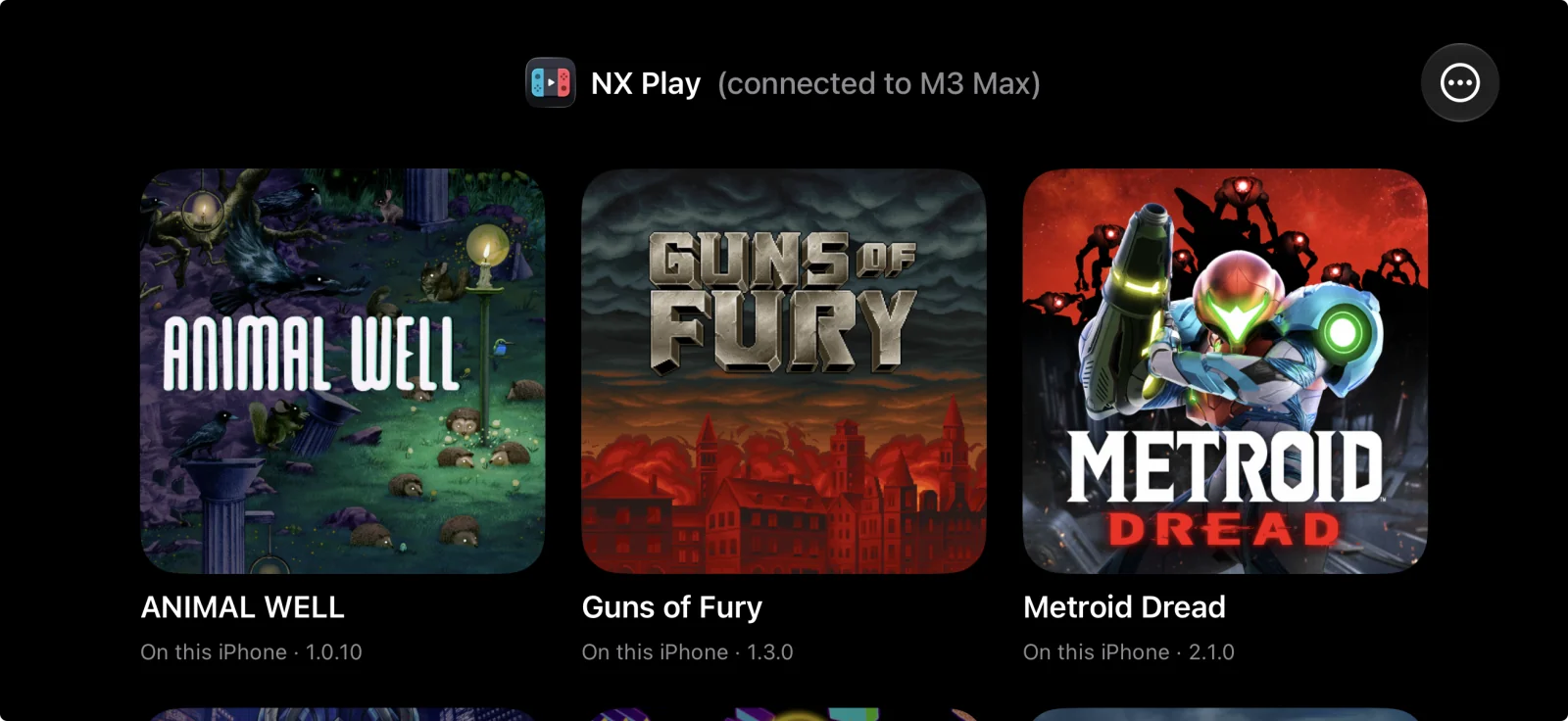
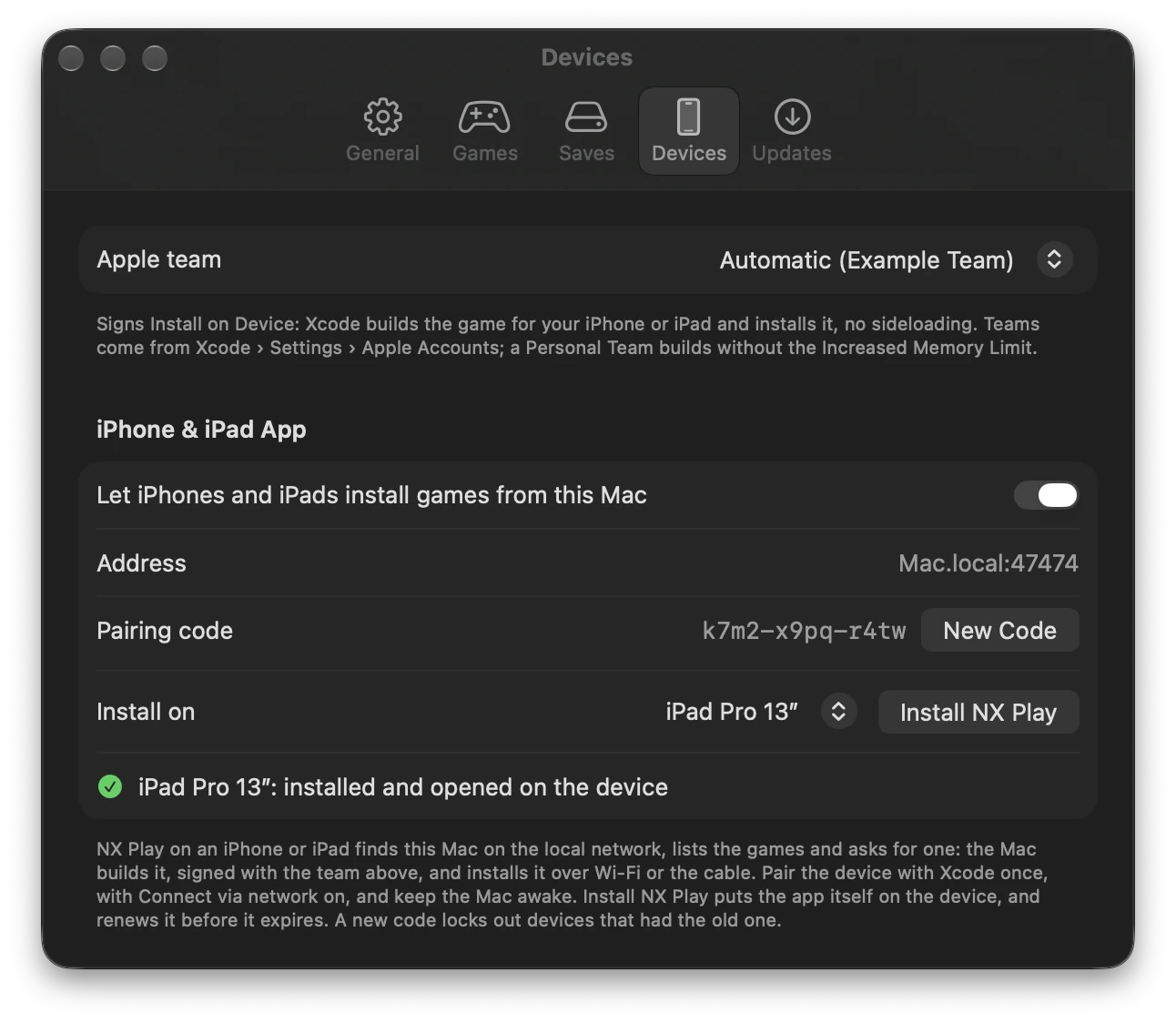
- NX Play for iPhone and iPad: a launcher that lists the Mac's games, asks the Mac to install one, and plays the installed ones. The Mac builds the game and installs it on the device over Wi-Fi, or over the cable when the device is plugged in. On the Mac, turn on Settings › Devices › iPhone & iPad App and click Install NX Play. Then pair the device with the code Settings shows; New Code replaces the code. On the device:
- The header shows NX Play's icon and which Mac it's connected to.
- A controller can drive it.
- It says when a game's signature runs out (7 days with a Personal Team). Renew installs the expiring games again.
- It notices a game you deleted from the home screen when you come back to it, or when you pull down to refresh, and marks it Removed from this iPhone (or iPad). One tap reinstalls it.
- Games installed on a device open from NX Play for iPhone and iPad: nxplay gives each one a URL scheme,
nxplay-. Reinstall a game installed before this once.
Changed
- NX Play's own log lines are blue too, like nxplay's since 1.7.16: the save backup's commits and pushes, the command each run starts with, and how it ended (done, failed, cancelled).
1.7.16
- Ajout d’une confirmation avant la mise à jour d’un jeu : affichage des changements (nombre de commits, shaders traduits, durée précédente) et choix entre Mettre à jour maintenant ou Jouer avec la version actuelle.
- Couleur bleue des lignes spécifiques à NX Play dans les logs (Mac et terminal) pour les distinguer des sorties de nxnative.
- Correction de la détection des sauvegardes locales : demande explicite du choix entre la sauvegarde de NX Play, celle du Mac ou la plus récente avant le lancement.
- Possibilité de désactiver la question via Ne plus demander (réversible via Redemander dans les paramètres du jeu).
Added
- Play asks before updating a game (#7): when nxnative has new code for a game's build, Play no longer rebuilds right away. It says what the update brings: how many new commits, which ones are for this game, whether every shader is translated again, and how long the last update took, the Mac app included. Then it asks: Update Now, or Play Current Build to play straight away. Playing the current build leaves nxnative where it was, so the other games don't fall behind. In Console Mode the controller answers. Settings › General can always update first, as before, or always play the current build. Rebuild and Update All Builds still take the latest code.
Changed
- NX Play's own lines in the log are blue, so they stand apart from nxnative's output: which save a play uses, the game settings it passes, nxnative updates, rebuilds and the like.
nxplayin a terminal does the same; setNO_COLORto turn it off.
Fixed
- Play asks which save to use when the Mac app has its own (#8): a Mac app opened from Finder before NX Play shared its save keeps a save of its own. Play used to start the app with NX Play's save without saying so, so progress made in the app looked gone. While the two saves differ, Play now asks: NX Play's save, the Mac app's save, or the newer one. Nothing is copied or deleted; the other save stays as it is. Tick Don't ask again to keep the answer for the game, and use Ask Again in Game Settings to undo it. In Console Mode the controller answers. The log now names the save each play uses.
1.7.15
- Correction du message d’erreur "App out of date" après une mise à jour de l’application Mac, évitant un décalage entre la version du jeu et celle de l’émulateur.
- (Aucune autre information pertinente pour macOS ou Mac dans ce changelog.)
Fixed
- "App out of date" right after Update Mac App: an app packed after nxnative updated, but before the game was rebuilt, runs newer code than the build, yet NX Play called it out of date. It now counts as up to date, and Play opens it.
Réagir sur le forum
Une question, un retour d’expérience ? Ouvrez la discussion sur le forum.