Toy Story 2 : Buzz Lightyear to the Rescue!
Portage natif de Toy Story 2 : Buzz Lightyear to the Rescue! pour macOS.
Toy Story2Recomp est un portage natif de Toy Story 2 : Buzz Lightyear to the Rescue! pour macOS, distribué en binaire dans ses releases.
Architecture
 Mac OS X - macOS
 Apple Silicon
 64 bits
Jeu d’origine
Toy Story 2 : Buzz Lightyear to the Rescue! PlayStation
Téléchargement et liens
- Télécharger Toy Story 2 : Buzz Lightyear to the Rescue!
- Code source 23 étoiles sur GitHub
Historique des versions
0.6.1
Changelog complet
This release focuses on improving the optional native 16:9 widescreen experience in Toy Story 2: Buzz Lightyear to the Rescue!
Following v0.6.0, we've addressed three visual issues affecting the HUD, dialogue boxes, and Level Select screen. These improvements make widescreen gameplay more consistent while preserving the original 4:3 presentation.
No new gameplay features or configuration options have been introduced in this update.
✨ What's Fixed
🎯 HUD Stability – #22
Fixed an issue where HUD elements could briefly jump back to their original 4:3 positions during slow frames or demanding gameplay sequences.
- HUD elements now remain anchored to the widescreen edges.
- Improved stability during shooting, falling, and other demanding scenes.
- Preserved existing HUD positioning and behavior.
💬 Dialogue Box Borders – #23
Fixed incorrect positioning of dialogue box borders in native widescreen mode.
- Vertical dialogue borders no longer shift toward the screen edges.
- Correct positioning is maintained during opening and closing animations.
- Also fixes the borders of the "You have collected a token!" message box.
📝 Level Select Text Alignment – #24
Fixed long level names appearing split or incorrectly aligned in the Level Select screen.
Previously, individual characters could be pushed toward the widescreen edges instead of remaining part of the centred title.
The following level names now display correctly:
- Andy's Neighborhood
- Alleys and Gullies
- Toy Barn Encounter
- Airport Infiltration
- The Evil Emperor Zurg
Shorter level names, navigation prompts, counters, and other interface elements retain their intended positions.
🛠️ Technical Improvements
- Improved widescreen HUD anchoring during slow frames.
- Refined classification of dialogue box rendering elements.
- Introduced string-aware alignment for front-end text.
- Preserved compatibility with the existing Modern Camera enhancement.
- No new game hooks or changes to the PSXRecomp and recomp-ui submodules were required for these fixes.
✅ Testing
All three fixes underwent technical review and manual gameplay verification.
- Native 16:9 widescreen rendering verified.
- Original 4:3 presentation verified.
- HUD stability tested during slow frames.
- Dialogue boxes and Level Select screens manually tested.
- Modern Camera, pause menu, and Progress Tracker checked for regressions.
- Release build workflow completed successfully across all four targets: Windows x64, Linux x64, macOS x64, and macOS ARM64.
- Release candidate playtest completed successfully.
⚠️ Important Notes
Savestate compatibility
Savestates created with v0.6.0 may not be compatible with v0.6.1 because the recompiled game code has changed.
We recommend using the game's normal Memory Card save system to preserve your progress when upgrading.
Platform testing
The widescreen fixes were manually verified on macOS x64. The other supported platform builds passed automated CI checks.
Original presentation
Native widescreen remains optional. The original 4:3 display mode is preserved.
🙌 Thank You!
Thank you to everyone following the development of ToyStory2Recomp!
This update completes our current Widescreen Polish milestone and brings us another step closer to a smoother, more refined way to experience this PlayStation classic.
More improvements are planned for future releases. Stay tuned!
Full Changelog: https://github.com/PeriBluGaming/ToyStory2Recomp/compare/v0.6.0...v0.6.1
Project Website: https://periblugaming.github.io/
Repository: https://github.com/PeriBluGaming/ToyStory2Recomp
0.6.0
Changelog complet
🎮 What's New in v0.6.0
⭐ NEW: Progress Tracker Mod
Your adventure. Your progress. All in one place!
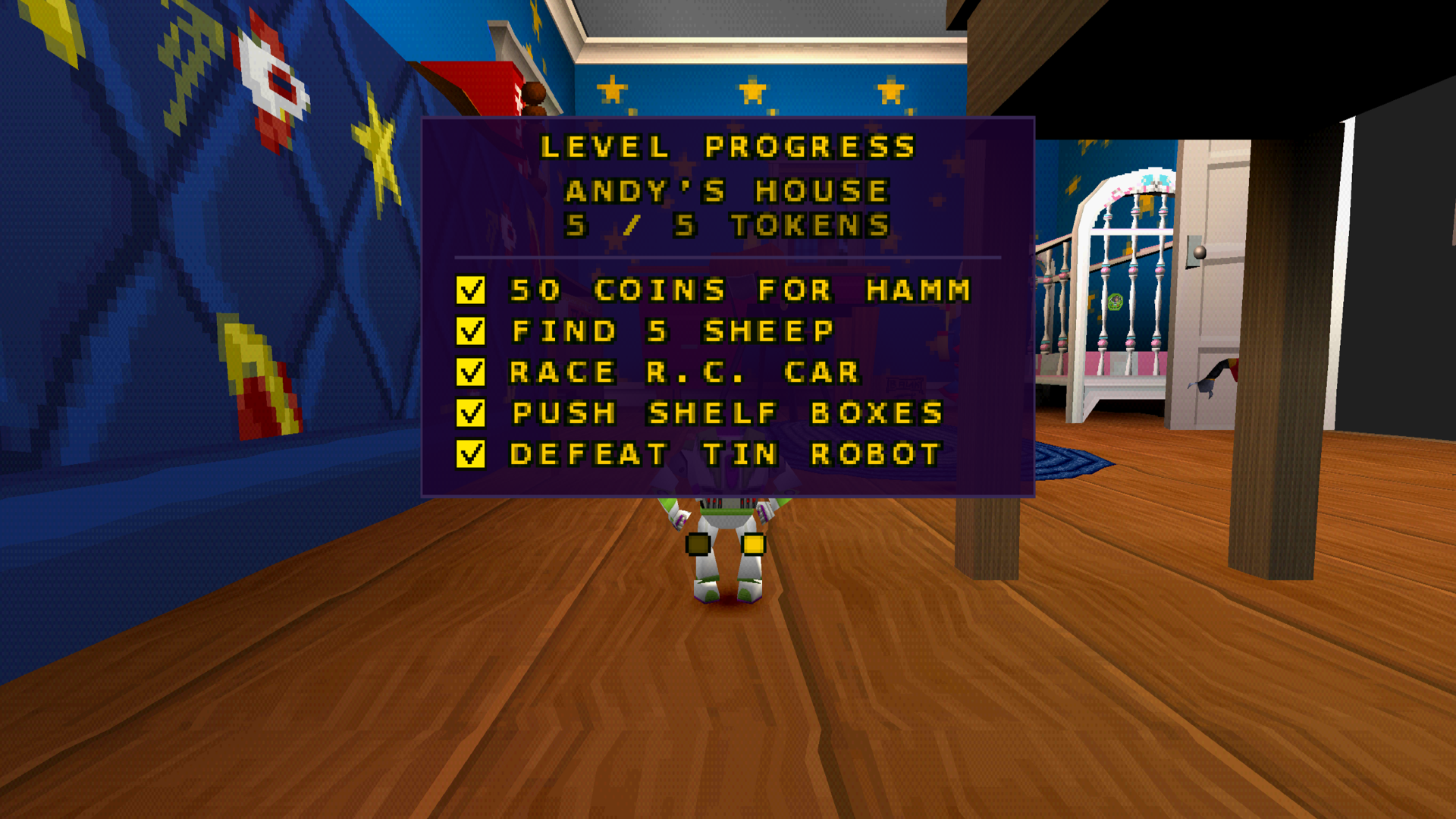
The new optional Progress Tracker adds a dedicated Level Progress page to the original pause menu, making it easier than ever to discover what's left to collect.
Features:
- 🪙 Pizza Planet Token Tracker – See how many of the five tokens you've collected in the current level.
- ✅ Individual Objectives – View five unique token objectives for each of the ten regular levels.
- ⚡ Live Progress Updates – Completed objectives are automatically checked off as you collect tokens.
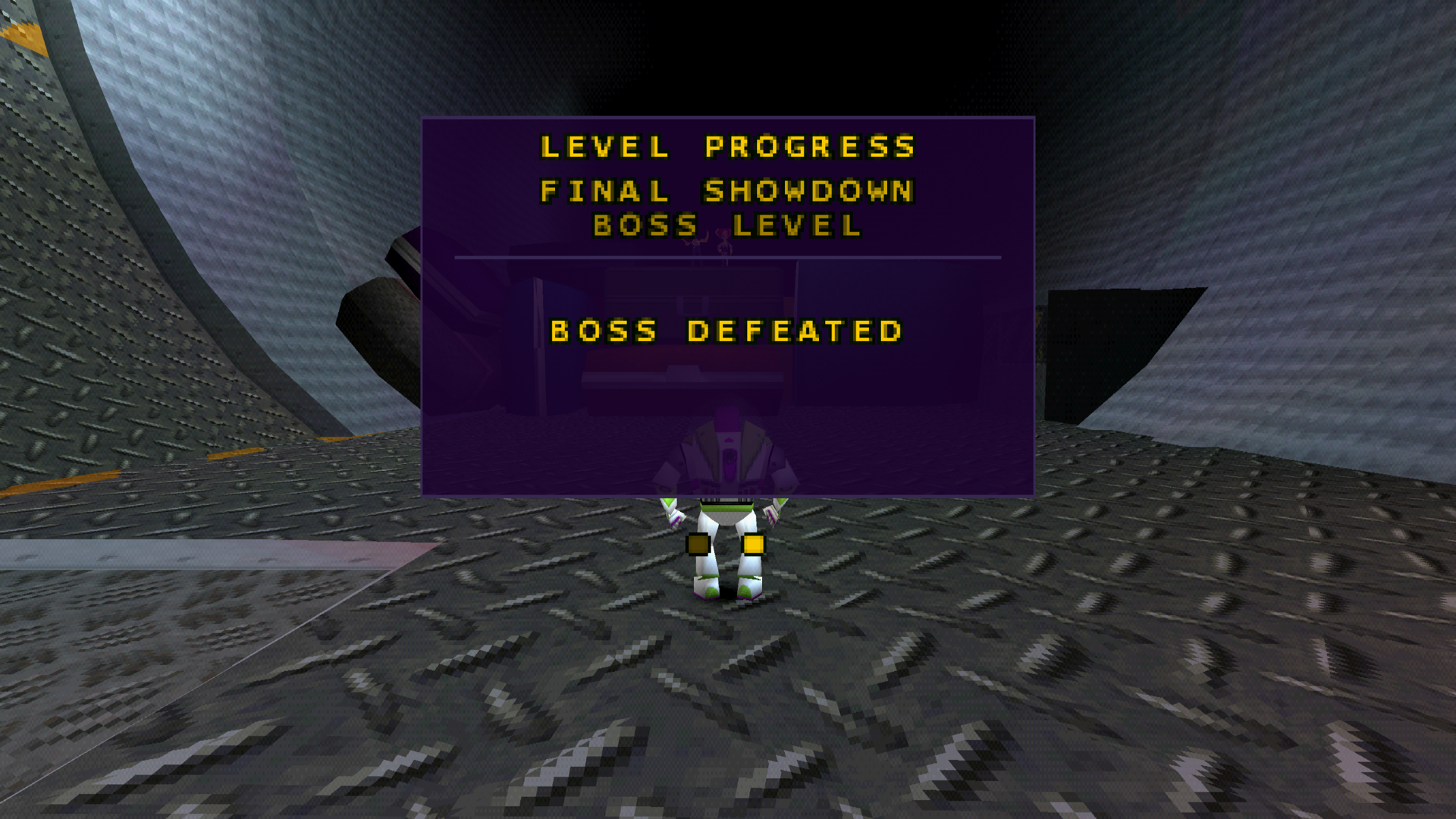
- 🏆 Boss Completion Tracking – See whether a boss level has been defeated.
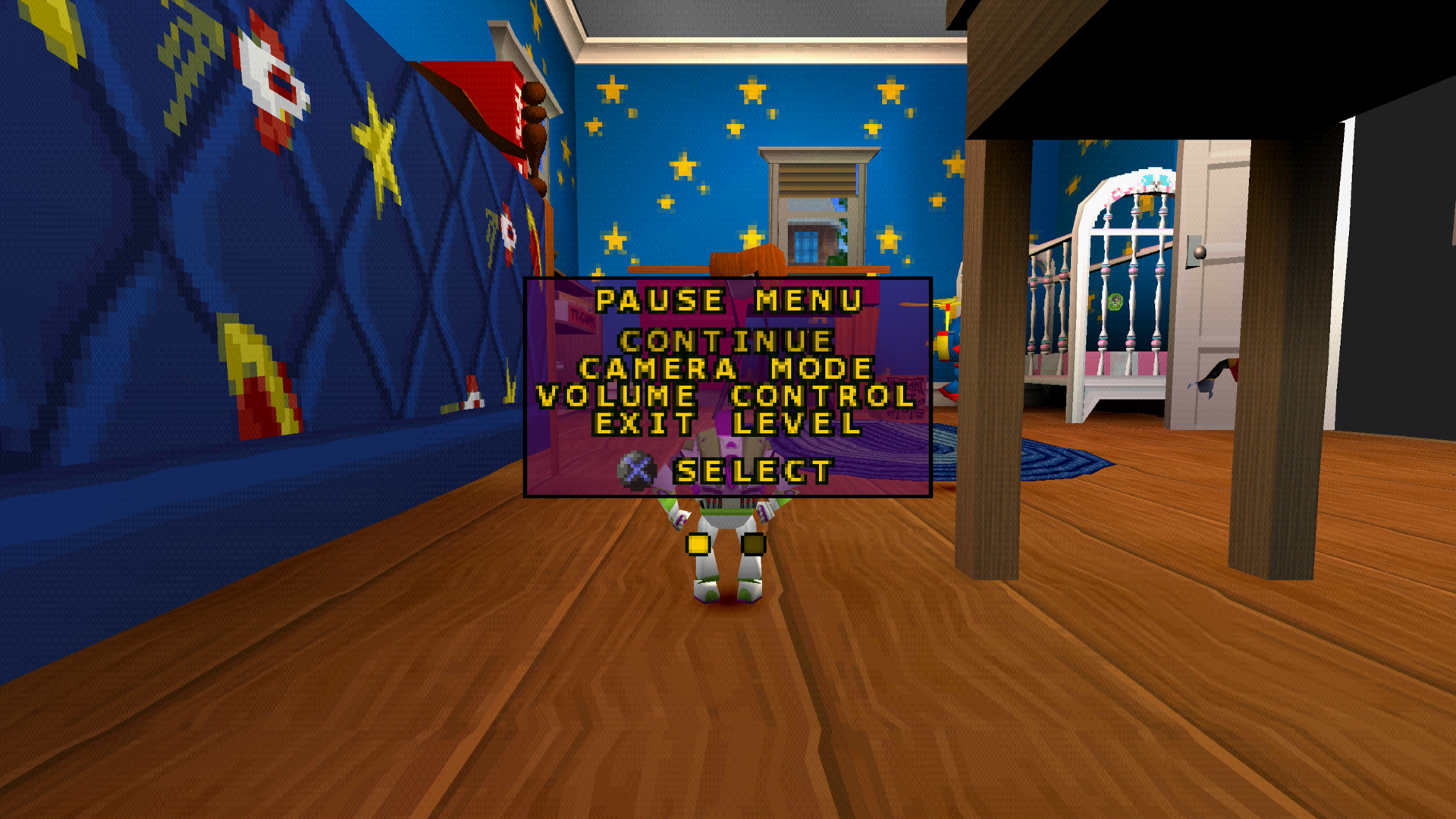
- 📋 Integrated Pause Menu – Switch seamlessly between the original pause menu and the new Level Progress page.
- 🌐 Widescreen Compatible – Designed for both classic 4:3 and native 16:9 displays.
- 🎨 Original Visual Style – Uses the game's familiar fonts and visual elements to blend naturally into the PlayStation experience.
Controls:
| Button | Action |
|---|---|
| D-pad Right | Open Level Progress |
| D-pad Left / Triangle | Return to the original pause menu |
| Start | Resume gameplay |
The enhancement is completely optional and disabled by default. Enable it through the in-game mod settings whenever you want to track your progress.
📸 Progress Tracker Preview
Track your Pizza Planet Tokens
Keep an eye on defeated bosses
Seamlessly integrated into the original pause menu
✨ Available Enhancements
All enhancements are optional and can be configured individually.
📷 Modern Camera Controls
Explore Toy Story 2 with modern right-stick camera movement!
- Horizontal and vertical camera control using the right analog stick
- Adjustable sensitivity and deadzones
- Configurable camera axis inversion
- Smooth R3 camera recentering
- Original camera controls preserved
🌐 Native 16:9 Widescreen
Experience Toy Story 2 beyond its original 4:3 presentation!
- True native 16:9 rendering
- Expanded horizontal field of view
- Repositioned HUD elements for widescreen displays
- Preserves the original PlayStation visual style
🎬 Skip Startup Intro
Jump into the adventure faster!
- Skip startup logos and intro movies
- Go directly to the original Press Start title screen
- Preserve the classic title screen experience
💿 OpenBIOS Compatibility
Play using the bundled OpenBIOS without requiring a separate retail PlayStation BIOS dump.
Includes compatibility improvements for the game's original runtime behavior.
📚 Documentation & Project Improvements
This release also includes:
- Expanded enhancement documentation covering the Progress Tracker
- Updated README with the new enhancement
- Three new in-game Progress Tracker screenshots
- Detailed controller instructions and feature descriptions
- Additional compatibility and gameplay validation
The Progress Tracker was extensively tested throughout a complete playthrough of all 15 levels, including boss encounters and the ending sequence.
💻 Supported Platforms
Prebuilt packages are available for:
- 🪟 Windows – x64
- 🐧 Linux – x64
- 🍎 macOS – Intel x64
- 🍎 macOS – Apple Silicon ARM64
All four platform builds passed automated CI build and package verification.
The Progress Tracker was also tested in-game with both 4:3 and 16:9 rendering. Successful CI builds do not guarantee identical runtime behavior across every platform.
📥 Installation
- Download the ZIP package for your operating system from the release assets below.
- Extract the archive.
- Launch ToyStory2Recomp.
- Follow the setup instructions and provide your compatible original PlayStation game disc.
- Open the in-game mod settings and enable Progress Tracker if desired.
- Enjoy your adventure and keep track of every Pizza Planet Token!
Supported game version: USA / NTSC-U (SLUS-00893).
For detailed instructions, see the [Installation Guide](https://github.com/PeriBluGaming/ToyStory2Recomp/blob/main/docs/installation.md).
For more information about the new enhancement, see the [Enhancements Guide](https://github.com/PeriBluGaming/ToyStory2Recomp/blob/main/docs/enhancements.md#progress-tracker).
⚠️ Known Limitations
- Some widescreen scenes may still show rendering or culling issues.
- CD speed settings above 4x may cause problems in certain situations.
- Savestates created with older versions may not be compatible with v0.6.0.
- The Progress Tracker's undefeated-boss state and interactive rewind behavior have not yet been fully runtime-tested.
- Successful CI builds do not guarantee identical runtime behavior across all platforms.
For more details, see [Known Limitations](https://github.com/PeriBluGaming/ToyStory2Recomp/blob/main/docs/known-limitations.md).
💚 Thank You!
Thank you to everyone following and supporting the development of ToyStory2Recomp!
With Modern Camera, native Widescreen, and now the Progress Tracker, we're continuing to bring new quality-of-life improvements to this beloved PlayStation adventure.
There's still much more planned for future releases, and we're excited to keep exploring what's possible!
To infinity and beyond! 🚀
Developed by PeriBluGaming
Full Changelog: https://github.com/PeriBluGaming/ToyStory2Recomp/compare/v0.5.0...v0.6.0
0.5.0
Changelog complet
A classic PlayStation adventure, recompiled for modern systems!
Version 0.5.0 introduces one of the most exciting enhancements yet: Modern Camera Controls!
Explore the world of Toy Story 2 with a modern right-stick camera while preserving the charm and gameplay of the original PlayStation classic.
🎮 What's New in v0.5.0
⭐ NEW: Modern Camera Mod
Take control of the camera with the right analog stick!
The new optional Modern Camera enhancement makes exploring Andy's Room and the rest of the game more intuitive.
Features:
- 🎮 Right Stick Camera Control – Move the camera horizontally and vertically.
- 🎯 Adjustable Sensitivity – Customize horizontal and vertical camera movement speeds.
- ⚙️ Customizable Deadzone – Fine-tune analog stick responsiveness.
- 🔄 Invert Camera Axes – Independently invert horizontal and vertical controls.
- 📷 R3 Camera Recenter – Press the right stick to smoothly recenter the camera.
- 🕹️ Original Controls Preserved – Retain the classic camera behavior and existing controls.
The enhancement is completely optional and can be configured through the in-game mod settings.
✨ Available Enhancements
All enhancements are optional and can be enabled individually.
🌐 Native 16:9 Widescreen
Experience Toy Story 2 beyond its original 4:3 presentation!
- True native 16:9 rendering
- Expanded horizontal field of view
- Repositioned HUD elements for widescreen displays
- Preserves the original PlayStation visual style
🎬 Skip Startup Intro
Jump into the adventure faster!
- Skip the startup logos and intro movies
- Go directly to the original Press Start title screen
- Preserve the classic title screen experience
💿 OpenBIOS Compatibility
Play using the bundled OpenBIOS without requiring a separate retail PlayStation BIOS dump.
Includes compatibility improvements for the game's original runtime behavior.
📚 Documentation & Project Improvements
This release also includes:
- Completely redesigned GitHub README
- Updated installation and configuration guides
- Expanded documentation for all available enhancements
- New widescreen gameplay screenshot
- Clearer compatibility and known-limitations information
- Project licensing and third-party attribution notices
- Improved release packaging and automated license verification
💻 Supported Platforms
Prebuilt packages are available for:
- 🪟 Windows – x64
- 🐧 Linux – x64
- 🍎 macOS – Intel x64
- 🍎 macOS – Apple Silicon ARM64
All four platform builds passed automated CI build and package verification.
The macOS Intel build was additionally tested on a real Intel Mac, successfully running the game with all included mods, including Modern Camera.
📥 Installation
- Download the ZIP package for your operating system from the release assets below.
- Extract the archive.
- Launch ToyStory2Recomp.
- Follow the setup instructions and provide your compatible original PlayStation game disc.
- Enable your preferred enhancements and enjoy!
Supported game version: USA / NTSC-U (SLUS-00893).
For detailed instructions, see the Installation Guide.
⚠️ Known Limitations
- Some widescreen scenes may still show rendering or culling issues.
- CD speed settings above 4x may cause problems in certain situations.
- Savestates created with older versions may not be compatible with v0.5.0.
- Successful CI builds do not guarantee identical runtime behavior across all platforms.
For more details, see Known Limitations
💚 Thank You!
Thank you to everyone following and supporting the development of ToyStory2Recomp!
This project continues to evolve, with more improvements planned for future releases.
To infinity and beyond! 🚀
Developed by PeriBluGaming
Full Changelog: https://github.com/PeriBluGaming/ToyStory2Recomp/compare/v0.4.0...v0.5.0
0.4.0
Changelog complet
ToyStory2 Recompiled v0.4.0 🚀
We’re excited to announce ToyStory2 Recompiled v0.4.0, a major update focused on widescreen support, modding, cross-platform compatibility, and improved Windows tooling!
This release brings us another step closer to making the original PlayStation version of Disney/Pixar’s Toy Story 2: Buzz Lightyear to the Rescue! more accessible and enjoyable on modern systems through native recompilation.
✨ What’s New
🖥️ Widescreen Support
- Added widescreen support for a more modern gameplay experience.
- Improved rendering and display handling to better accommodate widescreen resolutions.
- Continued work on compatibility between the original PlayStation game and modern displays.
🧩 Mod Support
- Integrated the Skip Startup Intro mod.
- Expanded the foundation for future modifications and game customization.
- Improved integration of optional game modifications into the native build.
🎮 BIOS-Free Compatibility Improvements
- Added compatibility improvements for running the recompiled game without relying on the traditional PlayStation BIOS execution path. Running with openBios
- Improved supporting runtime functionality.
🪟 Windows Toolchain Improvements
- Fixed Windows overlay compilation to use native MinGW-w64 instead of incompatible MSYS/Cygwin toolchains.
- Fixed Python module loading when using the bundled Python runtime.
- Improved compiler detection and native DLL compatibility validation.
- Added regression tests to help prevent Windows toolchain issues in future releases.
🔧 Stability & Build Improvements
- Improved cross-platform build reliability.
- Updated release automation and documentation.
- Added additional compatibility checks for dynamically compiled game overlays.
📦 Downloads
Prebuilt packages are available for:
Platform Download Windows x64 toystory2-0.4.0-windows-x64.zip Linux x64 / Steam Deck toystory2-0.4.0-linux-x64.zip macOS Intel toystory2-0.4.0-macos-x64.zip macOS Apple Silicon toystory2-0.4.0-macos-arm64.zip
🧪 Testing & Compatibility
This release successfully completed all four platform builds in GitHub Actions.
Runtime testing has been performed on:
- Windows x64
- Linux / Steam Deck
- macOS Intel
The macOS Apple Silicon build has been successfully generated in CI but has not yet been runtime-tested on physical ARM64 hardware.
Please note that this project is still under active development. Some rendering differences, compatibility issues, and platform-specific quirks may remain.
🔮 What’s Next?
We’re continuing to work on:
- Further widescreen and display improvements.
- Better Steam Deck compatibility and presentation.
- Cheat Menu
- Expanded modding capabilities.
- General stability and compatibility improvements.
❤️ Thank You!
Thank you to everyone following the development of ToyStory2Recomp!
This project is powered by the incredible work of the open-source PlayStation recompilation community, especially the psxrecomp project.
If you encounter bugs or have suggestions, please open an issue on GitHub.
Enjoy exploring Andy’s world again! 🚀
⸻
Full Changelog: v0.3.0…v0.4.0
0.3.0
New Features
- Feature/skip intro mod into main by @PeriBluGaming in https://github.com/PeriBluGaming/ToyStory2Recomp/pull/10
- Added Skip Startup Intro, the first optional enhancement mod for ToyStory2Recomp.
- Skip legal notices, the ESRB rating screen, and startup movies.
- Preserve the original "Press Start" title screen.
- Optional compatibility with the separate CD Speed Boost enhancement for potentially faster loading times.
Improvements
- Added a dedicated mod configuration with the enhancement disabled by default.
- No changes to the original gameplay or save functionality are intended.
Full Changelog: https://github.com/PeriBluGaming/ToyStory2Recomp/compare/v0.2.0...v0.3.0
0.2.0
What's Changed
- Feature/psxrecomp update by @PeriBluGaming in https://github.com/PeriBluGaming/ToyStory2Recomp/pull/6
Full Changelog: https://github.com/PeriBluGaming/ToyStory2Recomp/compare/v0.1.0-alpha...v0.2.0
0.1.0-alpha
First Release with recomp-ui Launcher
- Recomp-ui integrated
- First Windows Release
- First MacOS Release (Intel-Chip)
Windows
Run ToyStory2Recomp.exe, bring your own BIOS (or use build-in OPENBIOS) + Toy Story 2 - Buzz Lightyear to the Rescue! (SLUS_00893) disc image.
Mac OS (Intel-Chip)
Run ToyStory2Recomp bring your own BIOS (or use build-in OPENBIOS) + Toy Story 2 - Buzz Lightyear to the Rescue! (SLUS_00893) disc image.
Réagir sur le forum
Une question, un retour d’expérience ? Ouvrez la discussion sur le forum.