
RetroVault est un client macOS natif pour RomM : il parcourt la bibliothèque de ROM servie par une instance RomM et lance les jeux. Le DMG est publié pour Apple Silicon.
Last updated:
Architecture
 Mac OS X - macOS
 Apple Silicon
Download and links
- Download RetroVault
- Source code 24 GitHub stars
Version history
2026.11.9
- Support officiel de macOS 15 Sequoia, avec adaptation des interfaces (matériaux et boutons) aux standards Apple.
- Récompilation des cœurs Libretro intégrés et du moteur Vita3K (expérimental) pour macOS 15.
- Cemu Companion (outil complémentaire) désormais compatible avec Sequoia.
- Version ad-hoc signée, non notarisée : nécessite une autorisation manuelle lors du premier lancement.
- Fichier SHA-256 portable fourni pour vérifier l’intégrité du DMG officiel.
RetroVault 2026.11.9 runs on macOS 15 Sequoia.
What’s new
- RetroVault now supports macOS 15 Sequoia, in addition to macOS 26. Custom surfaces and prominent buttons still use Liquid Glass on macOS 26. On macOS 15 they use a standard material and bordered prominent buttons. System navigation, sidebars, toolbars, menus, and search fields follow the version of macOS you're running.
- Bundled Libretro cores are rebuilt for macOS 15, so games load on Sequoia. The experimental Vita3K engine and the Cemu companion load there as well.
Requirements
- Apple-silicon Mac
- macOS 15 (Sequoia) or later
- RomM server
Installation
This release is ad-hoc signed and is not notarized. Drag RetroVault to Applications. If macOS blocks the first launch, open System Settings → Privacy & Security and choose Open Anyway. Download RetroVault only from this official release page.
A portable SHA-256 checksum is attached beside the DMG.
2026.11.7
- Intégration complète de RetroAchievements : connexion via les paramètres, affichage des badges et progrès dans les jeux (via rcheevos), avec notifications en jeu et gestion du mode Hardcore (désactive les sauvegardes, rewinds et fast-forward).
- Ajout d’un onglet RetroAchievements dans les paramètres Big Picture pour vérifier le compte, activer/désactiver le mode Hardcore et se déconnecter avec un contrôleur.
- Affichage des détails des achievements dans Get Info : points, badges, lien vers le jeu et dernière synchronisation avec RomM (si utilisateur lié à RetroAchievements).
- Mise à jour visuelle du catalogue et du mode Big Picture : progression des achievements affichée (ex. 12/75).
- Compatibilité macOS : support exclusif des processeurs Apple Silicon (M1/M2/M3) et exigence de macOS 26 pour l’exécution.
- Installation sur macOS : build ad-hoc signé (non notarié) nécessitant une autorisation manuelle via Système → Sécurité à la première ouverture.
RetroVault 2026.11.7 brings RetroAchievements to RetroVault, from your RomM library all the way into a running game.
What’s new
- Sign in to RetroAchievements in Settings. The session token is stored in the Keychain, and Libretro games unlock achievements through rcheevos, with an in-game toast showing the badge, title, description, and points.
- Hardcore mode is off until you enable it. While it's on, save states, rewind, and fast-forward are disabled.
- Big Picture Settings now has a RetroAchievements section, so you can check your account and status, toggle Hardcore, and sign out with a controller.
- Get Info shows the RetroAchievements set RomM stored for a matched ROM, including points, badges, and a link to the game, plus the unlocks RomM last synced when your RomM user has a RetroAchievements username.
- The library and Big Picture show synced achievement progress, such as
12/75.
Requirements
- Apple-silicon Mac
- macOS 26
- RomM server
Installation
This release is ad-hoc signed and is not notarized. Drag RetroVault to Applications. If macOS blocks the first launch, open System Settings → Privacy & Security and choose Open Anyway. Download RetroVault only from this official release page.
A portable SHA-256 checksum is attached beside the DMG.
2026.8.17.1
- Ajout de mini-vignettes d’artwork dans les listes de jeux par défaut, chargées uniquement pour les lignes visibles via le cache existant.
- Bascule entre la vue liste standard et une vue à 50 % d’artwork côté droit pour le jeu sélectionné.
- Possibilité de désactiver l’artwork pour conserver une interface textuelle pure.
- Prototype exploratoire pour une compatibilité future avec Apple TV, sans impact sur macOS.
- Exige macOS 26 et un Mac Apple Silicon pour fonctionner.
- Fichier .dmg non notarisé : autorisation manuelle requise lors du premier lancement.
RetroVault 2026.8.17.1 brings artwork into the controller-first library without giving up the fast text-first interface.
What’s new
- Small box-art thumbnails now appear in game lists by default and load only for visible rows through the existing image cache.
- Select toggles between the standard library layout and a 50% right-side artwork view for the highlighted game.
- The standard list remains the default layout, and box art can still be disabled for a text-only library.
- Added an Apple TV feasibility and prototype plan without changing the current macOS product boundary.
Requirements
- Apple-silicon Mac
- macOS 26
- RomM server
Installation
This public preview is ad-hoc signed and is not notarized. Drag RetroVault to Applications. If macOS blocks the first launch, open System Settings → Privacy & Security and choose Open Anyway. Download RetroVault only from this official release page.
A portable SHA-256 checksum is attached beside the DMG.
2026.8.17
- Pico-8/FAKE-08 devient une plateforme intégrée et officiellement supportée (plus expérimentale) sur Mac Apple Silicon.
- Les fichiers .p8 et .p8.png s’exécutent directement sans passer par le lanceur intégré ou le REPL de FAKE-08.
- Correction des problèmes de parsing des commentaires longs pour les cartouches Pico-8 compatibles.
- Prise en charge des cartouches Pico-8 utilisant la souris avec gestion des mouvements et clics macOS.
- Patch de compatibilité FAKE-08 appliqué de manière reproductible lors des builds du noyau.
- Version minimale requise : macOS 26 (Ventura ou ultérieur) sur Mac Apple Silicon.
RetroVault 2026.8.17 promotes Pico-8 playback through FAKE-08 to supported status on Apple-silicon Macs.
What’s new
- Pico-8/FAKE-08 is now a supported bundled platform rather than an experimental core.
- Real
.p8and.p8.pngcartridges launch directly instead of falling back to FAKE-08’s built-in launcher or REPL. - Pico-8-compatible long-comment parsing fixes cartridges such as 3D Picoh Mummy.
- Mouse-aware Pico-8 cartridges can receive macOS pointer movement and clicks.
- The FAKE-08 compatibility patch is pinned and applied reproducibly during core builds.
Requirements
- Apple-silicon Mac
- macOS 26
- RomM server
Installation
This public preview is ad-hoc signed and is not notarized. Drag RetroVault to Applications. If macOS blocks the first launch, open System Settings → Privacy & Security and choose Open Anyway. Download RetroVault only from this official release page.
A SHA-256 checksum is attached beside the DMG.
Note: FAKE-08 plays Pico-8 cartridges, but it does not provide PICO-8’s online Splore browser.
2026.8.14
- Intégration native améliorée : menu bar macOS avec commandes contextuelles Library et Game pour les sessions Big Picture, Libretro, Vita3K et Cemu.
- Contrôles de jeu simplifiés via le menu bar : pause, mute, reset, sauvegarde/charge rapide, plein écran et arrêt sans conflits de raccourcis.
- Historique de rewind optimisé pour Libretro : compression LZFSE hors boucle d’émulation, étendant le rewind PS1 à ~60 secondes avec la même mémoire.
- Correction des collisions de raccourcis et restauration du chrome de fenêtre après sortie du plein écran.
- Version preview exclusive pour Apple Silicon avec macOS 26 requis et signature ad-hoc (non notarisée).
RetroVault 2026.8.14 is an Apple-silicon public preview focused on deeper native macOS integration and longer, smoother rewind history.
What’s new
- RetroVault’s native macOS menu bar now has complete, contextual Library and Game commands across Big Picture, Libretro, Vita3K, and Cemu sessions.
- Gameplay controls for pause, mute, reset, quick save, quick load, fullscreen, and stopping a game are available from the menu bar with conflict-free shortcuts.
- Libretro rewind history is compressed with LZFSE away from the emulation loop, extending PlayStation rewind to roughly sixty seconds within the same memory budget.
- Leaving fullscreen restores normal window chrome, and library/game shortcut collisions have been resolved.
Requirements
- Apple-silicon Mac
- macOS 26
- RomM server
Installation
This preview is ad-hoc signed and is not notarized. After extracting RetroVault and moving it to Applications, macOS may block its first launch. Open System Settings → Privacy & Security, find the RetroVault warning, and choose Open Anyway. Download RetroVault only from this official release page.
A SHA-256 checksum is attached as RetroVault-2026.8.14-arm64.zip.sha256.
2026.8.5
- Ajout du support du fast-forward via Libretro avec un multiplicateur personnalisable via LibretroFastForwardMultiplier, affichage de la vitesse active dans l’overlay.
- Sauvegarde automatique des quick states et de la mémoire sauvegardée (batterie) toutes les minutes pendant une session active.
- Fermeture propre (Cmd-Q) avec sauvegarde finale atomique avant l’arrêt.
- Mise à jour des recherches matérielles pour les contrôleurs et des captures d’écran en Big Picture.
RetroVault 2026.8.5 is an Apple-silicon public preview focused on safer play sessions and configurable transport controls.
What’s new
- Libretro fast-forward can now use any positive multiplier set through the
LibretroFastForwardMultipliermacOS default; the active speed appears in the gameplay overlay. - Active Libretro sessions now checkpoint quick states and battery-backed save memory every minute.
- Command-Q waits for one final atomic gameplay checkpoint before RetroVault terminates.
- The public Big Picture screenshot and direct-controller hardware research are up to date.
Requirements
- Apple-silicon Mac
- macOS 26
- RomM server
Installation
This preview is ad-hoc signed and is not notarized. After dragging RetroVault to Applications, macOS may block its first launch. Open System Settings → Privacy & Security, find the RetroVault warning, and choose Open Anyway. Download RetroVault only from this official release page.
A SHA-256 checksum is attached as RetroVault-2026.8.5-arm64.dmg.sha256.
2026.8.4
- Première version publique native pour Apple Silicon, client macOS optimisé pour les manettes et centré sur la gestion de bibliothèques RomM.
- Support officiel de macOS 26 ou ultérieur, avec installation via .dmg exclusif pour ARM64 (M1/M2/M3).
- Intégration de 27 noyaux Libretro préinstallés, incluant les moteurs Cemu (Metal/Vulkan) et Vita3K pour l'émulation.
- Synchronisation hors ligne des téléchargements et sauvegardes via RomM 5.x, avec un centre de gestion dédié.
- Prise en charge native des manettes DSU et interface "controller-first" pour une navigation simplifiée.
- Signature ad-hoc non notarisée : nécessite une autorisation manuelle dans Sécurité & Confidentialité après installation.
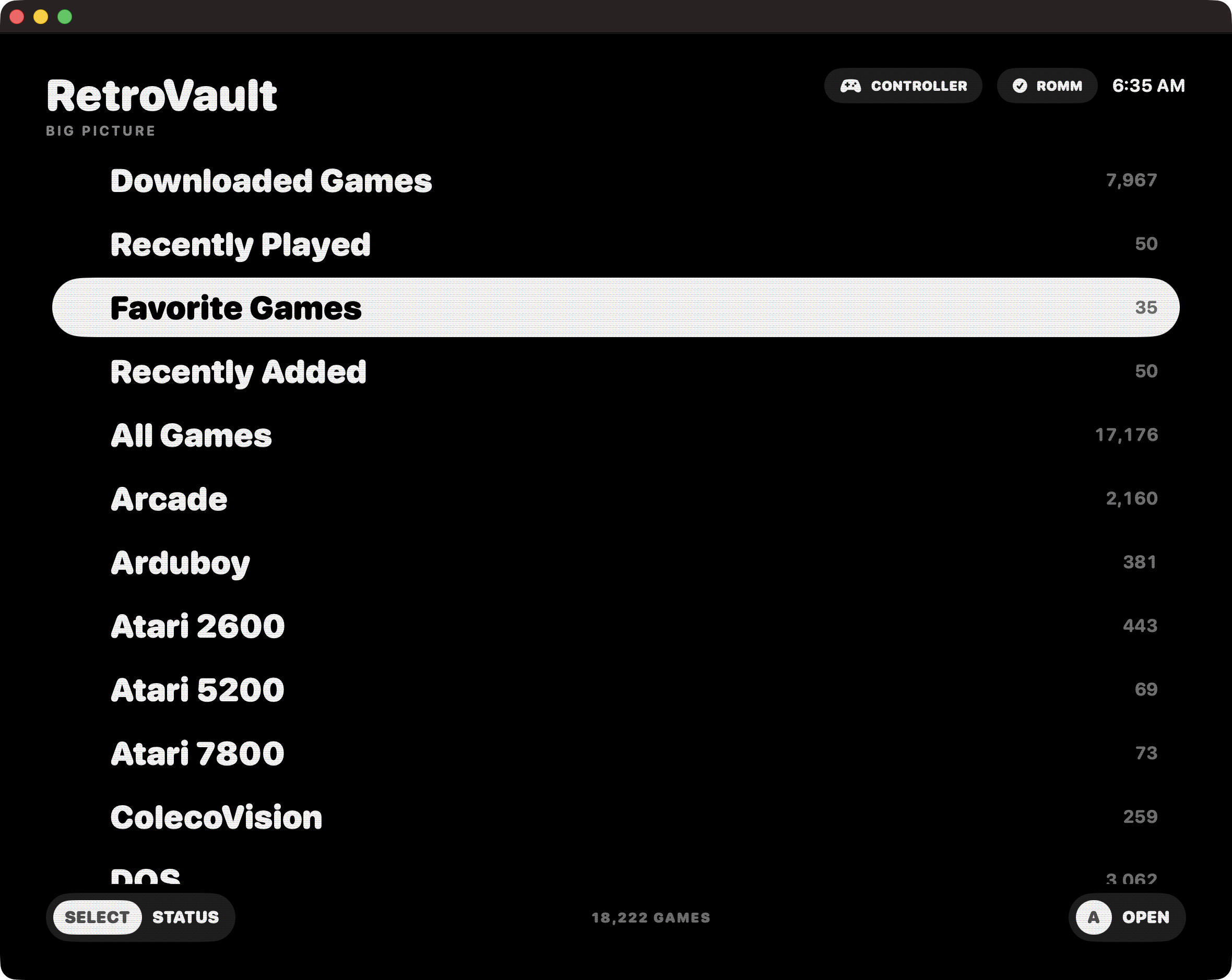
RetroVault’s first downloadable Apple-silicon public preview. It is a native, controller-first macOS client for browsing, downloading, preserving saves, and playing a RomM library.
Requirements
- Apple silicon Mac
- macOS 26 or later
- RomM 5.x server
Included
- Controller-first library and Save Center
- Offline managed downloads and save synchronization
- 27 bundled Libretro cores
- Hosted Cemu Metal/Vulkan and Vita3K engines
- DSU controller support
Install
- Download
RetroVault-2026.8.4-arm64.dmg. - Open the disk image and drag RetroVault to Applications.
- Open RetroVault once. macOS will block this non-notarized preview.
- Open System Settings → Privacy & Security, scroll to Security, click Open Anyway, then confirm Open.
Security notice
This preview is ad-hoc signed, not signed with an Apple Developer ID, and not notarized. Gatekeeper will therefore require the manual approval above. Only approve the DMG downloaded from this official release. The separately attached SHA-256 file can be used to verify the download.
SHA-256: bcd641bca2d1680edacf01f72512cc6d2e8d428a31723a54a97140c2fc7e36ad
RetroVault is GPL-2.0-or-later with a scoped Libretro linking exception. Bundled third-party components retain their own licenses; acknowledgements are included in the app.
Reply on the forum
A question or a hands-on report? Open the discussion on the forum.