
VF1 Recomp est un portage natif de Virtua Fighter pour macOS, distribué en binaire dans ses releases.
Architecture
 Mac OS X - macOS
 64-bit
Original game
Virtua Fighter Arcade
Download and links
- Download Virtua Fighter
- Source code 95 GitHub stars
Version history
1.9.0-beta1
Full changelog
A beta, for testing the new rooms with friends
This is a test version (a pre-release), not the next release. You don't need it to play online: v1.8.0 is still the version to have, and the site's download is still v1.8.0. Try this one if you want to help test the new rooms with friends before they come out for everyone in v1.9.0.
What's new to try
- Rooms where the winner stays on (Online → Create room). The room belongs to the online service, not to whoever made it: the creator can leave and the room carries on. The two at the table play; everyone else waits in a line that everyone in the room can see, in order, and watches the match while they wait. The winner stays on and the loser goes to the back of the line. The room counts the winner's wins in a row, shown over their energy bar in the game's own letters ("3 WINS"), where the game's CHAMPION count used to be.
- Your turn comes by itself. When you're next, GET READY counts down from 3 and you're in, with no button to press. While you're being called, the room's page offers READY NOW (in at once) and NOT NOW (let this turn go; you go AWAY and keep your place). The rest of the time, READY: ON / OFF does the same: with OFF (AWAY) you keep your place while the others play; turn it ON again and you play next. If nobody in the line is READY, the two at the table play on.
- The room's page (Online, while you're in a room) shows the table, the winner's streak, the line with READY or AWAY by each name, and your place. Leave line keeps you in the room watching; Join the line puts you at the back. The creator has Room settings, with Close the room.
- Rooms that hold on. If the online service restarts (it's updated now and then), your room and your place in the line are still there when it's back a moment later. If your game crashes, start it again within 30 seconds and enter the same code to get your place back.
- "Version X is out": a line in the menu when a newer version is out, checked at most once a day (nothing is ever downloaded). Game → Check for updates turns it off. In this beta it also tells you when the next beta, or the release itself, is out.
Playing with everyone else
- Quick match, and rooms made by players on v1.8.0, work as always. This beta plays v1.8.0 online (the same game, checked hash for hash), so you meet everyone in Quick match and can enter their room codes.
- Rooms you create in the beta are the new kind, and only players on this beta can enter them. A friend on v1.8.0 who's given the code is told "The host has v1.9.0-beta1, you have ..." and can't join. To play a friend who hasn't got the beta, use Quick match, or have them create the room and enter their code.
- In a room, a player whose game can't play yours (another version) is never seated against you: you're told "Your opponent has ..., you have ..." instead of a match that can't start.
- Your settings stay in the same folder as v1.8.0's, and v1.8.0 reads them as before, so you can go back at any time.
Testing it (3 to 8 of you)
One of you creates a room (Online → Create room); the others choose Enter code and type its code (or Copy code and paste it to them). Then just play: lose, wait your turn, turn READY off and on, press NOT NOW when you're called, leave the line and join it again, leave the room and come back. With more of you the line gets long: check its order is the same for everyone.
Watch out for:
- a match that goes out of step;
- a match that never starts after someone is seated (more than 30 s);
- someone seated who wasn't the first READY one in the line;
- the line in a different order for different players;
- the wins count not matching what happened;
- anything odd going from watching to playing and back.
To report: open an issue starting "Rooms beta:", saying what happened and roughly when, with your log.txt (and the other players' if you can). The log masks every address, so it's safe to post. Its first line shows the version: v1.9.0-beta1.
Downloads
| Windows | VirtuaFighterRecomp-windows.zip |
| Mac (Apple Silicon and Intel) | VirtuaFighterRecomp-mac.zip |
| Steam Deck / Linux | VirtuaFighterRecomp-deck.tar.gz |
| Linux on ARM (ARM64) | VirtuaFighterRecomp-linux-arm64.tar.gz |
You still need your own vf.zip (the arcade ROM), set up as before.
1.8.0
Dural in gold, and Smooth motion Off
- Cheats → Dural's colour (#47): Gold on player 2 (as the Saturn version's second colour, the default), Chrome (as the arcade) or Gold. It goes with Dural wherever she fights, as the Secret character too. Only the picture: online each player sees their own choice, and the game plays exactly the same.
- Display → Quality → Smooth motion (#15): Off shows the arcade's own frames, as the board does: the 3D moves 30 times a second, and the background and the 2D each frame (57.5 a second). On (the default) is as before. Only the picture: the game plays exactly the same.
No update is forced: plays v1.7.0, v1.6.2, v1.6.1, v1.6.0, v1.5.1 and v1.5.0 online as before.
Downloads
| Windows | VirtuaFighterRecomp-windows.zip |
| Mac (Apple Silicon and Intel) | VirtuaFighterRecomp-mac.zip |
| Steam Deck / Linux | VirtuaFighterRecomp-deck.tar.gz |
| Linux on ARM (ARM64) | VirtuaFighterRecomp-linux-arm64.tar.gz |
You still need your own vf.zip (the arcade ROM), set up as before.
Please report anything odd with your log.txt.
1.7.0
Full changelog
Free camera
https://github.com/user-attachments/assets/21abe078-156b-4963-8230-0547bc668e56
- Free camera: press F4 (or a pad's View (Back) + R3, or Menu → Display → Free camera) and fly a camera around the fight. The mouse or the right stick looks; W A S D or the left stick moves; E and Q, or the triggers, go up and down; Shift is faster and the mouse wheel sets the speed. R (or Y on a pad) puts it back on the game's camera, and F4 leaves. The fight goes on while you fly, or press P to pause it and fly around the frozen moment. The HUD hides while it's on. It works offline and while watching an online match, not while playing one yourself. Only the picture changes: the game plays exactly the same.
- The menus are back to their full size, and Display is now three pages: Picture, Quality and Screen filter and colours, each showing its settings at a glance (Free camera is on Display itself). A player's button combinations and Cheats' fight switches have pages of their own. No page scrolls.
- The menus match across Virtua Fighter 1, 2 and 3 Recomp: the same order and wording in all three, and help texts brought up to date.
No update is forced: plays v1.6.2, v1.6.1, v1.6.0, v1.5.1 and v1.5.0 online as before.
Downloads
| Windows | VirtuaFighterRecomp-windows.zip |
| Mac (Apple Silicon and Intel) | VirtuaFighterRecomp-mac.zip |
| Steam Deck / Linux | VirtuaFighterRecomp-deck.tar.gz |
| Linux on ARM (ARM64) | VirtuaFighterRecomp-linux-arm64.tar.gz |
You still need your own vf.zip (the arcade ROM), set up as before.
Please report anything odd with your log.txt.
1.6.2
The room's line moves every match, smoother watching
- A room's line moves after every match (#42): when someone is waiting in a room's line, the guest makes way after each match, whoever won, and the next in line plays the host. The host sees a NEXT IN LINE banner first, and the guest's Online page says they made way. With nobody waiting, the loser can press Start and play on as before. (It's the room's host's game that does this: a host on this version or later.)
- Watching is smoother: a watcher now stays at least 1.5 s behind the players (it was about 0.2 s), so on a steady connection it no longer skips or repeats a frame now and then. Following a room to its next match still shows the KO first.
No update is forced: plays v1.6.1, v1.6.0, v1.5.1 and v1.5.0 online as before.
Downloads
| Windows | VirtuaFighterRecomp-windows.zip |
| Mac (Apple Silicon and Intel) | VirtuaFighterRecomp-mac.zip |
| Steam Deck / Linux | VirtuaFighterRecomp-deck.tar.gz |
| Linux on ARM (ARM64) | VirtuaFighterRecomp-linux-arm64.tar.gz |
You still need your own vf.zip (the arcade ROM), set up as before.
Please report anything odd with your log.txt.
1.6.1
Full changelog
Updated 9 Nov 2026: watching a match you joined late, the sound is right once it has caught up (the music could stick on one note and the sound effects go quiet until the next round). Same version: old and new builds still play each other.
HUD off, Arcade shadows, a second binding for every control
- Display → HUD: Off hides a fight's energy bars, timer, names and round calls, for a clean picture of the 3D (the select, the VS screen and the menus keep theirs). Only the picture: the game plays exactly the same.
- Display → Shadows: Arcade (#32) draws the shadows as the original board did, at any render scale: the checkered mesh, over a fighter lying in one. Smooth, the default, blends them as before.
- The match found chime is the cabinet's own coin sound (#44), made from your ROMs when the game starts (the old bell if it can't be made). Online → Settings → Match found chime still turns it on and off.
- A second key and a second pad button for every control: Controls → Player → Second keys and Second pad buttons. Either one works (Guard on a face button and a trigger, for example).
- Display → V-Sync (On / Off) and Frame limit (Off, 30, 60, 120, 144 or the screen's refresh, the default). Only the pictures: the game's speed, its sound and online timing are as before.
- Online, the sound after a rollback: the sounds and music of the moves that really happened no longer go missing when the game corrects a guess about the other side's input. Only the sound: matches play exactly the same.
- Watching a match you join late is quicker: it catches up about twice as fast, and silently, until it reaches the live match.
- The menus are a size smaller, so every page fits whole: none scrolls any more (Display's last rows and a player's keys looked missing).
No update is forced: plays v1.6.0, v1.5.1 and v1.5.0 online as before.
Downloads
| Windows | VirtuaFighterRecomp-windows.zip |
| Mac (Apple Silicon and Intel) | VirtuaFighterRecomp-mac.zip |
| Steam Deck / Linux | VirtuaFighterRecomp-deck.tar.gz |
| Linux on ARM (ARM64) | VirtuaFighterRecomp-linux-arm64.tar.gz |
You still need your own vf.zip (the arcade ROM), set up as before.
Please report anything odd with your log.txt.
1.6.0
Full changelog
Rooms, watching, and 13 languages
Online is now a room browser. Menu → Online lists the open rooms and the matches being played, with both players, the score and how many are watching. Pick one to join or watch, or:
- CREATE ROOM: a room with a code for your friends. It is unlisted (code only) unless you turn on Listed in Rooms, and it can have a name. When a match ends, the next player waiting plays the winner.
- ENTER CODE: a room's code joins it, or watches the match being played in it.
- QUICK MATCH: an opponent near you, as Random was. Quick matches are listed too, to be watched (Online → Settings → "Show my Quick Match games in Rooms" turns that off for yours).
Watching
Any match can be watched: WATCH on a match in the list, or its room's code.
- A watcher never slows the players down or puts them out of step, however many watch (up to 400 a match) and whatever their connection.
- The delay adapts to each watcher's connection and stays as close to live as it can, a few seconds behind the players.
- The players see how many are watching (
WATCHINGin the connection display). - Join late and the match catches up from its start, unseen: a few seconds of "finding" is normal.
- Random and Seed fighters are watched as they are: the watcher sees the same two fighters and colours as the players.
The Online page
https://vf-online.pages.dev/online shows the rooms and matches of all three games, each on its own tab. JOIN and WATCH open the game straight into that room or match (it asks the browser's "open the app?" first). If the game isn't installed there, the page shows the code to type in Online → Enter code. On a phone the button reads GET CODE and copies it.
13 languages
Every menu in English, 한국어, 日本語, 简体中文, 繁體中文, Русский, Español, Português, Français, Deutsch, Italiano, Polski and Türkçe. It follows your system's language; change it in Menu → Game → Language (no restart), or with language = in settings.ini. The game's own text stays as the arcade had it.
Nobody has to update
It plays every online build. The online version is unchanged (v1.5.0): builds from v1.5.0 and v1.5.1 play this one by Quick match and room codes, both ways, as before. An older build just doesn't see the rooms, and its matches can't be watched. Update to see the rooms and to be watched.
Everything from v1.5.1 is in here too, with all its updates.
Downloads
| Windows | VirtuaFighterRecomp-windows.zip |
| Mac (Apple Silicon and Intel) | VirtuaFighterRecomp-mac.zip |
| Steam Deck / Linux | VirtuaFighterRecomp-deck.tar.gz |
| Linux on ARM (ARM64) | VirtuaFighterRecomp-linux-arm64.tar.gz |
You still need your own vf.zip (the arcade ROM), set up as before. The links from the Online page work once the game has been run once (Windows and Linux register them then; the Mac app has them from the start).
Please report anything odd with your log.txt.
1.5.1
Full changelog
Updated 5 Nov 2026, evening: online, a player joining now also reaches a host whose router changes ports, so first connections fail less often. Same version: old and new builds still play each other.
Updated 5 Nov 2026, later: on Windows, Fullscreen is a borderless window, so AMD's Vulkan driver can't freeze it (Display → Fullscreen mode: Standard for the old way). Same version: old and new builds still play each other.
Updated 5 Nov 2026: Menu → Display → Window size (1x to 4x the arcade's 384 lines), and the window remembered: its size, place, maximised and fullscreen stay as you left them. Same version: old and new builds still play each other.
A playable CPU fallback, and the updates since v1.5.0
When the 3D falls back to the CPU during play (the GPU failing, or a GPU picture that isn't right), it now draws at 1x without antialiasing for the rest of that run, so the game stays playable instead of crawling at the GPU's render scale. The notice says so. Your Display settings are kept, and changing one puts it back.
Also new since v1.5.0
These came as updates to v1.5.0's downloads. They're all in this one:
- Fit the window up to 80:9 (issue #39): three or five screens side by side get the whole picture, with no bars.
- Online matches are always first to 3 rounds, whatever either player's Arcade settings. Offline, a Rounds to win (vs player) of 2 left from before goes to 3 once more.
- Arcade sticks the game didn't find now work (DirectInput sticks such as HORI's Virtua Stick High Grade and the Astro City Mini's). Menu → Controls → Player 1 (or 2) → Set up buttons sets their buttons by pressing them.
- Menu → Game → Log file turns
log.txtoff (from the next start). Aportable.txtbeside the game keeps everything in its own folder. - Play by address (Online → Play by address, and
--host,--join ADDRESS,--port N), a chime when an online match is found, Online → Settings → Random: max ping, and the seed book (docs/SEEDS.md). - Online, each frame is shown as it's played (57.5 a second). On the Mac, CRT colours, brightness and gamma work. The music online no longer holds its notes.
It plays every online build. The online version is unchanged (v1.5.0), and nothing splits players: Normal, Random and Seed fighters all meet each other.
Downloads
| Windows | VirtuaFighterRecomp-windows.zip |
| Mac (Apple Silicon and Intel) | VirtuaFighterRecomp-mac.zip |
| Steam Deck / Linux | VirtuaFighterRecomp-deck.tar.gz |
| Linux on ARM (ARM64) | VirtuaFighterRecomp-linux-arm64.tar.gz |
You still need your own vf.zip (the arcade ROM), set up as before.
See who's playing online right now: https://vf-online.pages.dev/online. How to play online: see v1.5.0's notes and the README. Please report anything odd with your log.txt.
1.5.0
Full changelog
Updated 3 Nov 2026: Display → Picture shape → Fit the window now fills windows up to 80:9, so three (or five) screens side by side get the whole picture with no bars. Same version: old and new builds still play each other.
Updated 2 Nov 2026: online matches are always first to 3 rounds, whatever either player's Arcade settings; offline a Rounds to win (vs player) of 2 left from before goes to 3 once more. Same version: old and new builds still play each other.
Updated 2 Nov 2026: arcade sticks the game didn't find (DirectInput sticks such as HORI's Virtua Stick High Grade and the Astro City Mini's) now work, and Menu → Controls → Player 1 (or 2) → Set up buttons sets their buttons by pressing them. Same version: old and new builds still play each other.
Updated 1 Nov 2026: Menu → Game → Log file turns log.txt off (from the next start), and a portable.txt beside the game keeps everything in its own folder. Same version: old and new builds still play each other.
Updated 30 Oct 2026: Play by address is back (Online → Play by address: the same network or a VPN, no online service; and --host, --join ADDRESS, --port N on the command line), a chime when an online match is found, Online → Settings → Random: max ping, and the seed book: every Seed name and what it gives (docs/SEEDS.md). Same version: old and new builds still play each other.
Updated 29 Oct 2026, night: online, each frame is shown as it's played (57.5 a second, as in Virtua Fighter 2 and 3), so the motion no longer jitters with rollback; and on the Mac CRT colours, brightness and gamma work. Same version: old and new builds still play each other.
Updated 29 Oct 2026, evening: the RANDOM card says 0 online when no one else is, so you know where to look. Same version: old and new builds still play each other.
Updated 29 Oct 2026, later: a challenger who picks Akira against a random fighter sees his own Akira at the select, not in the random fighter's colours. Same version: old and new builds still play each other.
Updated 29 Oct 2026: the music online no longer holds its notes for a second or two while the game waits for the other player. Same version: old and new builds still play each other.
Online play
Virtua Fighter Recomp plays online with rollback netcode, as Virtua Fighter 3 Recomp does. Find a random opponent in one click, or send a friend a room code. There's nothing to set up and no ports to forward. Online play is still experimental: please report anything odd with your log.txt (see Reporting a problem).
Arcade speed, online too: 57.5 fps. That's the Model 1 board's own frame rate, not a slowed-down 60, the same as offline. Input delay and rollback absorb the connection, so the game doesn't slow down to wait for it.
This is the first online release. Every later release plays it online, until one changes the game (its notes will say so).
New since v1.4.2
- Online play (below).
- Your fighter online: Normal, a Random fighter at every select, one Seed's fighter every game, or a Secret character (below).
- First to 3 rounds between two players, as in Virtua Fighter 3 and SEGA's tournaments: Arcade settings > Rounds to win (vs player) is 3 out of the box, and an older install's 2 goes to 3 once.
- Display: CRT colours (an arcade monitor's, as Supermodel's presets), with brightness and gamma beside them, as in Virtua Fighter 3 Recomp.
Downloads
| Windows | VirtuaFighterRecomp-windows.zip |
| Mac (Apple Silicon and Intel) | VirtuaFighterRecomp-mac.zip |
| Steam Deck / Linux | VirtuaFighterRecomp-deck.tar.gz |
| Linux on ARM (ARM64) | VirtuaFighterRecomp-linux-arm64.tar.gz |
You still need your own vf.zip (the arcade ROM), set up as before.
Both players need the same
vf.zip, and v1.5.0 or later. The game checks both, and tells you in plain words if they don't match.
How to play online
Open the menu (Esc, or View / Select on a controller) and choose Online. The first time, it asks for your name (up to 10 letters). Your name shows under your energy bar, with your country's flag.
RANDOM: play anyone
- Pick RANDOM. The card shows how many people are online right now.
- It finds whoever else is searching, the nearest first (the best connection), and widens the search the longer you wait. Stop gives up.
- You can play solo while you wait. The match takes over as soon as someone's found.
- After a match, New opponent searches again.
HOST / JOIN: play a friend
- One player picks HOST. It shows a 6-letter room code like
FR7-W25. Copy code puts it on the clipboard: send it to your friend. - The other picks JOIN and types or pastes the code. It joins by itself at the 6th letter, and the steps on screen show how far it's got.
- Once you're both in, the game starts at its title screen: both press Start.
On a controller, the code and name screens show letters to pick with A (X deletes, Y pastes). On a keyboard, just type.
Your fighter (Online > Settings)
- Normal: pick at the select, as ever.
- Random: a new random fighter at every select: a head, a body and moves mixed from across the cast, as Menu > Cheats makes them.
- Seed: one named fighter every game, the same build and moves on any machine. Type its name (from its energy bar, like
SAJACWOLF) in the Seed row under it. - Secret: one of the characters left in the game (Siba, Jeff, Takeru, the Koskol brothers, Dural).
- It's yours whichever side you're on, and your opponent sees it under your name on the VS screen before the fight. Your own Cheats stay off in a match: both sides play the same game.
In a match
- Each player uses their own Player 1 controls.
- Matches play the PC way (free play), with the host's arcade settings (rounds, difficulty, energy).
- The rounds are the host's. How many rounds win a match is the host's Menu > Arcade settings > Rounds to win (vs player): 3 from v1.5.0 on, as in Virtua Fighter 3, SEGA's tournaments and Japan's arcades (the board's own is 2: an install from before v1.5.0 goes from 2 to 3 once, and a 2 you set after that stays). Host, and it's yours; join a friend, and it's theirs; with RANDOM, it's whoever the match makes host.
- The stage is random, like a cabinet that's been on all day: a random one for the first fight, then the game's own order.
- Whoever loses is asked to press Start for a rematch. As in the arcade, the winner plays on against the computer until they do.
- After leaving, Play again reopens the same room code, and your friend rejoins by itself.
How it works
- Rollback netcode, like modern fighting games and Fightcade. Your own inputs show at once, after a small input delay. When your opponent's inputs arrive, the game quietly re-runs the last few frames with them, so it never waits on the network. At higher ping you may see a move "jump" slightly as it's corrected: that's rollback doing its job.
- Auto input delay, on by default:
- It uses as little delay as it can: none on a LAN and 1 frame almost anywhere else, with rollback quietly covering the rest.
- It accounts for slower machines. Each game measures how many frames it can re-run without a hitch and tells the other; the other side's delay covers the rest, so a Steam Deck in a heavy fight never stutters.
- Against a far opponent it adds delay rather than slowing the game down, so the game always runs at its full 57.5 fps (about 3 frames at 170 ms, 5 at 250 ms, up to 15).
- It ignores short bursts (a phone network's second of high ping): rollback covers those.
- You can set it yourself instead (0–10) in Online > Settings.
- Keeping in time. When one side runs a frame or two ahead of the other, it slows down a touch (2% a frame) until the other catches up, rather than stopping for a whole frame. So a match runs at the pace both machines can hold: 57.5 fps when both can.
- The sound runs on its own clock. In a match, the music, voices and effects play in real time on their own, so a slow frame, a wait for the other player, or the game keeping in time never makes them drop out or change pitch. The Sound page's volumes apply mid-match.
- Direct first, relay if needed. The two games connect to each other directly whenever they can. When a network won't allow that (phones' 5G, some office, school and hotel networks), the match goes through Cloudflare's relay instead, automatically. The connection display says DIRECT or RELAY.
- The lobby only introduces players. Room codes and random matching run on a small Cloudflare service. No game data goes through it, and it doesn't log anything.
- Desync protection. Both games check every 2 seconds that they're in exactly the same state, on a Mac against a PC too. If they ever weren't, the match ends with a message rather than playing on wrong.
The connection display
At the bottom of the screen during a match, out of the way of the game's own bars and timer:
| ● NAME | Your opponent. The dot is green (great), yellow (OK) or red (rough), by how the match plays. |
| PING | Round trip in milliseconds. Under ~100 ms plays great; up to ~250 ms plays well. |
| DELAY | Your input delay in frames (Auto changes it as needed). |
| RB | The most frames rolled back recently. |
| DIRECT / RELAY | How you're connected. |
Online > Settings > Connection display sets it to On, Detailed or Off. Detailed adds the jitter, the average rollback, how far ahead your side is running, and what each frame costs your machine.
Privacy
- IP addresses: in a direct match your opponent's game knows your IP address, as in any peer-to-peer game.
- A random opponent never gets your home network's local address.
- Hide my IP address (Online > Settings) sends every match through the relay, so your opponent only sees Cloudflare. It adds a little ping.
- Your flag is the country Cloudflare places your connection in. A VPN shows the VPN's country.
- log.txt masks every IP address, so it's safe to post.
Known issues
- Few players online at first. RANDOM only finds players searching at the same time, so tell a friend, or post a time to meet.
- Each game plays only itself. A Virtua Fighter player can't match a Virtua Fighter 2 or 3 one.
- Far opponents: past about a 250 ms round trip, Auto adds input delay to keep full speed. Beyond about 670 ms the game slows down instead.
- Slow machines: a machine that can't hold full speed offline will struggle online, and slows the match for both. Use the GPU 3D renderer (see Troubleshooting).
- Through the relay the ping is a little higher than direct, and a session through it may need to reconnect after 6 hours.
- A dropped connection holds the match for a few seconds, then ends it if it doesn't come back.
- The menu doesn't pause an online match. It goes on behind the menu, with your inputs off.
- The character select plays on guesses, like the fight: for a moment you may see the other player's cursor or face jump as their inputs arrive.
- Mac: the app isn't signed, so macOS may ask to allow incoming connections again for each new version.
- Not yet: spectating, replays, lobbies or chat.
Troubleshooting
"Couldn't reach the online service"
- Check your internet connection.
- A firewall or antivirus may be blocking the game: allow it (see Firewalls below).
- If it's the service itself, try again in a few minutes.
"You both need the same version": one of you has a test build or one built from source between releases (those only play the same build), or a later release changed the game. Both download the latest.
"Your game files (the ROM) aren't the same": you have different vf.zip files. Both need the same dump.
It won't connect, or gets stuck on a step
- The Online screen shows which step it reached and why, in plain words.
- Check the code, and that the host is still hosting: a room closes when the host stops.
- Try again goes again. If a direct connection can't be made, it uses the relay by itself.
Firewalls
- Windows: the first time you host, allow the game when asked. If you dismissed it: Windows Security > Firewall > Allow an app, and tick Virtua Fighter Recomp for Private and Public.
- Mac: System Settings > Network > Firewall > Options: allow it. Also System Settings > Privacy & Security > Local Network: on.
Stutter, slowdown, or lots of rollback
- Use the GPU renderer: Menu > Display > 3D renderer: GPU. On Windows and Linux, Vulkan or Direct3D 12 work best.
- Check your speed offline: Display > Show FPS should read 57 or 58 steadily. If it doesn't offline, it won't online. Lower the render scale (F5).
- Use a cable if you can: Wi-Fi adds jitter.
- Steam Deck: turn off Wi-Fi power management (Settings > System > Developer Mode on, then Settings > Developer > Enable Wi-Fi power management: off).
- Set the Connection display to Detailed: a high JITTER means the network; a high FRAME means the machine.
"The match went out of step" means the two games disagreed: a desync. This shouldn't happen. Please report it with both players' log.txt.
Reporting a problem
Open an issue on GitHub with:
- Both players'
log.txtif you can (one helps too). The last 3 runs are kept aslog.1.txttolog.3.txt. They're in the game's data folder:- Windows:
%APPDATA%\Virtua Fighter Recomp - Mac:
~/Library/Application Support/Virtua Fighter Recomp - Steam Deck / Linux: the game's own folder, or
~/.local/share/Virtua Fighter Recomp
- Windows:
- What each player is on (PC/Mac/Deck), Wi-Fi or cable, and roughly where (country is enough).
- The ping and connection shown, and what happened.
See you in RANDOM 😊
1.4.2
- Windows laptops with two graphics chips (NVIDIA Optimus, AMD switchable graphics): the game asks the drivers for the faster one.
- Linux on ARM: a download of its own,
VirtuaFighterRecomp-linux-arm64.tar.gz, for ARM64 Linux (a Raspberry Pi 5, ARM laptops and boards): Ubuntu 22.04, Debian 12, Raspberry Pi OS bookworm or newer. - The site has one Download button now, with every platform in it.
1.4.1
- Never slow on a working GPU. One bad start or one failed check used to keep the game drawing on the CPU at every start after, so it was smooth at 1x and slow above (most often on Windows). Now every start tries the GPU again, a graphics driver that closes the game on Vulkan goes to Direct3D 12 by itself on Windows, the check only rejects a GPU that is really broken (a driver's rounding no longer counts), and if the game ever does draw on the CPU it tells you why on screen, with what to do.
- Windows: Vulkan first on every graphics card (Direct3D 12 was much slower on many NVIDIA and AMD cards), with a Display > Graphics driver setting; power throttling off, so Windows 11 never runs the game on its slow cores.
- Waking from sleep: the game's pacing starts fresh, no catching up or stale sound.
- Saves are written in the background, once a minute (no more stutter on a hard disk).
- Random opponents: the ending's replays show the fighters as fought, the last fight in Dural's chrome.
- Menu: a mouse click on < steps a choice back.
1.4.0
Full changelog
Updated 20 Oct: if you beat the game with Random opponents on, the ending's replays now show the fighters you actually fought (no more new ones building in), and the final fight is a random fighter in Dural's chrome. Clicking Play style with the mouse no longer closes the game, too. And on Windows the game now starts on Vulkan on every graphics card (Direct3D 12 was slow on some NVIDIA ones), with Display → Graphics driver to switch back. No more stutters when the game is on a hard disk, either. Just download again to get it.
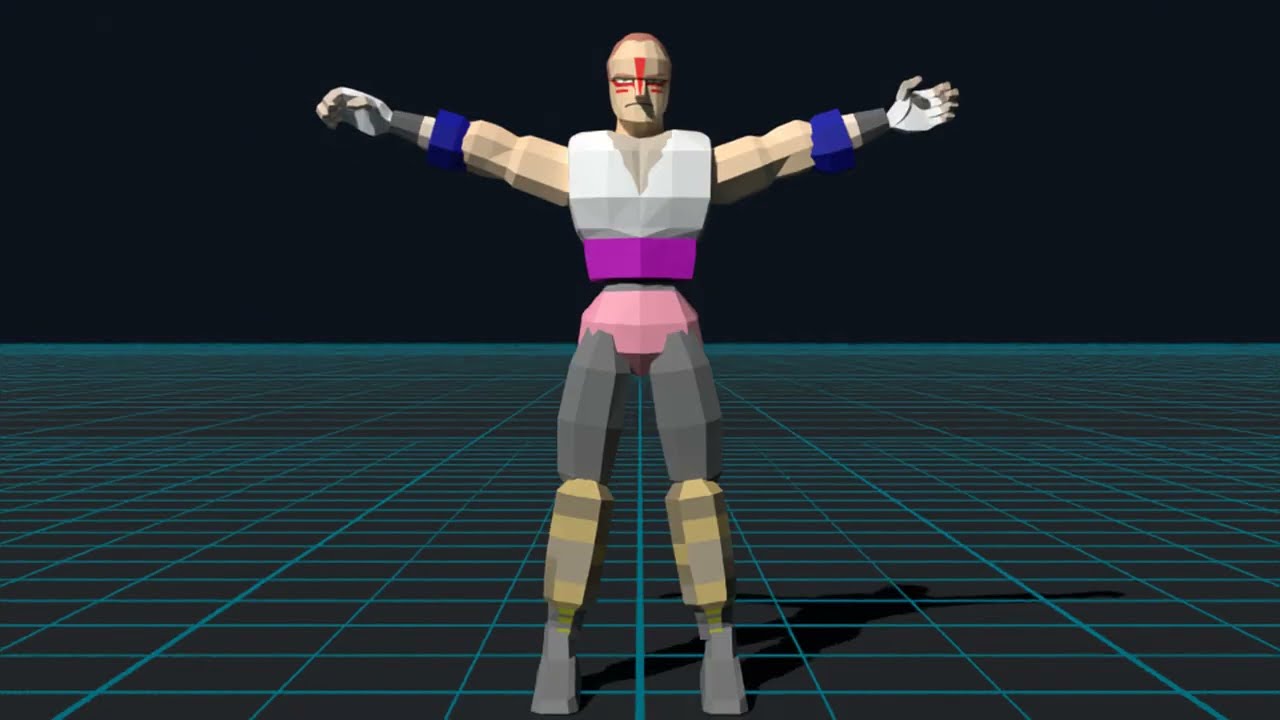
This is a big one. VF1 now has a character randomizer, so every game you get a brand new fighter stitched together from three of the cast, and the best part is they actually play like real fighters. Have a watch of the trailer above, then give it a go.
Character randomizer
Head to Menu → Cheats → Player 1 fighter and pick Random. Each game builds a new fighter from three of the cast - their heads, bodies and limbs all mixed up, their moves dealt out between them, one of their voices, and a name made from theirs up on the energy bar. Player 2 can have one too.
Up top are random fighters rendered in Blender from the game's own models, and below is how they look in the game.
They actually play
Every move is a real move from one of its three parents, with the same inputs and timing as the arcade. Some of VF's move code checks which character you are ("is this Akira, Jeffry or Wolf?"), so each random fighter answers as whichever parent that move came from. I ran an automated audit that typed 37 commands across 30 random fighters, and 98.3% of the moves matched their parent.
A name to match
Each fighter gets a name built from its three parents (JACPAIWOLF, WOLFLAURAH, WOLFSAPAI and so on), and its select portrait is its own head.
Built in front of you
In round 1 the fighter puts itself together from its polygons as the fight starts. Outfits get a new colour theme every game, and the body's skin is matched to the face.
Seeds and random opponents
- Seeds - pick Seed under Player 1 fighter and type in a fighter's name from the energy bar to play it again. You get the same build and moves on any machine, just in new colours, so share the good ones.
- Random opponents - every computer opponent is a random fighter, made fresh for each match. You can fight them as your favourite, or as a random fighter of your own.
Also new
- Kage's mask - turn it on in Cheats and a hit can knock his hood back, just like on a cabinet that's been played for nine hours. Thanks @chocolatelily-0716 (#17)
- Language - English or Japanese, in Arcade settings. Installs switch to English once, so if you prefer Japanese just set it back there. Thanks @svera (#23)
- Smoother - the next frame runs while the picture waits for the screen, Auto uses the GPU whenever its check passes, and with vsync on you get one picture per refresh. Close-ups, throws and replay camera cuts no longer freeze for a moment, and every picture steps evenly on 60 and 120 Hz screens.
- AMD on Windows - the GPU renderer now starts on Vulkan. In VF2 an RX 9070 went from about 30 pictures a second on Direct3D 12 to 6x at full speed on Vulkan. Direct3D 12 is still used if Vulkan won't start. Thanks @game713 for finding it.
- Low antialiasing on the GPU - now works on Windows and Steam Deck.
- Widescreen - no more 4:3 flash on the title's first frame or before a fight.
- Fullscreen keys - these now work with the menu open.
The randomizer and the rest of the cheats live in Menu → Cheats, and with every cheat off the game plays exactly as it did before - I checked it frame for frame against v1.3.2.
Have fun, and let me know which fighters you like - maybe we can start a fun character seed list! 🙂
1.3.2
Fixed: stuck at 60 FPS on some NVIDIA cards. On Windows, at high render scales in 16:9, the game could stop putting its pictures together on the GPU right after starting and drop to 60 frames a second. A few pixels of rounding difference from the graphics driver no longer switch the GPU off, and log.txt now says how many pixels differed. Thanks @duartepedro03!
1.3.1
Fixed: secret characters stretching. Siba, Jeff and the other secret characters no longer stretch for a moment when a kick knocks the other fighter down, as reported with Smooth motion at high frame rates.
Fixed: camera cuts. Cuts are clean now, like TIME OVER's and the attract mode's throws and kicks, with no swoops through views and poses the game never shows.
Portable mode: portable.txt now also works in the folder you unzipped to, one level above the game's folder. Thanks @sanviler!
Fixed: Dural's metallic sounds. Picked in Cheats, Dural is now the game's own Dural, so her metal clanks play when she's hit, as in the arcade's boss fight. Thanks @chocolatelily-0716!
1.3.0
Full changelog
New in v1.3.0:
- Faster GPU 3D on Windows and Steam Deck. The 3D is now drawn straight into the picture on the graphics card: nothing is copied back to the CPU and back up again, and the game no longer waits for the GPU each frame. High render scales (5x, 6x) and the KO and game-over cameras, which fill the screen with floor, should hold their frame rate where they dropped before. If anything looks wrong, Display → 3D renderer → CPU switches it off, and log.txt says which way it's drawing.
- Fixed: Siba's pounce. Up + Punch on a downed opponent is now Lau's pounce. His own had no jump in its data, so he flew across the ring, often right out of it.
Fixed in v1.2.1: the player select keeps its widescreen sides with a secret character in Akira's spot, and they come in with the screen, with no blue flash from the title.
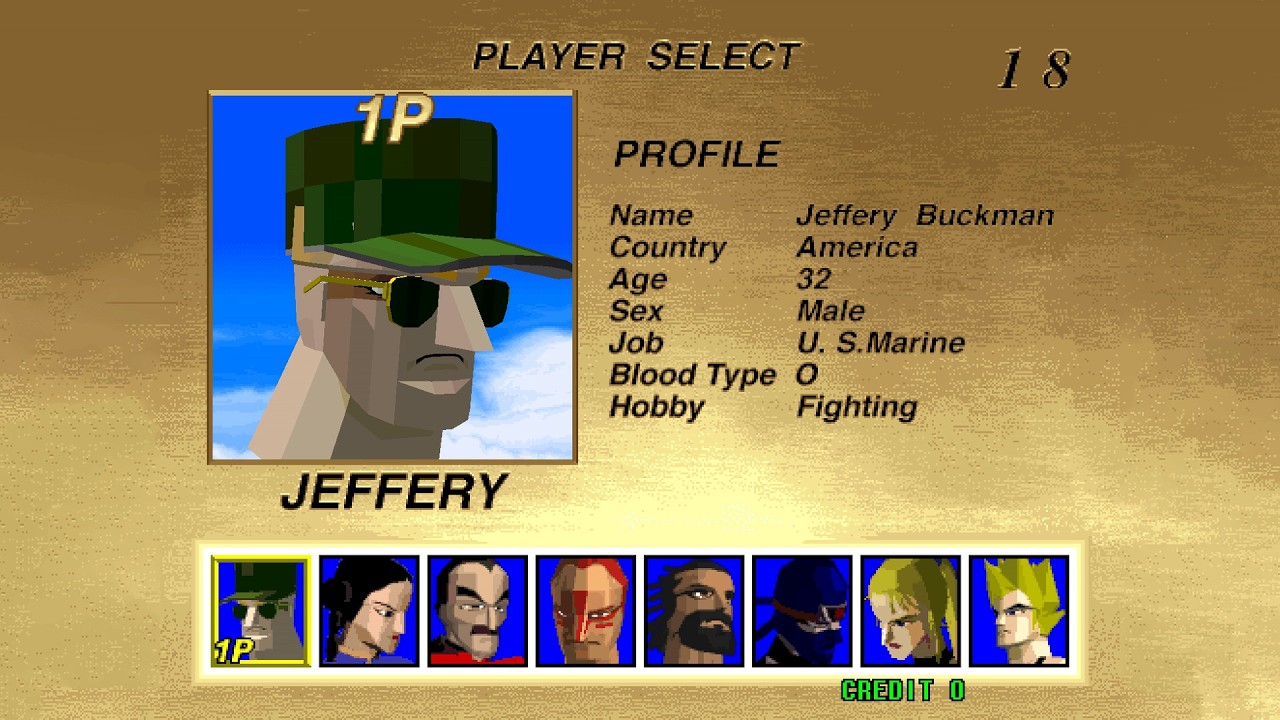
Secret characters — Menu → Cheats → Secret character puts a fighter cut from the arcade ROM in Akira's spot: Siba (Majido), Jeff, Takeru (the early Akira), the Koskol brothers Rekka, Score and Aeon, and Dural. Watch them in action.
Portraits and icons made from the game's own 3D models. Only Siba ever got select-screen art. For the rest, each head was rendered by the game's own renderer from its real model in the ROM, then made to match the cast: portraits lined up against the others' (eye height, centring, head size), and icons fitted to Akira's real icon — same framing, brightness and 12-colour pixel-art look — so they sit in the row like the originals.
The cast and the secret characters:
Who they were (from The Cutting Room Floor):
- Siba (Majido Ab Dul): in pre-release screenshots and on the international cabinet art as "Shiiba". Renamed Majido, then cut late — the only one with his own select icon and voice clips. Came back as a hidden character in Fighters Megamix.
- Jeff (Jeffery Buckman): a soldier in camo, cap and shades, likely named after VF1 staff member Jeffrey Buchanan. Finish the game with him and the rankings call him WILLIE, Jeffry's early name.
- Takeru (Takeru Ryushoji): most likely Akira's early design. Fights under Akira's name, but has his own unused bio, nameplate and ranking name.
- The Koskol brothers (Rekka, Score, Aeon): named in early design documents as the game's three final bosses, maybe meant to be fought a round each. They share Dural's name and moves.
- Dural: the real final boss, never selectable — but an unused early select screen in the code has a portrait for her.
Cheats — infinite energy (P1, P2 or both), one-hit KO, no time limit, and tiny or huge rings.
Known quirks — these characters were never finished, so expect oddities:
| Character | Select screen | Health bar | Notes |
|---|---|---|---|
| Siba (Majido) | Own portrait, icon and profile; name reads MAJIDO (P1) or SHIIBA (P2) | MAJIDO | Moves from Sarah and Lau; his pounce is Lau's (his own flew him out of the ring) |
| Jeff | Own portrait and profile, made icon; name reads JEFFERY | JEFF | A handful of Jacky's moves; his cap and shades can be knocked off |
| Takeru | Akira's name and profile, made icon | AKIRA | Wears Akira's headband |
| Rekka | Made portrait and icon (no blinking); Akira's name and profile | DURAL | Rekka and Score share the same head |
| Score | Made portrait and icon (no blinking); Akira's name and profile | DURAL | Looks like Rekka |
| Aeon | Made portrait and icon (no blinking); Akira's name and profile | DURAL | |
| Dural | Made portrait and icon (no blinking); Akira's name and profile | DURAL |
All of them: borrowed moves and no throws. They take over Akira's spot, so the CPU's Akira in arcade mode is them too, and Akira himself can't be picked while one is on.
- Windows: the GPU renderer works on AMD and older NVIDIA cards (Direct3D 12), with a Vulkan fallback
- Menu button: L3 + R3 or the touchpad click on any pad, remappable in Controls
- FPS counter hides while the menu is open; log.txt shows the version first
The secret characters come from mountainmanjed's MAME cheats, documented on The Cutting Room Floor. Thanks to @unxpected-uxp and @svera, and everyone who reported issues.
1.2.1
Full changelog
Fixed in v1.2.1: the player select keeps its widescreen sides with Jeff, Takeru, the Koskol brothers or Dural in Akira's spot (it went 4:3); the sides now come in with the screen instead of a few frames late, with no blue flash coming from the title.
Secret characters — Menu → Cheats → Secret character puts a fighter cut from the arcade ROM in Akira's spot: Siba (Majido), Jeff, Takeru (the early Akira), the Koskol brothers Rekka, Score and Aeon, and Dural.
Portraits and icons made from the game's own 3D models. Only Siba ever got select-screen art. For the rest, each head was rendered by the game's own renderer from its real model in the ROM, then made to match the cast: portraits lined up against the others' (eye height, centring, head size), and icons fitted to Akira's real icon — same framing, brightness and 12-colour pixel-art look — so they sit in the row like the originals.
The cast and the secret characters:
Who they were (from The Cutting Room Floor):
- Siba (Majido Ab Dul): in pre-release screenshots and on the international cabinet art as "Shiiba". Renamed Majido, then cut late — the only one with his own select icon and voice clips. Came back as a hidden character in Fighters Megamix.
- Jeff (Jeffery Buckman): a soldier in camo, cap and shades, likely named after VF1 staff member Jeffrey Buchanan. Finish the game with him and the rankings call him WILLIE, Jeffry's early name.
- Takeru (Takeru Ryushoji): most likely Akira's early design. Fights under Akira's name, but has his own unused bio, nameplate and ranking name.
- The Koskol brothers (Rekka, Score, Aeon): named in early design documents as the game's three final bosses, maybe meant to be fought a round each. They share Dural's name and moves.
- Dural: the real final boss, never selectable — but an unused early select screen in the code has a portrait for her.
Cheats — infinite energy (P1, P2 or both), one-hit KO, no time limit, and tiny or huge rings.
Known quirks — these characters were never finished, so expect oddities:
| Character | Select screen | Health bar | Notes |
|---|---|---|---|
| Siba (Majido) | Own portrait, icon and profile; name reads MAJIDO (P1) or SHIIBA (P2) | MAJIDO | Moves from Sarah and Lau; his pursuit attack can teleport him across the stage |
| Jeff | Own portrait and profile, made icon; name reads JEFFERY | JEFF | A handful of Jacky's moves; his cap and shades can be knocked off |
| Takeru | Akira's name and profile, made icon | AKIRA | Wears Akira's headband |
| Rekka | Made portrait and icon (no blinking); Akira's name and profile | DURAL | Rekka and Score share the same head |
| Score | Made portrait and icon (no blinking); Akira's name and profile | DURAL | Looks like Rekka |
| Aeon | Made portrait and icon (no blinking); Akira's name and profile | DURAL | |
| Dural | Made portrait and icon (no blinking); Akira's name and profile | DURAL |
All of them: borrowed moves and no throws. They take over Akira's spot, so the CPU's Akira in arcade mode is them too, and Akira himself can't be picked while one is on.
- Windows: the GPU renderer now works on AMD and older NVIDIA cards (Direct3D 12), with a Vulkan fallback
- Menu button: L3 + R3 or the touchpad click on any pad, remappable in Controls
- FPS counter hides while the menu is open; log.txt shows the version first
The secret characters come from mountainmanjed's MAME cheats, documented on The Cutting Room Floor. Thanks to @unxpected-uxp and @svera, and everyone who reported issues.
1.2.0
Full changelog
Secret characters — Menu → Cheats → Secret character puts a fighter cut from the arcade ROM in Akira's spot: Siba (Majido), Jeff, Takeru (the early Akira), the Koskol brothers Rekka, Score and Aeon, and Dural.
Portraits and icons made from the game's own 3D models. Only Siba ever got select-screen art. For the rest, each head was rendered by the game's own renderer from its real model in the ROM, then made to match the cast: portraits lined up against the others' (eye height, centring, head size), and icons fitted to Akira's real icon — same framing, brightness and 12-colour pixel-art look — so they sit in the row like the originals.
The cast and the secret characters:
Who they were (from The Cutting Room Floor):
- Siba (Majido Ab Dul): in pre-release screenshots and on the international cabinet art as "Shiiba". Renamed Majido, then cut late — the only one with his own select icon and voice clips. Came back as a hidden character in Fighters Megamix.
- Jeff (Jeffery Buckman): a soldier in camo, cap and shades, likely named after VF1 staff member Jeffrey Buchanan. Finish the game with him and the rankings call him WILLIE, Jeffry's early name.
- Takeru (Takeru Ryushoji): most likely Akira's early design. Fights under Akira's name, but has his own unused bio, nameplate and ranking name.
- The Koskol brothers (Rekka, Score, Aeon): named in early design documents as the game's three final bosses, maybe meant to be fought a round each. They share Dural's name and moves.
- Dural: the real final boss, never selectable — but an unused early select screen in the code has a portrait for her.
Cheats — infinite energy (P1, P2 or both), one-hit KO, no time limit, and tiny or huge rings.
Known quirks — these characters were never finished, so expect oddities:
| Character | Select screen | Health bar | Notes |
|---|---|---|---|
| Siba (Majido) | Own portrait, icon and profile; name reads MAJIDO (P1) or SHIIBA (P2) | MAJIDO | Moves from Sarah and Lau; his pursuit attack can teleport him across the stage |
| Jeff | Own portrait and profile, made icon; name reads JEFFERY | JEFF | A handful of Jacky's moves; his cap and shades can be knocked off |
| Takeru | Akira's name and profile, made icon | AKIRA | Wears Akira's headband |
| Rekka | Made portrait and icon (no blinking); Akira's name and profile | DURAL | Rekka and Score share the same head |
| Score | Made portrait and icon (no blinking); Akira's name and profile | DURAL | Looks like Rekka |
| Aeon | Made portrait and icon (no blinking); Akira's name and profile | DURAL | |
| Dural | Made portrait and icon (no blinking); Akira's name and profile | DURAL |
All of them: borrowed moves and no throws. They take over Akira's spot, so the CPU's Akira in arcade mode is them too, and Akira himself can't be picked while one is on.
- Windows: the GPU renderer now works on AMD and older NVIDIA cards (Direct3D 12), with a Vulkan fallback
- Menu button: L3 + R3 or the touchpad click on any pad, remappable in Controls
- FPS counter hides while the menu is open; log.txt shows the version first
The secret characters come from mountainmanjed's MAME cheats, documented on The Cutting Room Floor. Thanks to @unxpected-uxp and @svera, and everyone who reported issues.
1.1.13
- Crash guard: a graphics driver that crashes while the GPU renderer starts (seen on an old Radeon with CRT Emudriver) no longer stops the game. The next start uses the CPU's 3D instead; delete
gpu-start.crashedin the game's data folder to try the GPU again.
No ROMs or game data are included: bring your own MAME set. Install steps: https://vf1-recomp.pages.dev/
1.1.12
A quick fix release.
- GPU renderer: no longer switches off over a few pixels of rounding difference on some graphics cards (NVIDIA). The game still checks the GPU's picture against the CPU's when it starts, and still uses the CPU if the GPU's picture is really wrong; if you chose GPU (not Auto) in Display > 3D renderer, only a broken picture or an error switches it off.
- Widescreen select and title: changing Render scale or Antialiasing from the pause menu no longer blacks out the painted sides (and the select portrait's sky).
Your settings, saves and ROM carry over.
1.1.11
Full changelog
- GPU renderer: the 3D can now be drawn by the graphics card on Mac, Windows and Steam Deck, with exactly the same picture. Display > 3D renderer: Auto (the default, also for upgrades) uses the GPU unless it's slower on your machine. The game checks the GPU's picture when it starts and quietly uses the CPU if anything is off (log.txt says which it used).
- Sarah's stage: the light from below the fighters pulses with the floor, as on the cabinet.
- Smaller menus: tighter rows and text, so more fits on small screens.
- Portable mode: put a file named
portable.txtbeside the game and it keeps everything (settings, saves, screenshots, log.txt and your vf.zip) in its own folder, nothing in your user folder. - Your own ROM folder: start the game with
--roms, setVF_ROMS, or addroms_folder =to settings.ini, and it looks for vf.zip there first, only reading it (e.g. Batocera's/userdata/roms/ports/vf), so an update or reinstall can't touch your ROMs. log.txt says which folder it used. See the README. - Steam Deck: simpler install steps in the README (the shortcut points at the game itself). The Windows build also runs under Proton, but the native Linux build is the one to use.
You need your own MAME "vf" set (vf.zip). The Mac and Windows builds are unsigned. Unofficial fan project, not affiliated with SEGA.
1.1.10
- Arcade mode: Start only starts a game when there's a credit, like the cabinet's start button. Credits come from the Coin button.
- Widescreen: the player select gets its painted sides when player 2 starts from the demo or a challenger joins, not just for player 1.
- Name entry: the wheel's letters, symbols and BACK are blue and END is red, as on a real cabinet (they were black).
- Wolf's stage above 1x: the clouds blend into the sky instead of starting at a hard line.
You need your own MAME "vf1" set (vf.zip). The Mac and Windows builds are unsigned.
Reply on the forum
A question or a hands-on report? Open the discussion on the forum.