Super Street Fighter II Turbo; Street Fighter Alpha; Street Fighter Alpha 2; Street Fighter Zero 2 Alpha; Street Fighter
Portage natif de Super Street Fighter II Turbo; Street Fighter Alpha; Street Fighter Alpha 2; Street Fighter Zero 2 Alpha; Street Fighter pour macOS.
CPS-2 Recomp est un portage natif de Super Street Fighter II Turbo; Street Fighter Alpha; Street Fighter Alpha 2; Street Fighter Zero 2 Alpha; Street Fighter pour macOS, distribué en binaire dans ses releases.
Architecture
 Mac OS X - macOS
 64-bit
Original game
Super Street Fighter II Turbo; Street Fighter Alpha; Street Fighter Alpha 2; Street Fighter Zero 2 Alpha; Street Fighter
Download and links
- Download Super Street Fighter II Turbo; Street Fighter Alpha; Street Fighter Alpha 2; Street Fighter Zero 2 Alpha; Street Fighter
- Source code 203 GitHub stars
- License : GPL-3.0
Version history
1.6.0-beta.4
Full changelog
**Every game now runs at its arcade board's speed by default, and the Street Fighter II family is proven to.** Testers found Street Fighter II: Hyper Fighting and Super Street Fighter II Turbo running too fast; they were: the port gave the processor every clock unless Arcade timing was chosen, and the CPS-1 games had no board timing at all. Now every game takes the time the board takes (its memory waits, its video chip's copying, and the 68000's own clocks, five of which were wrong), CPS-1 and CPS-2 alike. **Slowdown → None** (Game page) gives the processor every clock instead. Also: Marvel vs. Capcom four-player teams and Cross Fever rematches, online Tag team and Ball battle chosen while paused with a Ready, and exact-rate arcade monitor modes (Switchres). Pre-release, as 1.6.0-beta.3 was.**The proof.** jotego's FPGA cores of the boards (jtcps2, jtcps1), simulated cycle by cycle, and the port play the same fight: the same inputs on the same frames from the same game state. The round clock's frames a second (more is slower):| Game | FPGA core | This release | 1.6.0-beta.3 | | --- | --- | --- | --- | | Super Turbo, Turbo 1 | 32.12 | 32.12 | 27.8 | | Super Turbo, Turbo 2 | 31.58 | 31.47 | 26.9 | | Super Turbo, Turbo 3 | 30.92 | 30.92 | 26.0 | | Super Turbo, Turbo 4 | 30.07 | 30.60 | 24.9 | | Hyper Fighting | 34.96 | 34.88 | 30.9 |Super Turbo's game state is the core's byte for byte through character select, the VS screen and the round's first seconds at every turbo setting (where it then parts, one turbo tick a frame apart, the scripted fight goes another way, and the speeds after that differ either way: Turbo 4's 0.5 is that). World Warrior and Champion Edition keep the core's pace through the fight; Alpha 2's attract mode keeps step with its core for 5,705 of 5,710 frames. How it was measured, and how to repeat it: docs/ARCADE_ACCURACY.md.Super Turbo, Turbo 4: the FPGA core, this release, and 1.6.0-beta.3 (every clock), the same fight from the round's start: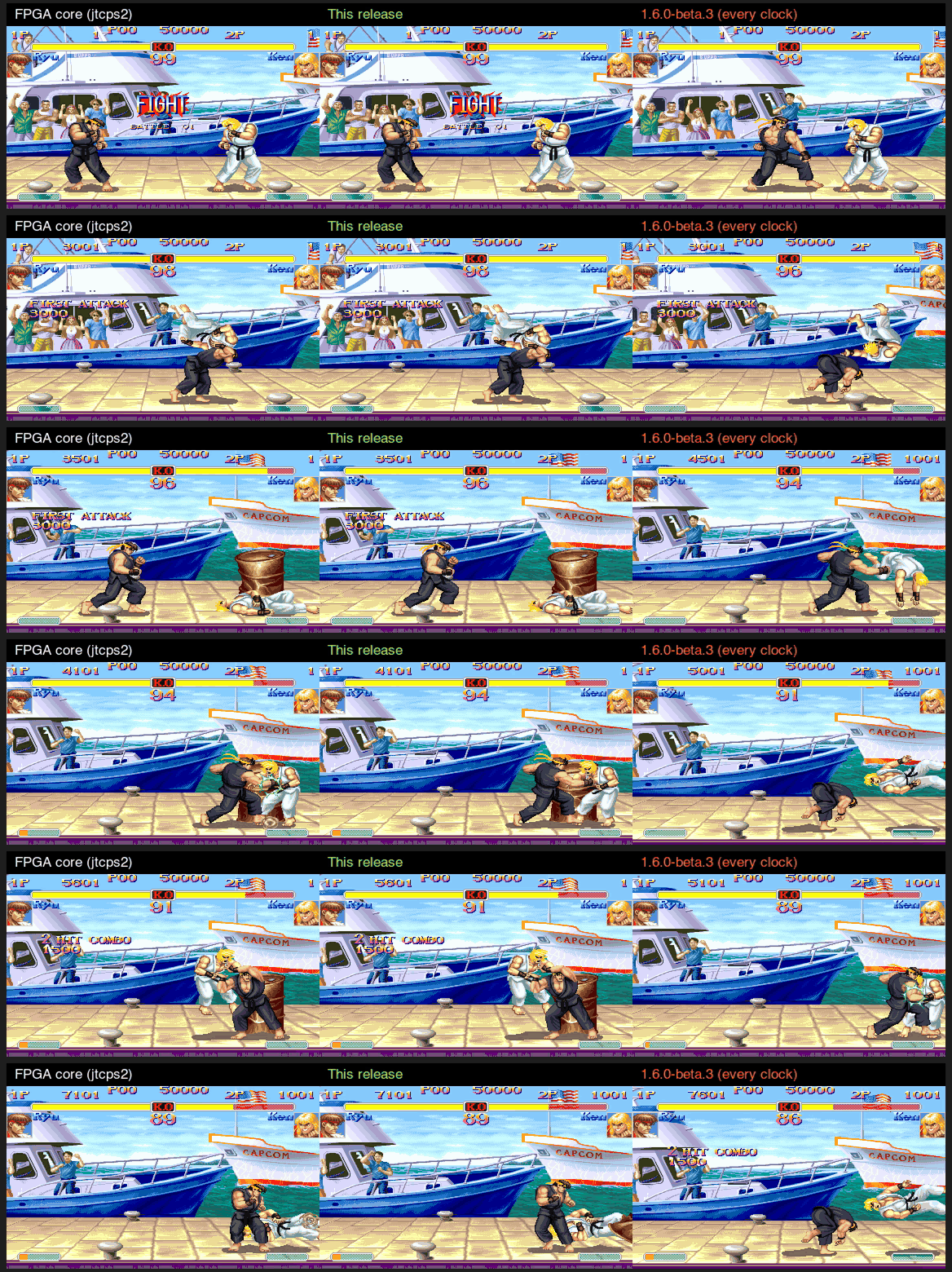Super Turbo, Turbo 1: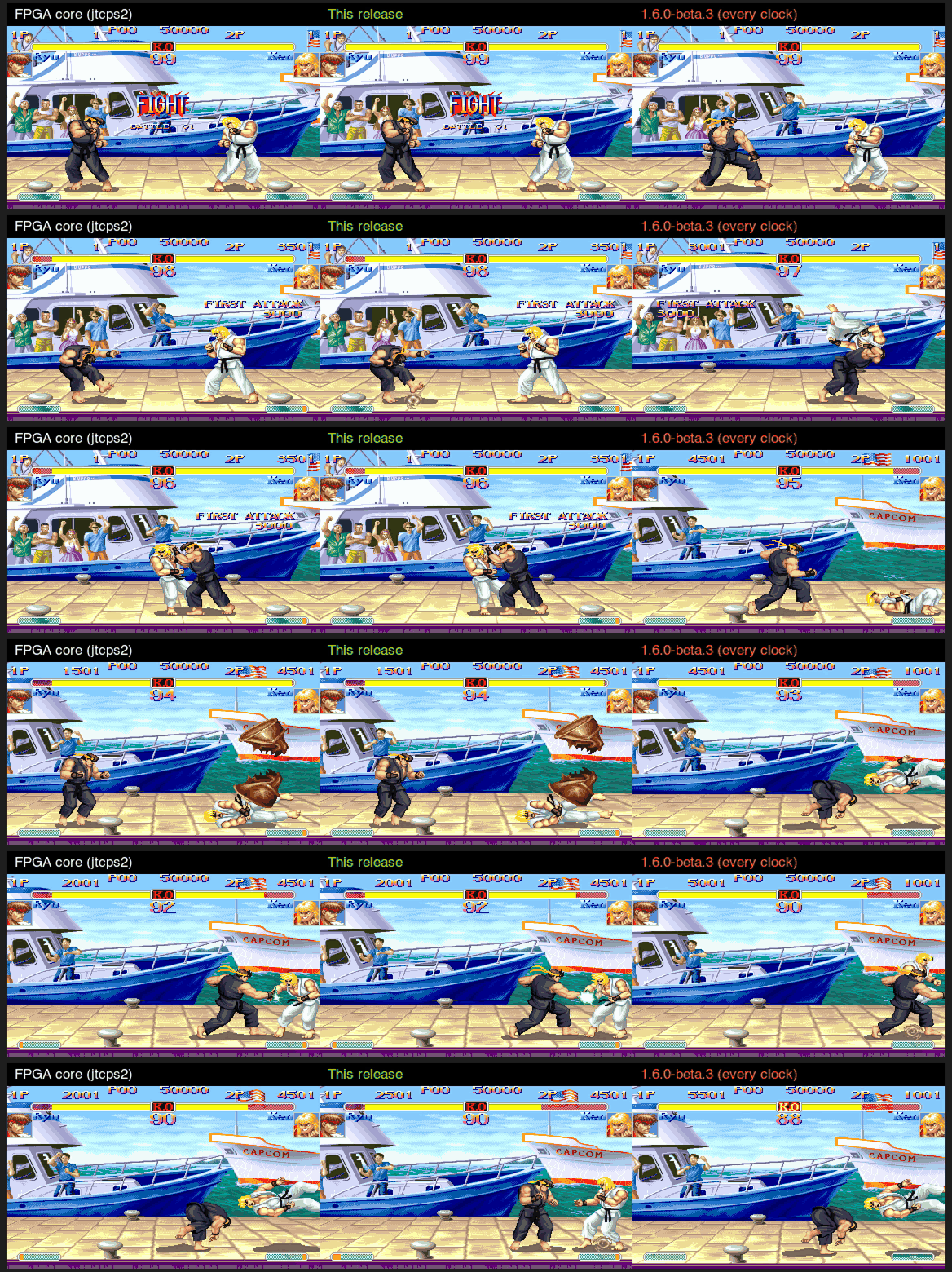Hyper Fighting against jtcps1: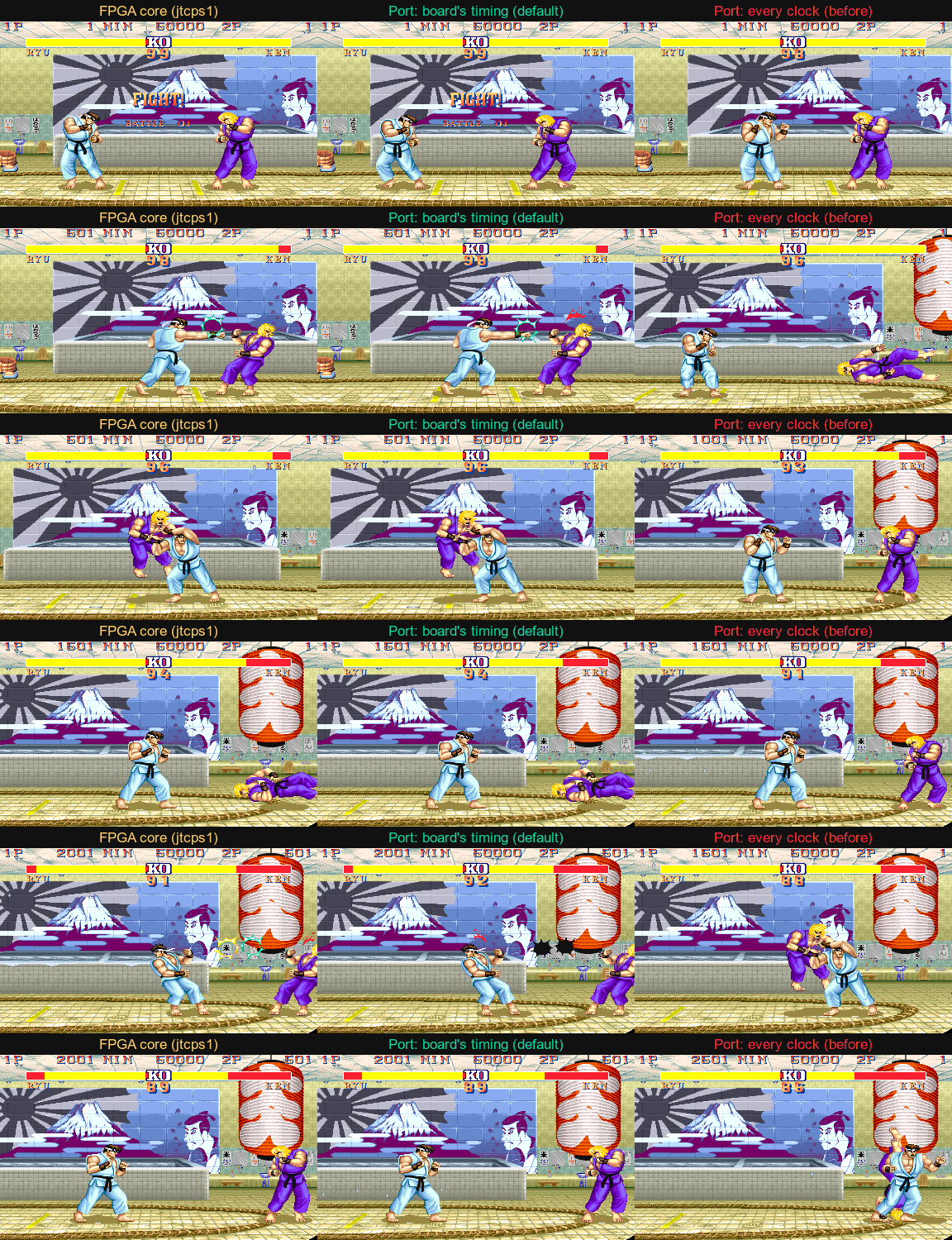Unofficial native ports of Capcom's CPS-2 (and CPS-1) arcade games, in one download with one launcher. **No game is included: you need your own ROM sets** ([which ones](https://github.com/tmcleroy/cps2recomp#what-you-need)).## Download| Your system | Download | | --- | --- | | macOS 13 or later, Apple silicon or Intel | **CPS2Recomp-macOS.zip** | | Windows 10 or 11, 64-bit | **CPS2Recomp-windows-x64.zip** | | Linux x86_64, Steam Deck, Steam Machine | **CPS2Recomp-linux-x86_64.tar.gz** | | Linux ARM64 (aarch64: ARM handhelds, single-board computers) | **CPS2Recomp-linux-arm64.tar.gz** | | Android 9 or later, 64-bit ARM phones and tablets | **CPS2Recomp-android.apk** |`SHA256SUMS.txt` has the downloads' checksums. The `update-*.txt` files are what the launcher reads to update itself; you don't need them.## Install### macOS 1. Open the zip: it gives **CPS-2 Recomp.app**. Move it to your **Applications** folder (it updates itself, so it must be somewhere it can write, not left in Downloads' unzipped folder). 2. The app is not notarized by Apple, so the first time: right-click it and choose **Open**, then **Open**. If macOS only offers **Done** or **Move to Trash**, choose **Done**, then open **System Settings → Privacy & Security**, scroll down and press **Open Anyway** next to "CPS-2 Recomp". 3. On the **Games** page, press **Choose folder…** and pick the folder with your ROM sets. Press **Play** beside a game.### Windows 1. Right-click the zip, choose **Extract All…**, and extract it to a folder of your own (for example `Documents\Games`), not Program Files: the launcher updates itself and needs to write there. 2. In the `CPS2Recomp` folder, open **cps2recomp-launcher.exe**. The programs are not signed, so the first time Windows may say it protected your PC: press **More info**, then **Run anyway**. 3. On the **Games** page, press **Choose folder…** and pick the folder with your ROM sets. Press **Play** beside a game.### Linux 1. Unpack it where it can stay: `tar xzf CPS2Recomp-linux-x86_64.tar.gz -C ~/Applications` (or `CPS2Recomp-linux-arm64.tar.gz` on ARM64; any folder of your own works). 2. Run `~/Applications/CPS2Recomp/cps2recomp-launcher`. It needs only an X11 or Wayland desktop and the usual sound libraries (SDL 3 is built in). 3. On the **Games** page, press **Choose folder…** and pick the folder with your ROM sets. Press **Play** beside a game.### Android 1. Download the APK on your phone or tablet and open it to install it (allow installs from your browser or file manager when asked). 2. Copy your ROM sets to the phone (USB, or any file manager). In the app, on the **Games** page, press **Add ROM sets…** and choose them. Press **Play** beside a game.### Steam Deck and Steam Machine 1. Hold the power button and choose **Switch to Desktop**. 2. Download the Linux file. In the file manager (Dolphin), right-click it, choose **Extract → Extract archive here**, and move the `CPS2Recomp` folder where it can stay (for example a new `Applications` folder in your home folder). 3. Put your ROM sets in one folder on the device (from a USB stick or the SD card, say). 4. In the `CPS2Recomp` folder, open **cps2recomp-launcher**. On the **Games** page, press **Choose folder…** and pick that folder. 5. On each game's page, press **Add to Steam**. It adds the game to your library, and the first time also **CPS-2 Recomp** (the launcher). 6. Go back with **Return to Gaming Mode** on the desktop. The games are in your Library under **Non-Steam**.In a game, Esc or F1 (on a gamepad, a click of the left stick, or Start and Select together) opens the in-game menu. Its **Quit game** row ends the game.## UpdateThe launcher checks for a new version when it opens and offers it at the top of the **Games** page: **Update** downloads it, checks it and starts the new version. Or download this release and put it in place of the old app or folder. Your settings, save states and ROM sets are kept either way: they are in your own user folder (or in `user/` beside the launcher, with `portable.txt`: portable mode).## What's new in 1.6.0-beta.4- **Arcade monitor: modes at the board's exact rate, and a frame delay**: on Windows, **Make the mode at the board's rate** (Arcade monitor page) has Switchres make the 384 x 224 or super resolution mode at exactly 59.637 Hz and switch the screen to it, for the **Monitor** chosen (Arcade 15 kHz, a TV, the tri-sync monitors...), as GroovyMAME does; the desktop's mode comes back when the game ends. And synced to the screen, each frame's controls are read and its picture made as late before the screen's refresh as it can be (a frame delay, worked out by itself), which takes most of the wait for the refresh out of the controls' lag. The log says the mode made and the delay. - **Online Tag team and Ball battle: both players choose while the game is paused**: the host's Esc menu now pauses the game for both players and opens the other player's, so each chooses their fighters there. The other player then says **Ready**, and the host's **Start** waits until they have (changing a fighter takes Ready back). The other player no longer has to choose before the host starts. - **The 68000's own timing, checked against jtcps2's and jtcps1's bus traces**: long ADD/SUB/AND/OR/ADDA/SUBA from a register or an immediate take their 8 clocks (they took 6), EOR into a register its 4 (it took 8), a MOVE to `-(An)` what one to `(An)` does (it took 2 more), and the waits the board takes for the 68000's hidden accesses (its refetch after a change of SR or CCR, its read before a CLR or Scc); and a CPS-1's video RAM writes a clock more, as jtcps1 has it. With them the Street Fighter II family plays the same fight as its FPGA core at the core's speed: Super Turbo at every turbo setting, Hyper Fighting, World Warrior, Champion Edition (docs/ARCADE_ACCURACY.md, the table); Alpha 2's attract mode keeps step with its core for 5,705 of 5,710 frames (3,760 before). - **Every game runs at the board's speed** (testers: Hyper Fighting and Super Turbo too fast): the board's timing is now the default for every game, the CPS-1 games included. Street Fighter II's turbo speeds (Hyper Fighting's, Super Turbo's) fit in more of the game's work wherever a frame has time to spare, so with every clock the port ran them faster than the board: in a fight Super Turbo's round clock ticked every 27.3 frames, and every 31 with the board's timing; Hyper Fighting's every 29, and every 33.5 with the board's timing. **Slowdown** (Game page, every game but the shoot-'em-ups, which have their own) replaces Arcade timing, off unless chosen: **Arcade perfect** (the default) or **None** (every clock). - **The CPS-1's board timing**: its PAL's wait on every access outside 400000-7FFFFF (F00000-FEFFFF on the QSound board), and the CPS-A's DMA as on the CPS-1, where the objects are in video RAM: one entry of the object table a line, all 256 from the line after the game sets the table's base, as well as the row scroll, the tile rows and the palette. The DMA's time is counted in its own 16 MHz and turned into the 68000's clock (16, 12 or 10 MHz), with the step its scheduler takes at each of its eleven tasks' places up to the last one in use (jtcps1_dma.v). Checked against jtcps1 simulated (docs/ARCADE_ACCURACY.md): the DMA within 0.05% a frame, and Hyper Fighting's fight at the core's speed within 0.2% (34.90 frames a round-clock second against 34.96; every clock: 30.89, 11.6% fast). On CPS-2 the same rule leaves Street Fighter Alpha 2 the reference's at 5,634 of 5,671 frames (5,639 before; single frames in the fight), its DMA within 0.16% a frame (0.3% before). - **The evidence**, in `docs/ARCADE_ACCURACY.md`: Hyper Fighting's fight side by side with jtcps1 (a video, a GIF and a still in `docs/evidence/`), how to repeat the comparison, and `tools/reference/compare.py` (the frame-by-frame match and a fight's speed). `--ram-log FILE` writes work RAM at every vertical blank as the reference harness logs the board's, and `--cpu-clock 10|12` runs a CPS-1's 68000 at another board's clock. - `--check-rewrites` runs the readable rewrites with the board's timing on too (a plain run takes the game's own code in their place). Version 14 saves include the board’s object-copy progress, the DMA clock and MVC’s partner-tag state. - **Marvel vs. Capcom Tag team** supports three players, with the two teammates on either side. In a four-player match the host can pair P1/P2 against P3/P4 in classic Tag team or Cross Fever. P1/P3 against P2/P4 remains the default. A reserve player can hold HP+HK to tag when the game allows it, or release to cancel. Only the point player's own command can spend meter on a team Hyper or Duo. - **Cross Fever** now defaults to **Only by fighting** for both teams' gauges. The host can choose **Fill by themselves** for Dreamcast meter gain and set the Duo countdown, who can request a tag, the Dreamcast taunt chord and whether both teams reselect for a rematch. A fresh board clears both teams' previous starting order. [Controls and Dreamcast comparison](games/mvsc/CROSS_FEVER.md). - **Controllers** keep their player numbers when another pad disconnects. A returning pad reclaims its slot when the system recognizes it. In a local MVC fight, **Pause on controller disconnect** shows which player's pad to reconnect. - **Keyboard controls** now read a bound left or right Alt during play, including attacks and directions held by another player. **Game → Keyboard only** lets JoyToKey users play through their mapped keys without also sending native stick clicks to chat or the menu. Each machine chooses its own setting. - **Hosting and match settings** let the host set input delay and choose an unlisted match from inside the game. Hosting from Esc also reads the launcher's **Allow spectators** choice, including when hosting again. The match menu includes MVC's host rules and each player's own display and input settings. Protocol 14 carries board timing and four-player state, supports three-person rooms and requires matching builds for players and spectators. [Hosting](docs/ONLINE.md). - **Input during network waits** defaults to **Retain short taps**, which keeps sampled presses and releases in order while the match waits. Choose **Current state** to use the controls held when each frame advances. Online input movies record changes and the final frame. - **Online timing** keeps late inputs, discards stale clock estimates and uses fresh peer progress to pace four machines. A quiet link retries every 32 ms. The match log shows each direct link's round-trip time and separates waits for input prediction from waits for clock pacing. - **Online HUD** adds Soft, Faint and High contrast. The set score's background fits its text and MVC team names sit below the helper count. Each player can change name, streak, ping and delay visibility in the match menu. [Matched screenshots and test results](docs/ONLINE_TESTING.md#four-player-input-and-timing-checks-november-18-2026).
Reply on the forum
A question or a hands-on report? Open the discussion on the forum.