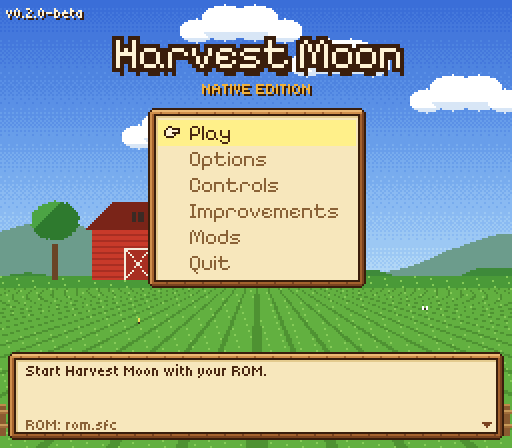
Harvest Moon Decomp est un portage natif de Harvest Moon pour macOS, compilé depuis ses sources.
Architecture
 Mac OS X - macOS
Original game
Harvest Moon Super Nintendo
Download and links
- Download Harvest Moon
- Source code 36 GitHub stars
Version history
1.0.0
Full changelog
Harvest Moon (SNES) running on its code rewritten in C, ready to play on Windows, Mac, Linux and Android (the AYN Thor's two screens included). / Harvest Moon (SNES) corriendo sobre su código reescrito en C, listo para jugar en Windows, Mac, Linux y Android (con las dos pantallas de la AYN Thor).
[!IMPORTANT] You need your own legal copy of Harvest Moon (USA). These downloads have no ROM and nothing taken from it: the first time, the program asks for your copy, checks it and remembers it. / Necesitas tu propia copia legal de Harvest Moon (USA). Las descargas no traen la ROM ni nada sacado de ella: la primera vez el programa te pide tu copia, la revisa y la recuerda.
Downloads / Descargas
| Windows 10/11 (x64) | HarvestMoon-1.0.0-Windows.zip: unzip, open HarvestMoonNative.exe / descomprime y abre HarvestMoonNative.exe |
| Mac (Apple Silicon and Intel, macOS 11+) | HarvestMoon-1.0.0-Mac.zip: unzip, double-click Harvest Moon.command / descomprime y doble clic en Harvest Moon.command |
| Android 8+ (phones, tablets, AYN Thor) | HarvestMoon-1.0.0-Android.apk: open it on the device to install it / ábrelo en el equipo para instalarlo |
| Linux (x86_64) | HarvestMoon-1.0.0-Linux.tar.gz: unpack, run ./HarvestMoonNative / descomprime y ejecuta ./HarvestMoonNative |
[!WARNING] Your computer or phone will warn you the first time: that is expected. This is a free hobby project, not a company's app: the programs are not signed with a paid certificate (Windows, Mac) and the APK is not from the Play Store, so the system cannot vouch for them and asks you first. Nothing is wrong with them: they are built by GitHub itself from the public source in this repository (see the Actions tab), and each file's SHA-256 is below so you can check it is the same one. / Tu computadora o teléfono te va a advertir la primera vez: es normal. Es un proyecto gratuito hecho por aficionados, no una app de una empresa: los programas no están firmados con un certificado de pago (Windows, Mac) y el APK no viene de la Play Store, así que el sistema no puede responder por ellos y te pregunta antes. No tienen nada malo: los compila GitHub mismo con el código público de este repositorio (ver la pestaña Actions), y abajo está el SHA-256 de cada archivo para comprobar que es el mismo.
What you will see, and what to do / Qué vas a ver y qué hacer:
- Windows — "Windows protected your PC": click More info → Run anyway. Your browser may also say the file "isn't commonly downloaded": choose Keep. / «Windows protegió tu PC»: da clic en Más información → Ejecutar de todas formas. El navegador también puede decir que el archivo «no se descarga habitualmente»: elige Conservar.
- Mac — "cannot be opened because it is from an unidentified developer": right-click
Harvest Moon.command→ Open → Open (on macOS 15: System Settings → Privacy & Security → Open Anyway; or, in Terminal,xattr -dr com.apple.quarantineon the folder). / «no se puede abrir porque es de un desarrollador no identificado»: clic derecho enHarvest Moon.command→ Abrir → Abrir (en macOS 15: Ajustes del Sistema → Privacidad y seguridad → Abrir igualmente; o, en Terminal,xattr -dr com.apple.quarantinesobre la carpeta). - Android — "For your security, your phone is not allowed to install unknown apps from this source": tap Settings and allow it for that browser or file manager, then go back and Install. Play Protect may offer to scan it: let it, then Install anyway if it asks. On the AYN Thor, launch the app on the top screen: the pause menu stays on the lower one. / «Por tu seguridad, tu teléfono no puede instalar apps desconocidas de esta fuente»: toca Ajustes y permítelo para ese navegador o explorador, luego regresa e Instalar. Play Protect puede ofrecer analizarla: déjalo, y si pregunta, Instalar de todas formas. En la AYN Thor, abre la app en la pantalla de arriba: el menú de pausa se queda en la de abajo.
- Linux — if it does not start, make it executable:
chmod +x HarvestMoonNative. / si no arranca, hazlo ejecutable:chmod +x HarvestMoonNative.
Prefer not to run a downloaded program? Build it yourself from the source with build.bat (Windows: no warning then, it is made on your PC), build_mac.command or build_android.bat. / ¿Prefieres no abrir un programa descargado? Compílalo tú con build.bat (en Windows así no sale el aviso, porque se hace en tu PC), build_mac.command o build_android.bat.
New in 1.0.0
The first full version. / La primera versión completa.
- Picture filters (Options → Filter): scanlines, CRT, and green (four shades, as on the first handheld screens).
- Smooth pixels (Options → Picture): a soft, rounded look that goes with any filter.
- RecompLauncher: each download has a
recomplauncher.json, so RecompLauncher can install the game, check your ROM and start it, with fullscreen, widescreen and window size on the game's page. The program also takes the ROM as--game. - Controllers: the launcher's bottom line names your pad's own buttons for choosing and going back, and the window comes to the front at start, so a pad works right away.
Novedades de la 1.0.0
- Filtros de imagen (Opciones → Filtro): Scanlines (líneas de barrido), CRT y Verde (cuatro tonos, como las primeras pantallas portátiles).
- Píxeles suaves (Opciones → Imagen): un aspecto suave y redondeado que va con cualquier filtro.
- RecompLauncher: cada descarga trae un
recomplauncher.json, para que RecompLauncher pueda instalar el juego, revisar tu ROM y arrancarlo, con pantalla completa, panorámica y tamaño de ventana en la página del juego. El programa también acepta la ROM como--game. - Controles: la línea de abajo del launcher dice qué botones de tu control eligen y regresan, y la ventana se pone al frente al abrir, para que el control funcione de inmediato.
Everything from the betas is still here: see CHANGELOG.md. / Todo lo de las betas sigue aquí: ver CHANGELOG.md.
What's in it / Qué trae
- The whole game in C, with the console's picture and sound. / Todo el juego en C, con la imagen y el sonido de la consola.
- A launcher in the look of the game (English, Español, Italiano): options, controls (keyboard, gamepads, touch), save states. / Un launcher con el aspecto del juego: opciones, controles (teclado, gamepads, táctil), estados guardados.
- Everything starts off: the game is exactly the console's until you turn on what you like. / Todo viene apagado: el juego es el de la consola hasta que activas lo que quieras.
- Picture / Imagen: scanlines, CRT, green, smooth pixels.
- Improvements / Mejoras: widescreen, Harvest Moon 64-style pause menu, crop bag, walk through crops, one seed at a time, mouse controls, your wife helps on the farm, her old clothes some days, fast text, longer days, endless game, OPTIONS on the title screen.
- Cheats / Trucos: money, stamina, stop the clock, lumber and fodder, seeds and feed, weather.
- Mods: drop the community's IPS / BPS patches into
mods/and turn them on in the launcher (seemods/MODS.md). / Pon los parches IPS / BPS de la comunidad enmods/y actívalos en el launcher (vermods/MODS.es.md). - Android: touch controls in the game's style; on two-screen devices (AYN Thor) a live pause menu on the second screen. / Android: controles táctiles con el estilo del juego; en equipos de dos pantallas (AYN Thor), el menú de pausa en vivo en la segunda pantalla.
Found a problem? Please report it in Issues. / ¿Encontraste un problema? Repórtalo en Issues.
SHA-256
To check a download / Para comprobar una descarga: Windows certutil -hashfile SHA256, Mac shasum -a 256 , Linux sha256sum .
afbb7e4dfb8cb48dc87093e4f06fc9d80d06983f5c10e9d38a45dbe4e2bd3c9d  HarvestMoon-1.0.0-Android.apk
bdde5a48d8282a2ca77c5fb864130c6b672a439634506f72a9b573614fb740d2  HarvestMoon-1.0.0-Linux.tar.gz
8858dc7fc3b20324fa21df9b66504363dc691c3c564375f55d20025e14cce641  HarvestMoon-1.0.0-Mac.zip
436f8cb903dff85e17e381433ea20f46207226e811a179914ec3ac863c25d2d7  HarvestMoon-1.0.0-Windows.zip
Reply on the forum
A question or a hands-on report? Open the discussion on the forum.