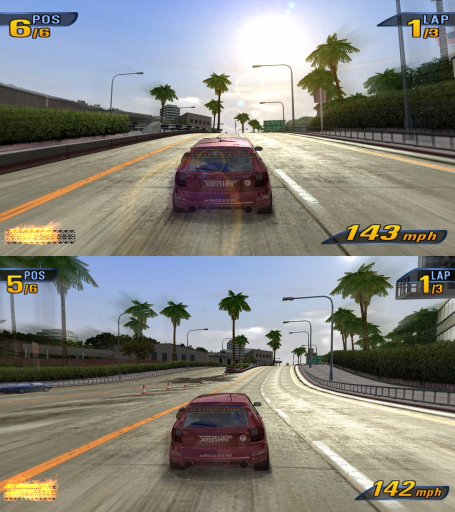
Takedawn est un portage natif de Burnout 3 : Takedown pour macOS, distribué en binaire dans ses releases.
Architecture
 Mac OS X - macOS
 Apple Silicon
 64-bit
Original game
Burnout 3 : Takedown PlayStation 2
Download and links
- Download Burnout 3 : Takedown
- Source code 632 GitHub stars
- License : MIT
Version history
0.3.1
Full changelog
Saves and settings from 0.3.0 carry over. The update steps for each platform are in the README.
Online: the relay
In 0.3.0, two players who couldn't connect to each other couldn't race together, usually because the host's ports were closed. The player who joined was removed from the game after about 20 seconds. Now those two play through the game server's relay. The game still tries the direct connection first and keeps it when it works, because its ping is lower. Through the relay every packet goes by way of the server, which adds about 10 to 60 ms in Europe.
[!IMPORTANT] Open ports still give the lowest ping. The player who creates a game should have UDP 31000 and 36000 open. Takedawn asks the router to open them (UPnP). If UPnP is off, forward both ports by hand. If they stay closed, the game now goes through the relay and the players who join stay in.
0.3.0 and 0.3.1 players can still play together. A 0.3.0 copy can't use the relay, so it needs a direct connection, as before.
Fixed
- Online: if the host changed the track, its direction, the mode or the laps in the lobby's Options, the host could race the old settings and everyone else the new ones. Now the host races the same settings as everyone else. Reported by worstcc (#122).
- The Crash Nav globe in World Tour was stretched a third wider in 16:9. With 4:3 pictures set to Blurred sides or Black bars it now has the shape and place it has in 4:3. Stretched keeps the old look. Reported by DonelBueno (#124).
- The globe's grid lines got thinner at render scale 2x and above. They now stay as thick as at 1x (#124).
Thanks
worstcc (#122) and DonelBueno (#124), for the reports.
| File | For | Size |
|---|---|---|
Takedawn-0.3.1-macos-arm64.dmg |
Macs with Apple silicon, macOS 13 or newer | 75.5 MB |
Takedawn-0.3.1-windows-x64-setup.exe |
64-bit Windows | 67.6 MB |
Takedawn-0.3.1-linux-x86_64.AppImage |
Linux and the Steam Deck, x86-64, glibc 2.30 or newer | 81.8 MB |
Takedawn-0.3.1-android-arm64.apk |
Android 13 or newer, 64-bit, Snapdragon chip with Adreno graphics (experimental) | 42.0 MB |
Every file works with all three discs.
None of the desktop files is code signed. The APK is signed with the project's own key. To check a download, compare its SHA-256 with the line in SHA256SUMS.
VirusTotal: the Windows setup scores 1/68. Only Deep Instinct flags it, with a generic machine-learning verdict. docs/antivirus.md explains why an unsigned installer can trip these engines.
Known issues
- If the host leaves, the online game ends; it doesn't pass to another player.
- A player whose connection to another player works in one direction only can still be removed from the game, because the relay doesn't cover that case yet. A 0.3.0 copy can't use the relay at all. The error box says why.
- The online messages (the lobby's top line, the waiting text) are in English in every language.
- With Driving controls set to PlayStation 2, Crash mode shows the wrong button prompts. The Crashbreaker prompt says B (or Circle), while R2 fires it.
- On the France/Germany/Italy disc, Game > Language reads English until you change it. The game runs in French, and the row offers only French, German and Italian.
- On a Mac the accelerator can stop working after a few Crash events (#111).
- Online on a Mac that has Local Network access turned off (or behind a router without hairpin): it can't reach players on the same network directly. Its car may not show for the others, it can get an empty result, and two players can get the same place. Turn on Takedawn under System Settings > Privacy & Security > Local Network.
- Online: if the server can't be reached, the connecting page can't be cancelled with B. After about 15 seconds the game says it can't play online and goes back to the menu.
Source
The packages were built from game commit 5d92044 of my working repository and toolkit commit bd54fd1 (xenophobentx/xboxrecomp, branch takedawn, tag takedawn-0.3.1). Each package's SOURCE.txt and the BUILDINFO file name both commits.
takedawn-0.3.1-source.tar.gzis the game tree at5d92044with the 0.3.1 README and changelog, without my private task notes, unused screenshots and the test and export scripts.xboxrecomp-takedawn-0.3.1-source.tar.gzis the toolkit atbd54fd1.
Together they are the corresponding source for the LGPL-2.1 files listed in the toolkit's NOTICE. The public repositories hold these two trees as one commit each (game 9f7c371, toolkit f471db8, both tagged).
SHA256SUMS
84a643aecbe914cd7f9158693b2ac59c641a67ac7496c3e0e53b6e58a6abad67  Takedawn-0.3.1-macos-arm64.dmg
5d571a9896be77defb96bc5a1e8552cf70eee83c91e907c6d852aaefcfa274cd  Takedawn-0.3.1-windows-x64-setup.exe
605ad3047c011bdd25d234b8b033959afff57162bc30f32d0ae8c4f86a271729  Takedawn-0.3.1-linux-x86_64.AppImage
77e1d1669985928dee1e93288efed9fd845225b992a28b46720dde0ad453febf  Takedawn-0.3.1-android-arm64.apk
3517f78e88b9cd42c1947ebab800a66fef707bf1921334310d8755d7c69d32f0  BUILDINFO
9e48ceb5ec89c27cefe65f94d58c667986a73b15f3826f3a6bef121389514b24  takedawn-0.3.1-source.tar.gz
53d0bf732e8acf6de4538e6744ffccf9dd45c75a418805b25e4740b89a37d09a  xboxrecomp-takedawn-0.3.1-source.tar.gz
0.3.0
Full changelog
Saves and settings from 0.2.1 carry over. The update steps for each platform are in the README.
Online play
Burnout 3's online mode works again, on by default. Pick TAKEDAWN ONLINE in the main menu (it shows how many players are online and how many games are waiting). Then:
- QUICK PLAY puts you in the fullest open game, or makes one. The race starts by itself: a 30-second countdown once two players are in.
- CREATE GAME makes a game with a five-letter code. Send the code to your friends; the game is open to anyone else too.
- JOIN WITH CODE joins your friend's game.
- BROWSE GAMES lists the open games.
Before a QUICK PLAY race everyone votes for the track. After the race you stay together: the game comes back with the same players, cars and settings, ready for the next one. If every game is already racing, QUICK PLAY waits for that race to end and puts you in the next one.
[!IMPORTANT] Online play needs open ports on the host. The player who creates a game needs UDP 31000 and 36000 open. Takedawn asks the router to open them (UPnP). If UPnP is off on your router, forward both ports to your computer by hand. If they stay closed, players who join are removed from the game after about 20 seconds.
System > Online play has Internet, Local network (no internet needed, for a LAN party) and Off. More in docs/online.md.
The server's page shows how many players are online, the open games, and the last 30 days.
Online play is new. If something goes wrong, a bug report (System > Create bug report) lets me find the same moment on the server.
The European discs
All three discs work now, in one download: North America, Europe (France, Germany, Italy) and Europe and Australia (English, Spanish, Dutch, Swedish). The setup window takes whichever you have. Each disc keeps its own saves and settings. Game > Language picks the language of the text, the speech and the films from the ones on your disc. PAL support by magicseb (#28) and ulrikadam, Language by itsDNNS.
New settings
| Where | What | Default |
|---|---|---|
| Display > Aspect ratio | 16:10: the 16:9 view with more above and below, HUD and menus fitted to it | 16:10 on the Steam Deck and 16:10 screens |
| Game > 4:3 pictures | Loading screens, the films behind the menus and the Crash Nav map keep their 4:3 shape instead of being stretched: Blurred sides, Black bars or Stretched (with Widescreen HUD on, in 16:9) | Blurred sides |
| Game > Language | The disc's languages | The disc's own |
| Graphics > Film upscale | Sharpens the intro and the menu background films while they play: Off, Cheap or Best | Best (Cheap on Android) |
| Graphics > Soft-body damage | Cars, and the traffic you hit in Crash events, crumple, keep their dents, tear and lose wheels. It changes only what you see. By itsDNNS (#88) | Off |
| Controls > Keyboard keys | Change the keys: two for each pad button (#57) | |
| Controls > First controller | Player 2: the keyboard is player 1 and the first pad player 2, for split screen with one keyboard and one pad. By Xoviec (#99) | Player 1 |
| System > Online play | Internet, Local network or Off | Internet |
| System > Save data | Import a PS2 save: a PCSX2 memory card, .psu, .max, .cbs, .xps, .sps, .psv or a save folder |
The settings are also rearranged into Display, Graphics, Game, Audio, Controls, Mods and System, and every page has "Reset this page". Your settings stay as they were.
Also new
- Sharper menu pictures: the setup window can upscale the loading screens, menu backgrounds and car pictures 4x with AI (Real-ESRGAN), on your computer, from your disc. Ticked on Apple silicon Macs and PCs with their own graphics card; it can be done later from Settings > Mods. Android offers it once after the install.
- Mods: the game reads its mods folder at every start, so a mod you put there works without any setup (on Linux and the Steam Deck it is
~/.local/share/takedawn/mods). Driver Details > Settings > MODS turns each mod on or off. Mods can bring texture packs: PNG files that replace the game's textures at any size. By HeartWorthBreaking (#67, #80, #81, #82). See docs/mod-folders.md. - A QUIT line at the bottom of the main menu closes the game (#85).
- Portable mode on Windows and Linux: put an empty
portable.txtbesideTakedawn.exeor the.AppImage, and saves and settings stay in adatafolder next to it (#56). - Mac: fullscreen on an external 60 Hz display no longer runs at 30 fps, and a ProMotion MacBook with High refresh rate no longer drops frames (#42).
Fixed
- Island Paradise: the sea was too dark and the wrong colour (#110).
- Bloom at render scale 2x and above showed glow dots (#78).
- High refresh rate: the Impact Time sound and the crash music were silent, and drift, air and trading-paint sounds were too quiet (#41).
- The PlayStation 2 driving layout didn't work in two-player games. By guenthermario (#102).
- The PlayStation 2 driving layout went back to the Xbox layout in Crash events until a restart (#52, #113).
- The first races could stutter while the game built its graphics, because the prepared shader lists were skipped since 0.2.1. Found by ulrikadam (#108).
- Windows: the game slowly leaked system handles while it ran.
- Online: a race no longer stalls at the start when one player's connection drops in the lobby.
- Crash Nav with the 4:3 map: the zoom from the globe to the city was stretched.
Thanks
- magicseb (#28) and ulrikadam: the European discs. ulrikadam also found the shader list problem and fixed the release scripts for Windows (#108, #109).
- itsDNNS: soft-body damage (#88) and Language.
- HeartWorthBreaking: mods (#67, #80, #81, #82).
- Xoviec: First controller (#99).
- guenthermario: the PS2 layout in two-player games (#102).
- jameseunson and Mateus109 (#42), idkwhatisthis123 (#110), DonelBueno (#78), rdholder22 (#41), megashub and trmckee1992-coder (#52, #113), unxpected-uxp (#56), JerichoJNS (#57), superuser-does (#85), jayshai (#7), YouCanDoWhatNow (#59), GonzaloIRREGULAR (#100), svera, ChrisLynn94, Jayhay89: thanks for the reports and ideas.
| File | For | Size |
|---|---|---|
Takedawn-0.3.0-macos-arm64.dmg |
Macs with Apple silicon, macOS 13 or newer | 75.5 MB |
Takedawn-0.3.0-windows-x64-setup.exe |
64-bit Windows | 67.5 MB |
Takedawn-0.3.0-linux-x86_64.AppImage |
Linux and the Steam Deck, x86-64, glibc 2.30 or newer | 81.7 MB |
Takedawn-0.3.0-android-arm64.apk |
Android 13 or newer, 64-bit, Snapdragon chip with Adreno graphics (experimental) | 41.9 MB |
Every file works with all three discs.
The Android build is experimental. It brings its own Turnip graphics driver. I test it on a Retroid Pocket 5, and the README lists the other devices it has run on. Online play on Android works over the internet; Local network may not.
None of the desktop files is code signed. The APK is signed with the project's own key. To check a download, compare its SHA-256 with the line in SHA256SUMS.
VirusTotal: the Windows setup scores 1/68. Only Deep Instinct flags it, with a generic machine-learning verdict. Why an unsigned installer can trip these engines is explained in docs/antivirus.md.
Known issues
- If the host leaves, the online game ends; it doesn't pass to another player.
- The online messages (the lobby's top line, the waiting text) are in English in every language.
- With Driving controls set to PlayStation 2, Crash mode shows the wrong button prompts. The Crashbreaker prompt says B (or Circle), while R2 fires it.
- On the France/Germany/Italy disc, Game > Language reads English until you change it. The game runs in French, and the row offers only French, German and Italian.
- On a Mac the accelerator can stop working after a few Crash events (#111).
- Online: in a full game, a player who cannot connect to all the others can be removed from the game. The error box says why.
- Online on a Mac that has Local Network access turned off (or behind a router without hairpin): it cannot reach players on the same network directly. Its car may not show for the others, it can get an empty result, and two players can get the same place. Turn on Takedawn under System Settings > Privacy & Security > Local Network.
- Online: if the server can't be reached, the connecting page can't be cancelled with B. After about 15 seconds the game says it cannot play online and goes back to the menu.
Source
The packages were built from game commit d3e977f of my working repository and toolkit commit dc7688f (xenophobentx/xboxrecomp, branch takedawn, tag takedawn-0.3.0). Each package's SOURCE.txt and the BUILDINFO file name both commits.
takedawn-0.3.0-source.tar.gzis the game tree atd3e977fwith the 0.3.0 README and changelog, without my private task notes, unused screenshots and the export scripts.xboxrecomp-takedawn-0.3.0-source.tar.gzis the toolkit atdc7688f.
Together they are the corresponding source for the LGPL-2.1 files listed in the toolkit's NOTICE. The public repositories hold these two trees as one commit each (game 0dd1043, toolkit 03b4f22, both tagged).
SHA256SUMS
5a3aeaaecd966f691551a6097601218005b772c642e5d77e8bd88bad85577412  Takedawn-0.3.0-macos-arm64.dmg
c549a139fa3744a5029c7d63170acc363549395b99fbcd12e65d436239670dbc  Takedawn-0.3.0-windows-x64-setup.exe
0ea9efb79c0076ad929816c7b3fa861eb97783204dbae6748d5ed088cd208774  Takedawn-0.3.0-linux-x86_64.AppImage
f0c29ec44532821af84c0145c274bb89192e4bc71a795aef78e45434313460d8  Takedawn-0.3.0-android-arm64.apk
3760e0a10249e8817c40ae610d95b293c8de04a73ab6295ac707c0c119e0563d  BUILDINFO
bffedaa6f6bac7ab03e532ee1eb8ccc12bb13d473911c2752d2aee6d056377f7  takedawn-0.3.0-source.tar.gz
cba335e5042c08a37e06d93bfd31025a42a16a9d8a0f399fbdf4c21c3ecd046b  xboxrecomp-takedawn-0.3.0-source.tar.gz
0.2.1
Full changelog
Saves and settings from 0.2.0 carry over. The update steps for each platform are in the README.
Added
- Menus, loading screens, the pause menu and the results are no longer stretched in 16:9: with Widescreen HUD on, their content keeps its 4:3 shape in the middle and the background fills the screen.
- High refresh rate (Graphics): draws at the display's refresh rate (120, 144 Hz and faster) while the game keeps its 60 steps a second. Cars and the camera are drawn between the steps. Off by default. Menus and split screen stay at the game's own rate, and so do crash cameras unless 60 fps crash cameras is on. It adds up to one 60 Hz step of delay. High refresh needs a fast machine. On the Steam Deck at 90 Hz, don't expect a steady 90 fps: there are small dips in heavy scenes, which we're working on smoothing out. High refresh is experimental. If something looks wrong with it on (a car, the camera, the HUD or an effect), turn it off to check, and open an issue with a bug report (Advanced > Create bug report). Details in docs/high-refresh.md. Started by Naitrate (#33).
- Sparks keep the same length at any refresh rate.
- The HUD animations, the flash at the end of a race, the race audio, the game's random numbers and the time played in your profile keep the game's speed at any refresh rate.
- Texture upscale (Graphics): Off, FSRCNNX or NNEDI3. It sharpens the world's textures on the graphics card while you play and keeps the results on disk, so the next race has them at once. Off by default. Scale 2x or 4x (a Steam Deck gets 2x only). Cut-outs such as fences and trees keep the game's own edges, and road surfaces stay as they are unless "Upscale road surfaces" is on. On Mac, Windows, Linux and Steam Deck, not Android. On Windows it held 120 Hz in tests on an RX 9060 XT. The shader files are LGPL-3.0 and listed in THIRD_PARTY_NOTICES.md.
- Upscale while loading (Graphics, on by default): does most of the sharpening during the loading screen and the countdown, so the first race on a track hitches less. It adds no load time.
- Rival marker switch (Display): Original or Farther. Farther shows the race position from 60 m and the arrow again past 75 m, checked every frame, so the marker changes earlier and no longer flips back and forth.
- Overscan: Fill height. It drops only the black border at the top and bottom and stretches the picture to the full height, about 7% taller. The sides stay (#41).
- Crash Nav map (Display): Full width or 4:3. It applies with Widescreen HUD on in 16:9. Full width is the default.
- Custom music at start (Audio, on by default): with a music folder set, the game starts on the custom soundtrack you last chose in EA GAMES TRAX, without a visit to that screen.
- Android setup also installs from an extracted game folder (#23).
- The mouse cursor hides after 2.5 seconds without movement and when you press a key or a controller button (jillsandwich1998).
Changed
- Mac HDR: levels are in nits as on the Steam Deck, and the peak comes from what macOS gives the app.
- Custom music loudness: quiet old songs with a wide dynamic range now reach the level of the game's music, and a new song no longer starts too loud.
- Custom music: the folder picker offers the folder you are in and a way one level up. A folder you change while a custom soundtrack plays takes over from the next song, with no restart.
- Mac: frames reach the display from a thread of their own, no longer waiting for the window's event loop. Button press to picture was about 17 ms shorter on the built-in display.
- Frame pacing Smooth works only when the display refreshes near 60 Hz. At other rates it acts like Low latency.
- Windows: the game's threads are no longer tied to one CPU core. Drifting through corners at 120 Hz stutters about half as often (measured on a Ryzen 7 5800X).
Fixed
- The LED words on the warning signs over the road (Silver Lake and other US tracks) no longer show through the back of the sign. They read mirrored at a distance, flickered closer in, and then vanished (#53).
- A car's reflection showed no sky on King of the Road, near the steel bridge. Texels with alpha 0 are now discarded as on the Xbox (#27).
- Steam Deck: with Smooth, the game could drop to 45 fps after a long session and stay there until you switched to Low latency.
- Windows and Linux load Vulkan when the game starts. An old Vulkan loader no longer stops the program before it opens ("entry point vkCmdBeginRendering could not be located"). Without Vulkan 1.3 the game and the setup window say to update the graphics driver (#37).
- Linux and Steam Deck: a crash or hang at the start of a loading screen with a custom soundtrack (#17).
- Android: the setup could not create the game's folder on some phones, where the system hides the Android/data folder (#36).
- The folder picker in the settings could freeze the whole game when it reached a slow network share or one with many files. It no longer waits on the folder scan, and network shares are listed but not scanned.
- Linux: the AppImage's setup window did not open on systems without libxkbcommon-x11. The AppImage now brings its own copy for those systems.
Thanks
- Naitrate: High refresh rate (#33) and its documentation.
- jillsandwich1998: the mouse cursor that hides on its own.
- sp00nz: a fix in the recompiler's disassembler, from the upstream toolkit.
- CTNeptune (#53), idkwhatisthis123 (#27), mike-cb07 (#37), SecularSteve (#17), ktoplay (#36), GonzaloIRREGULAR (#41), JohnBurnout16 (#23): thanks for the reports.
| File | For |
|---|---|
Takedawn-0.2.1-macos-arm64.dmg |
Macs with Apple silicon, macOS 13 or newer |
Takedawn-0.2.1-windows-x64-setup.exe |
64-bit Windows |
Takedawn-0.2.1-linux-x86_64.AppImage |
Linux and the Steam Deck, x86-64, glibc 2.30 or newer |
Takedawn-0.2.1-android-arm64.apk |
Android 13 or newer, 64-bit, Snapdragon chip with Adreno graphics (experimental) |
The Android build is experimental. It brings its own Turnip graphics driver. I test it on a Retroid Pocket 5, and the README lists the other devices it has run on.
None of the desktop files is code signed. The APK is signed with the project's own key. To check a download, compare its SHA-256 with the line in SHA256SUMS.
Known issues
- High refresh rate at 120 Hz and above needs a fast processor. On a Ryzen 7 5800X the game holds 120 on straights, but it can stutter briefly in drift corners and crashes. A Ryzen 7 7700X holds it. On the Steam Deck at 90 Hz, don't expect a steady 90 fps: there are small dips in heavy scenes, which we're working on smoothing out. High refresh is experimental. If something looks wrong with it on (a car, the camera, the HUD or an effect), turn it off to check, and open an issue with a bug report (Advanced > Create bug report).
- With Driving controls set to PlayStation 2, Crash mode shows the wrong button prompts. The Crashbreaker prompt says B (or Circle), while R2 fires it.
Source
The packages were built from game commit daa1f33 of my working repository and toolkit commit e04d11d (xenophobentx/xboxrecomp, branch takedawn, tag takedawn-0.2.1). Each package's SOURCE.txt and the BUILDINFO file name both commits.
takedawn-0.2.1-source.tar.gzis the game tree atdaa1f33with the 0.2.1 README and changelog, without my private task notes, unused screenshots and the export scripts.xboxrecomp-takedawn-0.2.1-source.tar.gzis the toolkit ate04d11d.
Together they are the corresponding source for the LGPL-2.1 files listed in xboxrecomp-NOTICE.txt. The public repositories hold these two trees as one commit each (game e493331, toolkit e3756d1, both tagged takedawn-0.2.1).
SHA256SUMS
69b95450124dab7b59e75e52232db57987e7c100e1a311d764e7d2b9c285173a  Takedawn-0.2.1-macos-arm64.dmg
85ab4e81ece174f29656f9e39bf68bc39cd7e1f0018870d89a49bc596d06da7e  Takedawn-0.2.1-windows-x64-setup.exe
255d5fa586285f34f2a6635ffb1d119cfe7924007421a500839f8db91015ff78  Takedawn-0.2.1-linux-x86_64.AppImage
d919562db6cc3108effac3f7dc1a9fa71de3ea3f9f08a10488ee574dad80099c  Takedawn-0.2.1-android-arm64.apk
f891bfaae3c4ddccb1111136cd27dbf31356ff770a3a2d3716d6b4b691cc19d4  takedawn-0.2.1-source.tar.gz
b036ca57132a01992a39671761caa3c3d7d1fa96251eb3582c1e2d74df928fa4  xboxrecomp-takedawn-0.2.1-source.tar.gz
0.2.0
Full changelog
Saves and settings from 0.1.1 carry over.
New
- Finally there are sliders for bloom and motion blur, on the Graphics page. On my Steam Deck at 720p I keep bloom at 20% at most and motion blur at 80%, so neither is harsh. I recommend that, especially with HDR.
- HDR output on Windows, Linux and the Steam Deck. The row is on the Graphics page when the display runs HDR (Use HDR in Windows, HDR on in game mode on the Deck). Lamps, sparks, the boost glow and the sun go brighter than white. The HUD and menus keep their brightness. Peak, paper white, HUD brightness, shadows, highlights and gamma have their own rows. Macs show the row on an HDR display. I have not checked it there.
- How HDR works: Takedawn doesn't invent highlights. The game already lights its scenes past white: its frame pass doubles the 3D picture, so lamps, sparks, the boost and the sun go above white, and the Xbox's 8-bit output clipped them. With HDR on, Takedawn keeps those values and maps them to your display's peak (HDR10) with a soft roll-off. The HUD and menus are drawn separately at paper white. Two exceptions: three light sprites (the boost glow, the exhaust flame and the sun glints on the paint) get a fixed gain, and the sun's disc gets a smooth profile, because the original draw shows as a square in HDR.
- Frame pacing (Windows, Linux, Steam Deck): Smooth keeps one finished frame queued, so a late frame does not repeat the last one. Automatic picks it on the Deck.
- After a long stall, a resume from sleep or a display change, the game resets its frame timing.
- Potato mode, on the Graphics page. A machine under 60 fps runs the start of a race in slow motion until the first crash. With Potato mode on, the race keeps real time from the start. Off by default.
- Import Xbox save..., on the Advanced page. It copies a North America save from an original Xbox and signs it for Takedawn.
- Touch controls on Android. In a race: a stick, GAS, BRAKE, BOOST, BREAKER, LOOK and VIEW. In menus: a d-pad and buttons. They hide while a controller is in use. The settings menu works by touch.
- Change... in the setup window puts the game data in another folder (Mac, Windows, Linux).
- The first start builds all shaders and pipelines before the first picture ("Preparing graphics N/M"). The first race has no compile stutter. The setup's graphics step takes seconds.
- The settings menu plays the game's menu sounds, read from your disc. Audio > Menu sounds turns them off.
Fixed
- Windows with G-Sync or FreeSync: frame times were uneven and the game ran slightly fast (#4).
- The Crash Nav globe and the garage at car select were drawn too small. The recompiler dropped part of the game's field-of-view calculation (#15).
- A race could freeze at the start, or crash Takedawn, when a sound file from the disc failed to load (#17).
- Quitting could crash on some systems. The game now stops its render and sound threads before it closes the graphics device (#17).
- Windows, drive with 4096-byte sectors: the game said "There is a problem with the disc you are using".
- Reset this page and Reset all settings acted on one keypress. They ask once more now.
- Diagnostic logging switched on in the settings was off again at the next start.
- Some LED signs and chevron markers flickered on a few US and European tracks.
Platforms
- Windows: the game builds natively from Git Bash.
- Android: no Fullscreen setting. The game always fills the screen.
- Steam Deck: Smooth frame pacing by default, HDR in game mode.
Thanks
- d-b-c-e: the native Windows build from Git Bash (#12) and the 4096-byte sector fix.
- GeorgeSnes (#4), jillsandwich1998 (#15), SecularSteve (#17), Almirante-Ming (#8), JohnBurnout16 (#3), JamesIV4 (#11), PhantasmProject (#2): thanks for the reports.
| File | For |
|---|---|
Takedawn-0.2.0-macos-arm64.dmg |
Macs with Apple silicon, macOS 13 or newer |
Takedawn-0.2.0-windows-x64-setup.exe |
64-bit Windows |
Takedawn-0.2.0-linux-x86_64.AppImage |
Linux and the Steam Deck |
Takedawn-0.2.0-android-arm64.apk |
Android 13 or newer, 64-bit, Snapdragon chip with Adreno graphics (experimental) |
The Android build is experimental. It brings its own Turnip graphics driver. I test it on a Retroid Pocket 5, and the README lists the other devices it has run on.
None of the desktop files is code signed. The APK is signed with the project's own key. To check a download, compare its SHA-256 with the line in SHA256SUMS.
Known issues
- With Driving controls set to PlayStation 2, Crash mode shows the wrong button prompts. The Crashbreaker prompt says B (or Circle), while R2 fires it.
Source
The packages were built from game commit eaf791b of my working repository and toolkit commit d7eacd3 (xenophobentx/xboxrecomp, branch takedawn, tag takedawn-0.2.0). Each package's SOURCE.txt and the BUILDINFO file name both commits.
takedawn-0.2.0-source.tar.gzis the game tree ateaf791b, without my private task notes, unused screenshots and the export scripts.xboxrecomp-takedawn-0.2.0-source.tar.gzis the toolkit atd7eacd3.
Together they are the corresponding source for the LGPL-2.1 files listed in xboxrecomp-NOTICE.txt. The public repositories hold these two trees as one commit each (game a705952, toolkit 5ae8ad9, both tagged takedawn-0.2.0).
0.1.1
Full changelog
A fix and polish release. Saves and settings from 0.1.0 carry over.
Added
- Power mode Auto. It watches how early each frame is ready and keeps the processor busy only when frames start to arrive late. When the game runs easily, it uses less power than Balanced.
- Scenery detail: Original or Far. On Original the pines switch to flat cut-outs at 250 m. On Far, trees and other roadside objects keep their detailed models as far as they are drawn. Far is the default on desktops and the Steam Deck, Original on Android.
- Score board: Original or Smooth. Smooth fades the dark plate behind the score together with its text.
- A hang report now also saves the game's memory, so a freeze can be traced back to its cause.
Changed
- Fences, palms and other cut-out textures keep their density at a distance with Metal and Vulkan. Chain-link fences no longer turn into grey walls, and thin railings no longer disappear.
Fixed
- A rare freeze after a long session, where the picture stopped and the game had to be closed. It came from the game's sound code being run later than on the console.
- The wait at the first loading screen on Mac, Windows and Linux.
- The LED signs above tunnels lost some of their letters for a frame now and then.
- Switching Bloom off while the glow was on screen left that glow frozen on the picture.
- The rows of the settings menu no longer jump when the hint text below them changes length.
| File | For |
|---|---|
Takedawn-0.1.1-macos-arm64.dmg |
Macs with Apple silicon, macOS 13 or newer |
Takedawn-0.1.1-windows-x64-setup.exe |
64-bit Windows |
Takedawn-0.1.1-linux-x86_64.AppImage |
Linux and the Steam Deck |
Takedawn-0.1.1-android-arm64.apk |
Android 13 or newer, 64-bit, Snapdragon chip with Adreno graphics (experimental) |
The Android build is experimental. The APK is for Android 13 or newer on a 64-bit device with a Snapdragon chip and Adreno graphics. It brings its own Turnip graphics driver. I test it on a Retroid Pocket 5, and the README lists the other devices it has run on.
None of the desktop files is code signed. The APK is signed with the project's own key. To check a download, compare its SHA-256 with the line in SHA256SUMS.
Known issues
- With Driving controls set to PlayStation 2, Crash mode shows the wrong button prompts. The Crashbreaker prompt says B (or Circle), while R2 fires it.
Source
The packages were built from game commit d1ac149 of my working repository and toolkit commit ced00eb (xenophobentx/xboxrecomp, branch takedawn, tag takedawn-0.1.1). Each package's SOURCE.txt and the BUILDINFO file name both commits.
takedawn-0.1.1-source.tar.gzis the game tree atd1ac149, without my private task notes, unused screenshots and the export scripts.xboxrecomp-takedawn-0.1.1-source.tar.gzis the toolkit atced00eb.
Together they are the corresponding source for the LGPL-2.1 files listed in xboxrecomp-NOTICE.txt. The public game repository (tag v0.1.1) is the same tree, with a later edit to docs/building.md (the toolkit tag).
0.1.0
Full changelog
The first release of Takedawn. It runs the original Xbox version of Burnout 3: Takedown as a native program on Mac, Windows, Linux and the Steam Deck. You need your own copy of the North America disc; the downloads contain no game data. What's in it is in CHANGELOG.md, and the setup steps are in the README.
| File | For |
|---|---|
Takedawn-0.1.0-macos-arm64.dmg |
Macs with Apple silicon, macOS 13 or newer |
Takedawn-0.1.0-windows-x64-setup.exe |
64-bit Windows |
Takedawn-0.1.0-linux-x86_64.AppImage |
Linux and the Steam Deck |
Takedawn-0.1.0-android-arm64.apk |
Android 13 or newer, 64-bit, Snapdragon chip with Adreno graphics (experimental) |
The Android build is experimental. The APK is for Android 13 or newer on a 64-bit device with a Snapdragon chip and Adreno graphics. It brings its own Turnip graphics driver. I test it on a Retroid Pocket 5, and the README lists the other devices it has run on.
None of the desktop files is code signed. The APK is signed with the project's own key. To check a download, compare its SHA-256 with the line in SHA256SUMS.
Known issues
- With Driving controls set to PlayStation 2, Crash mode shows the wrong button prompts. The Crashbreaker prompt says B (or Circle), while R2 fires it.
- Loading screen might wait a bit too much at gamestart... will fix
- The Android APK doesn't have the loading wait.
Source
The packages were built from game commit 8881774 of my working repository and toolkit commit 90e2547 (xenophobentx/xboxrecomp, branch takedawn, tag takedawn-0.1.0). Each package's SOURCE.txt and the BUILDINFO file name both commits.
takedawn-0.1.0-source.tar.gzis the game tree at8881774, without my private task notes, unused screenshots and the export scripts.xboxrecomp-takedawn-0.1.0-source.tar.gzis the toolkit at90e2547.
Together they are the corresponding source for the LGPL-2.1 files listed in xboxrecomp-NOTICE.txt. The public game repository (tag v0.1.0) is the same tree, with later README and screenshot edits.
The APK was built after the desktop files, from game commit 0f98f91 of my working repository and toolkit commit 38b6910 (branch takedawn, tag takedawn-0.1.0-android). Both commits add fixes, most of them for Android, on top of the desktop commits. The desktop files were not rebuilt.
takedawn-0.1.0-android-source.tar.gzis the public game repository at tagv0.1.0-android(commitfa825a4): the game tree at0f98f91, with the same files left out as in the desktop tarball.xboxrecomp-takedawn-0.1.0-android-source.tar.gzis the toolkit at38b6910.
Reply on the forum
A question or a hands-on report? Open the discussion on the forum.