ZEsarUX

Émulateur v12.0

ZEsarUX est un émulateur polyvalent conçu pour reproduire un large éventail de machines et micro-ordinateurs rétro, principalement issus de l’écosystème Sinclair et d’autres systèmes compatibles. Développé initialement pour les systèmes UNIX, il prend en charge des plateformes variées comme les ZX Spectrum (16K, 48K, 128K, +), ZX80, ZX81, QL, Z88, mais aussi des machines moins courantes telles que les Microdigital TK8x, Timex Sinclair, Sam Coupe, Amstrad CPC, MSX1, ou encore des consoles comme la Sega Master System et la Colecovision. Il se distingue par sa capacité à émuler des systèmes rares ou obsolètes, comme les Chloe 140/280 SE, Prism ou Chrome, pour lesquels il est l’un des rares émulateurs disponibles.

Sur macOS, ZEsarUX fonctionne sur les architectures Apple Silicon et Intel, avec une compatibilité minimale requise à macOS Mountain Lion. L’émulateur repose sur une licence GNU GPL v3, incluant des ROMs et des jeux tiers non couverts par cette licence. Son interface et ses fonctionnalités sont accessibles via un menu d’aide intégrant des documents techniques (comme FEATURES ou INSTALL). Bien que son développement soit communautaire et gratuit, des dons sont acceptés pour soutenir le projet.

Dernière mise à jour :

Plateformes

Architecture

Mac OS X - macOS Mac OS X - macOS Intel x86 Intel x86 64 bits 64 bits

Téléchargement et liens

Historique des versions

v13.0
  • Nouveautés majeures pour macOS :

    • Support natif pour Apple Silicon (M1/M2/M3) : version compilée dédiée pour les processeurs ARM macOS.
    • Amélioration des fonctionnalités de copier-coller : lecture du presse-papiers et envoi de son contenu sous forme de frappes de touches (compatibilité macOS confirmée).
  • Nouveautés fonctionnelles majeures :

    • Ajout de plus de 40 effets vidéo (ex. : zoom, pixelisation, filtres de couleur, distorsions, scanlines, etc.) pour les machines supportées.
    • Prise en charge du glissement-déposé de fichiers compressés (déjà disponible sur macOS).
    • Réduction de l’affichage à 1/2 ou 1/4 pour plusieurs systèmes (dont Colecovision, CPC, Master System).
    • Émulation d’appareils optiques : Datel Lightwriter, Defender Light Gun, Spectrum Doodler Lightpen, etc.
    • Améliorations ciblées pour ZX80/ZX81 : recodage complet du timing vidéo (100% fidèle) et suppression de paramètres obsolètes.
  • Corrections/améliorations critiques :

    • Stabilisation du VSYNC et détection sonore améliorée pour ZX80/ZX81.
    • Optimisation des sauvegardes/chargements de supports (disquettes, microdrives) via un système de smartload.
    • Debug CPU renforcé : affichage des timings opcodes, gestion des variables utilisateur (VAR0-VAR9), et suppression de bugs dans les vues mémoire.
  • Aucune mention spécifique aux builds .dmg ou aux versions macOS minimales dans ce changelog.

Changelog complet
ZEsarUX 13 - The Way of the Exploding Fist edition. 09 June 2026 * New things added: Added macOS Silicon version Added support for drag&drop on Windows and Linux (Xwindow) - was already supported on Mac and SDL2 Allow drag&drop of compressed files Added support for reading clipboard contents and send as keystrokes on systems: Mac, Windows, GNU/Linux (SDL2, Xwindow) Rename function "Input File Spooling" to "Send Text as Keystrokes" Added lots of special effects for video output: - Reduce, Unsteady, Flip Vertical, Flip Horizontal, Rotate, Twirl, Interferences, Sea, Waves, Magnetic Field, Shear, Lens, Radar - Zoom, Zoom Mouse, Pixelate, Blur, Shader Border, LED, LED RGB, Hsync lost, Vsync lost, Vsync, Scroll Horizontal, Scroll Vertical, Fade In, Fade Out, Fade InOut - Scanlines, Sepia, Red, RGB, Decolorize, Persistence, Contrast, Brightness, Nagravision, Random Lines, Decode Nagravision, Sortalike, Logo Rebound - Restore Original, Copy to buffer, Mix from Buffer, Load BMP Allow to reduce display to half (1/2) and to a quarter (1/4) Allow to reduce display on Colecovision, CPC, Master System, MSX, Prism, SG1000, Spectravideo, Spectrum, TSConf, ZX80, ZX81, Z88 Added aggresive scanline effect Added black & white video dither mode Added RGB 8 bit color mode Added show attribute grid on Spectrum Added Nagravision Audio effect Allow SDL driver to use a 8-bit color palette Allow SDL driver to force window size Added midi output status window Added f-key/icon to trigger an action ("SendKeysMenu") to send keys to menu, for example send keys "tti" to open input tape Allow DESTDIR environment variable on make install step Allow to accelerate loading and saving of diskette, microdrive, etc Allow to insert a standard tape on ZX Spectrum when the cpu is already running the rom load routine Allow to save smartload history on a file Added config setting for autoenable ay chip on Spectrum models without ay chip Added ZSF snapshot previews for QL, ZX80 and ZX81 machines Allow to see GO SUB stack of ZX80 and ZX81 Allow utf-8 characters on footer Added Optical Devices scope Added emulation of Optical Devices: - Datel Lightwriter - Defender Light Gun - Spectrum Doodler Lightpen - Stack Light Rifle - Trojan Light Pen * Improvements: Improved ZX80 and ZX81 emulation: - All timing and video code has been rewritten and fixed, near 100% perfect - Removed configuration settings: --vsync-minimum-length, --no-horiz-stabilization, --enablezx8081lnctradjust, --disablezx8081lnctradjust - Removed menu settings: Horizontal Stabilization, lnctr video adjust, Video x_offset - Improved vsync sound detection Improved Debug CPU: - Allow to show opcode timings (setting not enabled by default) - Added function to run until the cpu finds a return opcode (any RET, RETI, RETN or RET with true condition) - Show when registers values are modified by last opcode execution - Views 5 and 6 use a different memptr ("memptx") - Show when memory is modified by last opcode execution on views 5 and 6 - Direct key (t) to evaluate expressions - Added setting to stop on PC+2 when step over RST 8, useful when debugging esxdos calls - Added user variables VAR0, VAR1, ... VAR9 - Added video frames counter - Allow to delete a breakpoint from the Edit breakpoint window - Reassign option key 'x' ("switch view mode") to 'y' ("change layout") - Reassign option key 'e' (RET) to 'E' Improved Snapshots in RAM: - Browse visually all the stored snapshots in RAM, like on a "Time Machine" - Allow to save snapshots in RAM; you could do it before automatically at fixed intervals, now you can save it whenever you want Improved ZX Vision: - Added new Top Menu (not enabled by default) - Added tooltips for upper bottons (menu buttons) and lower buttons (device buttons) and for icons - Added support for 4 pixel wide charsets - Allow to set charset size > 8 - Added charset "ZEsarUXtiny" adequate for 4x6 charset configuration (same charset already used on icons) - Added GUI Styles "ZEsarUX Tiny" and "Pico-8" - Allow to press F-function keys from the menu - Allow to reduce available menu size to half size of Main Window - Allow to see file previews from the file selector on ZX Desktop background - Most windows can now be moved/resized using keys shift+OPQAWSKL - Reordered settings & new menu: check settings -> Emulated Display, General, Main Window, ZX Vision, TV - Moved some settings to settings -> Hardware - Added shortcuts helper action to create icon to trigger recorded keys - Some settings dialogs can reset value to defaults - Added a slider on numeric input dialogs - Maximized windows that are restored on startup, will be restored to the maximum size available - Allow to send messages to windows, to trigger actions. Can send messages from Windows menu or from Process Management Window - Allow to select dark or light GUI style depending on current hour - Changed charset for styles Solarized Dark and Light: now uses the same as AtariTOS - Show window size when resizing - Show window position when moving - Changed windows border color when dragging for resizing: Warning color when a window has to be enlarged (because there is text beyond current size), otherwise Selected color - New widget type Triangle on View Sensors Improved ZX Desktop: - Allow to set small values for ZX Desktop width size - Add setting to disallow enabling ZX Desktop - Allow to change background color for icons, lower and upper buttons - Added setting to automatically order icons on ZX Desktop - Added setting to add a stroke on icons - Added SamRam device icon - Windows are not closed when enabling ZX Desktop - Improved Trash icon Improved ZX Life: - Each generation of the game can advance to the rhythm of the AY chip's music - Allow to speed up game - Fix behaviour on board limits Allow to see all hardware sprites at once on View Sprites window Improved editing joystick to events/keys (allow to unasign easily) Improved decimal precision of Basic Variables window values Improved code to allow compilation on other Unix systems, like AROS, FiwixOS, Sortix, Minix3 Improved ZENG Online protocol: allow to connect different ZEsarUX client and server versions (if they are compatible), add uptime to rooms Improved inserting device files (mmc files, ide files, etc): now they are automatically enabled after inserting them Improved ZEsarUX window title: unify title on all different drivers: SDL, X11, etc ... Improved stdout menus: show "..." and ">" when menu open a window or menu has submenu Improved QL emulation: allow to assume mdv1_ for file operations without device preffix * Fixes: Fixed fullscreen issues on macOS, Linux and Windows (drivers cocoa, xwindow, sdl, sdl2) Fixed emulation of Magnum Light Phaser Fixed reading port BFFD on Spectrum +2A/+3 Fixed emulation of DD/FD+EB opcode: EX DE,HL instead of EX DE,IX/IY Fixed timing of inexistent DD/FD opcodes Fixed disassemble of undocumented opcodes DD/FD + CB + res/set (ix+d) where the result is also stored on a register Fixed loading tape with --tape and --realtape and autoload snapshot on start Fixed C register after loading standard tape (undocumented feature) - fixes loading of game Sweet Fightin' +2 Fixed sdl parameter --sdl-force-win-size when using rgb24 bit color mode on SDL1 Fixed sdl parameters --sdl-force-win-size and --sdl-8bit-color on SDL2 Fixed uncompress tar and rar files with spaces in name Fixed default timer on Mac OS X when not using cocoa driver Fixed non-pthreads compilation Fixed possible divide by 0 when getting bad cpu usage on Linux Fixed possible segfault on macOS cocoa driver Fixed glitch on border on Spectrum Next when changing turbo speed Fixed showing submenu indicator (>) when the menu has vertical scroll bar Fixed reopening windows that were closed and minimized (when setting "hide minimized windows" is enabled) Fixed Amstrad PCW palette color change Fixed expanding QL .mdv file contents Fixed some possible segfaults in several sections of the code Fixed enter cpu-step mode from ZRCP Removed some old/non-existent - Z80N Next opcodes
v12.1
  • Nouveautés majeures :

    • Ajout du mode Streaming pour ZENG Online (Spectrum) : réduit le lag et supprime les incohérences d'état entre joueurs.
    • Support natif des joysticks analogiques (volant inclus) pour les jeux de course, avec configurations prédéfinies ou personnalisées.
    • Support étendu des boutons de tir sur les joysticks (jusqu’à 4 boutons pour Kempston, 3 pour CPC, 2 pour Master System/SG1000/Colecovision).
    • Émulation d’un joystick bas de gamme (simule des valeurs de bus perturbant les interruptions).
    • Ajout de l’émulation ZXMMC+ et du support d’une seconde carte MMC/SD.
  • Corrections/améliorations critiques :

    • Correction du clavier Sinclair QL (permet une saisie rapide de texte).
    • Amélioration du détecteur de silence dans le lecteur AY (évite les arrêts intempestifs).
    • Fix du glitch de duplication du menu principal (pression répétée sur F6).
  • Spécificités macOS :

    • Pas de mention explicite de builds .dmg, d’optimisations pour Apple Silicon (M1/M2/M3) ou de mises à jour des contraintes système (macOS minimum).
    • Aucune correction ou fonctionnalité ciblant spécifiquement macOS dans ce changelog.
Changelog complet
ZEsarUX 12.1 - Night Shift edition. 25 September 2025 * New things added: Added Streaming mode to ZENG Online for ZX Spectrum. It improves gaming experience: reduces lag and drops all game state inconsistencies between all players Added support for steering wheel joystick (and other analog joystick controls) to racing games (using pre-defined modification for specific games or custom) Added real joystick support for SDL2 Added support for up to 4 joystick fire buttons on: - Kempston joystick (Spectrum): 4 buttons - Amstrad CPC: 3 buttons - Master System, SG1000, Colecovision: 2 buttons Added setting to emulate a cheap joystick device which puts values in the bus, affecting interrupts Added ZXMMC+ emulation Added second MMC/SD card emulation Allow to save to disk audio captured from External Audio Source Allow to save ZX80/81 screen to .scr file Allow to LOAD "name" of a ZX81 .P81 file Added direct functions to increase/decrease/silence Audio Volume Added lots of my tapes recovered from the 80s and 90s: - A total of 264 additional files in the my_soft folder - Include Utilities and Games - Some are new, others are different versions of existing programs - Mostly Spectrum but also some ZX81 programs (made by my father and brothers) Allow to locate rom files running ZEsarUX from a current folder different than the rom path Allow machine selection by family type (Spectrum, ZX80, ZX81, CPC, etc) Allow to change configuration file path from the menu Allow to view expanded file from Storage submenus (tape, dsk, etc) Added configuration wizard when running ZEsarUX for the first time Allow to save text note on a ZSF snapshot * Improvements: Improved AY Player: - Allow to load and save playlist (saving full playlist or just marked files) - Allow to increase track length (for some tracks with incorrect length) - Added direct functions to next/previous track/file - Show tenths of a second on song length and time elapsed - Better shuffle algorithm - Fixed silence detection when playback paused - Tell if no song is playing Improved Sinclair QL emulation: - Allow to increase RAM size - Allow to load and save QL screen files - Added QL Screen file previews on File Selector - Allow to use win1_ device as an alias to mdv1_ (useful for QL-SD paths) - Fixed Sinclair QL keyboard: allow fast text writing - Allow display blanking Improved audio conversion from ZX81 real tapes to P/P81 files: - Added alternative enhanced algorithm - Added tool on Storage-> Tape - Allow to see wave form while converting, describing pulses, bits and bytes - Allow to hear wave form while converting - Allow to see bits, bytes, and characters while converting - This is an educational and preservation tool of how the ZX81 tape signal works Improved External Audio Source window: - Show frequency when detected pilot tone or bits 0/1 - Show approximate read bytes - Show average frequency when unknown signal - Allow to enable input from this window Improved Debug CPU: - Allow to see and go to previous address of an opcode in cpu history - Show port number when port read opcode (IN, INI, etc). Show keyboard row when port is XXFEH on Spectrum - Show view number inside the window and not in the window title - Added pass count to breakpoints (a breakpoint that is triggered when the condition is hit a certain times) - Improved edit breakpoint window - Added option to enable/disable all breakpoints - Fixed moving cursor up when address near 0 - Watches can show results in hexadecimal or decimal - Allow to set labels in Watches Improve Memory Cheat: - Allow to set initial address - Can delete watches - Improve window layout Improved ZRCP: - Allow to set Linemode Telnet (char mode): allow cursor up, backspace, tab, ctrl-c, ctrl-d - Better CR+LF handling - Added commands: cd, pwd Improved ZX Vision: - Allow to hide minimized windows - Allow to place windows beyond ZEsarUX main window limits - Do not reopen menu when closing a Window - Allow fast text writing on input fields - Show, with a dot, when an icon is an open window but minimized - Keep ZEsarUX window size proportions (disallow different zoom x/y) by default - Hide cursor when sending a window to background - Allow to show short text for icons on ZX Desktop - Preserve icon name when changing its type - Changed charset for style ZEsarUX Plus: now uses the same as AtariTOS, it's a charset with better readability - Added rzx files support for file selector: can be expanded (to z80 snap file), show file previews, convert to SCR, convert to Z80, use as ZX Desktop background - Fixed glitch duplicating Main Menu when pressing F6 on Main Menu Improved File Selector: - Added .O (ZX80), .P/.81/.P81 (ZX81) file previews when no screen stored in file: show basic program listing - Added .bas (ZX Spectrum), .baszx80 (ZX80), .baszx81 (ZX81) basic listing preview - Added .txt file previews - Added .tap/.tzx/.pzx file preview when tape does not have screen: show basic program listing - Added conversion of ZX81 files P to P81, and P81 to P - Added some file actions for .81 files on File Selector - Allow to create link to file on ZX Desktop, from File utilities - Added .ay file support to File Viewer - Added GENS file support to File Viewer - Allow to use path to a FAT mounted image on all cases Improved View Basic Listing: - Window can be put in background - Automatically refreshes if listing changes - Allow to show BetaBasic tokens - Allow to set custom start and program length - Allow to follow line executed - Allow lines > 9999, useful for protected programs Improved View Basic Variables: - Window can be put in background - Automatically refreshes if variables change Added view GO SUB Basic stack window Improved Hexadecimal editor: follow expression is saved on configuration Improved maximum sent keys to ZENG/ZENG Online Improved Windows timing and any other system using SDL video driver. Now uses SDL Timing Improved Mac timing by using native timer Improved Watermark Logo: can be shown only when loading/saving, can change colors when loading/saving Improved Adventure Map: added enter and exit directions Improved Visual Cassette Tape window: support standard tape too Improved Custom rom setting adding a Reset machine option Improved DivMMC, DivIDE and ZXMMC emulation: allow to enable them even if no MMC/SD card or IDE inserted * Fixes: Fixed semaphore locking on Windows Fixed cpu usage calculation when footer is disabled Fixed setting esxdos handler root dir when loading a .nex file without path from command line Fixed bug restoring ZSF snapshot with DivIDE enabled Fixed menu sounds when closing menu, when showing an error, and when silence detection is enabled Fixed segfault when pressing CTRL-C on console Fixed PCW palette colour changes Fixed Chloe keyboard: allow fast text writing Fixed toggle breakpoint on a position that already had a breakpoint when breakpoints were disabled Fixed smartloading a tape file when a dsk is inserted Fixed visual casette tape when inserting an unsupported tape Fixed write protect tab on visual hilow datadrive window Fixed File Selector column for "" text on folders with utf-8 characters Fixed separator menu item on stdout video driver Fixed showing minimum volume on External Audio Source window Fixed segfault using text to speech on stdout menus and text messages very large
v12.0
  • Nouveautés majeures :

    • Émulation complète des Microdrives ZX Spectrum (MDR standard et brut, gestion des fichiers, fragmentation, secteurs défectueux, sons de lecture/écriture, visualisation cartouche et carte mémoire LEC).
    • Ajout de machines Czerweny (CZ 1000, CZ 1500, CZ 1000 Plus, CZ 1500 Plus, CZ 2000, CZ Spectrum, CZ Spectrum Plus).
    • Fonctionnalités de débogage avancées : gestion des cheats (Memory Cheat), recherche de chaînes mémoire, sauvegarde rapide d’écran, et améliorations du Symbol Table.
    • Améliorations de l’émulation Spectrum Next (modes de fusion, gestion des canaux DAC, corrections de timing, DMA, et palettes).
  • Corrections critiques :

    • Fix des bugs majeurs sur Spectrum Next (timings 128k/+2a, gestion DIVMMC, palettes, clipping sprites, DMA burst).
    • Stabilisation de l’émulation Hilow Datadrive (mode brut, formats variables, formatage partiel).
    • Corrections de l’interface ZX Vision (gestion des clics droits, alt-tab, restauration de fenêtres, et menus imbriqués).
  • Améliorations spécifiques macOS :

    • Pas de modifications ou correctifs exclusifs pour macOS dans ce changelog.
Changelog complet
ZEsarUX 12 - Bubble Bobble edition. 16 January 2025 * New things added: Added ZX Microdrive emulation on ZX Spectrum: that includes: - Standard MDR emulation. Allow to browse inside MDR files, see file map, fragmentation, rename files, sectors info, chkdsk and emulate bad sectors - Raw microdrive emulation. Supporting other non-interface1 rom file formats, like extending microdrive space with Multiface 128 or CP/M for LEC memory. Allow to see microdrive raw map (gap zones, sync bytes, data) and have "real problems", like autogenerate bad sectors or stretching the microdrive when it's new. - Simulate data sound on read and write - Visual Microdrive: Allow to see a microdrive cartridge in action Added Visual Cassette Tape window Added LEC memory extension emulation Added machines Czerweny CZ 1000, CZ 1500, CZ 1000 Plus, CZ 1500 Plus, CZ 2000, CZ Spectrum, CZ Spectrum Plus Added Memory Cheat feature: useful to find counters of energy, bombs, ammo or any other cheat in a game Added Find text string on memory menu Added Quicksave screen function Added setting to disable persistent writes on Z88 Cards Added CPC Additional ROMS emulation Added setting "--simplemenus" to have a very simple main menu * Improvements: Allow save screen to bmp for most machines Allow hotswap to Pentagon and to Spectrum +3 Allow hotswap from Spectrum 128 to Spectrum +3 Allow to load .SP snapshots of 64kb (like Shadow of Unicorn) Improve Azimuth warning on External Audio Source Window Added SDHC cards addressing support Added Flash Color mode (128 colors) Allow to not save snapshot when exiting ZEsarUX Allow to load an additional config file .zesaruxdevrc Allow to define Left Alt, Left Ctrl, Left Shift or TAB as Joystick Fire action Allow to change current tape read position on Input Tape Viewer for .tap files Allow loading a 8kb rom in ZX80 (for example the ZX81 rom, like an upgraded ZX80 to ZX81) Allow magnify sprites on View Sprites Added Sphere Meter Type to View Sensors Improve compilation: settings --enable-memptr --enable-visualmem --enable-cpustats are enabled by default on ./configure Improved Inves Spectrum+ emulation: alert when a game may crash due to the Inves write-on-interrupt bug Improved Spectrum Z80 CPU emulation core: add wait state (needed to emulate microdrive) Improved PCW emulation: add mode 3 (360x256x16), allow videomode changes by i/o port Improved Sega Master System emulation: allow to swap controls player 1 player 2 Improved ZSF snapshot: save Datagear DMA state Improved ZX Recreated keyboard support: allow to use it also on menu Allow saving .Z80 TC2048, TC2068, TS2068 snapshots. Allow loading .Z80 TC2048, TC2068 snapshots Improved Spectrum Next emulation (the following allows, for example, run Atic Atac version for Next): - Added Layer modes 6 and 7 (blend modes) - Added stackless NMI - Added DAC Channels A,B,C,D - Allow tiles on RAM 7 - Improve display render when only ula enabled (6% less cpu on my computer) - Fixed 128k/+2a/Pentagon timings - Fixed DIVMMC mapping after RETN - Fixed Copper timings - Fixed esxdos handler call DISK_FILEMAP - Fixed esxdos handler changing local directory when a .nex snapshot is loaded - Fixed palette offset for layer 2 - Fixed ULA layer horizontal scroll - Fixed sprite clipping on left and top border - Fixed Tile wrapping at 16k/8k - Fixed DMA burst mode when prescaler=0 - Fixed DMA Transfer restarting the byte count at the end of a transfer - Fixed cpu speed when opening tape file Improved Hilow Datadrive emulation: - Added Raw emulation, like the real device - Allow ddh variable size (from 3 up to 256 sectors) - Allow to format only one side on ddh files - Allow to clear contents when formatting ("c/borrado" or "s/borrado") on ddh files Improved Debug: - CPU history: allow to change memory pointer to the PC register show in history - CPU history: allow to see full history - Show when CPU is in wait state - Dissassemble numeric parameters on Z80N (Z80 Spectrum Next) opcodes (NEXTREG NN,A, TEST N, etc) - Added breakpoint action save-binary - Allow to enable/disable breakpoint at an adress (not just enable/remove), using key 'L' uppercase. Disabled state is saved on configuration - Added Symbol Table loading Improved Hexadecimal editor: - Now the data is refreshed when the window has the focus too - Now the memory pointer can follow an expression (CPU register for example) Improved ZX Vision: - More GUI improvements following more guidelines from the (retro)-specification IBM CUA - Menus show previous menus when selecting submenus - When selecting ZX Vision Style, it is applied on moving cursor - Improve cursor movement on menus when pressing PgDn/PgUp - Allow keys Home/End on windows - Added setting to allow use speccy keys for menu interaction: use keys 5678 as cursors, caps shift+space for ESC, caps shift+ctrl for TAB, caps shift+ctrl+m for Open Menu (F5) - Video layers window can now be backgrounded - Debug DMA window can now be backgrounded - Warn on the resize mark when a window has to be enlarged (because there is text beyond current size) - Allow a window to disable scroll actions - Process switcher is located at bottom-left part of the display by default - Now rainbow bars on windows title are visible on all GUI Styles when an error or splash message appears - Added a direct function to open Breakpoints window Improved ZX Desktop: - Allow to enable/disable upper and lower buttons independently - Allow right click on the device icons located on the lower part of the ZX Desktop * Fixes: Fixed ZX Vision: - Fixed right click on upper buttons when menu closed and no windows open - Fixed alt key pressed when changing to another window by using alt-tab on xwindow, cocoa, sdl1 and sdl2 drivers - Fixed recovering window position after restore/unminimize - Fixed bug reopening menu when executing run command on debug cpu and --allow-background-windows setting was disabled - Fixed text-to-speech on menu (bugs reading text on submenus and windows) - Fixed left clicking on an icon when menu was open Fixed cpu+memory leak bug using Linux and Xwindow driver. This is a bug that has always existed (a "long life bug" XD) Fixed ZX81 Online browser Remove buffer full indicator when pressing shift+e on External Audio Source window Fixed TZX autoload as Real Tape on Spectrum +3 Fixed inserting TZX file with invalid header type Fixed saving .scr screen when located on RAM 7 Fixed esxdos handler call F_GETCWD when root directory (/) Fixed esxdos handler call F_GETCWD when directory does not exist Fixed hotswap ZX80 to ZX81, ZX81 to ZX80 Fixed Amstrad CPC Scroll Fixed Cassette out sound: allow to hear it on computers: Jupiter Ace, CPC, MSX, Spectravideo Fixed memory map and behaviour on Jupiter Ace: now it's perfect and better than any other emulator Fixed loading .nex snapshots and Layer 2 not being initialized (fixes errors on Head Over Heels for Next, for example) Fixed loading .nex snapshots and MMU not managed correctly Fixed Search menu feature. Now it's enabled by default Fixed bug saving .ZSF Z88 snapshot when RAM or Memory Card block is not compressed Fixed showing footer message F5/Button menu Fixed MSX keyclick sound Fixed ZX-Uno write on addresses 0000h-3fffh when using Chloe MMU and segment is not ROM * As always, there are some other minor bugfixes and improvements

Captures d'écran

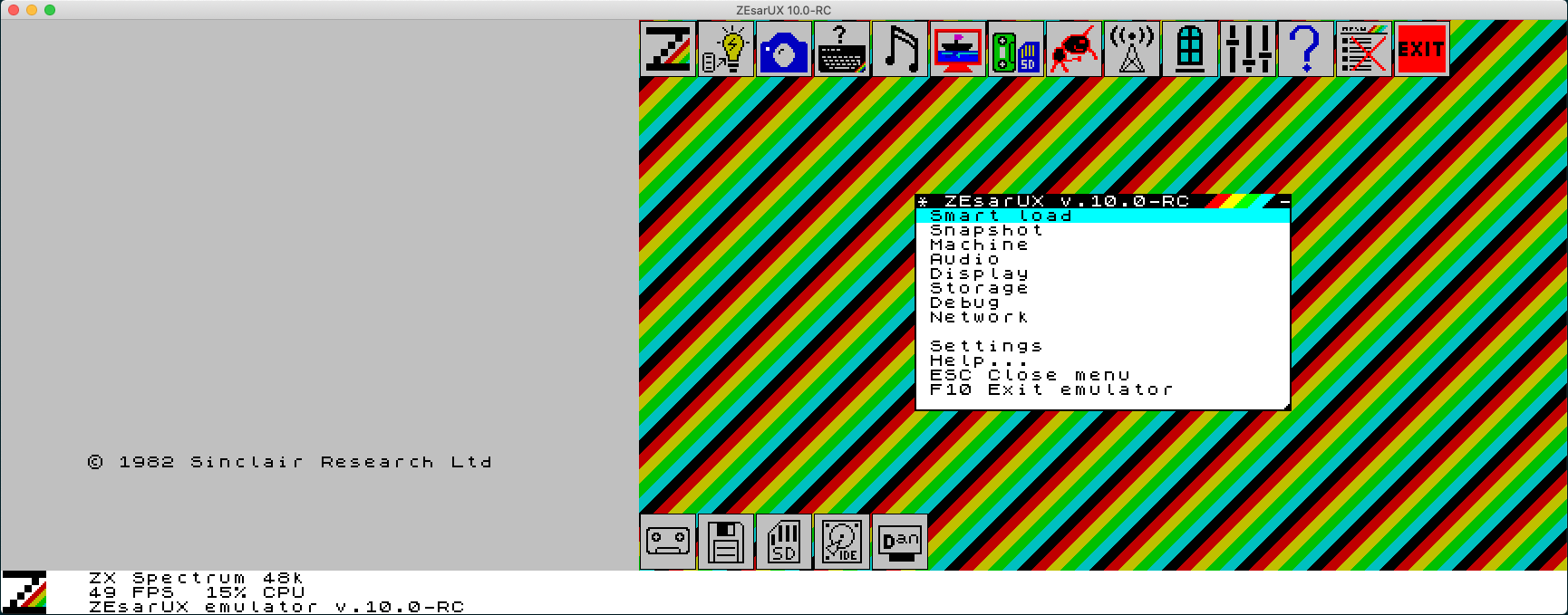
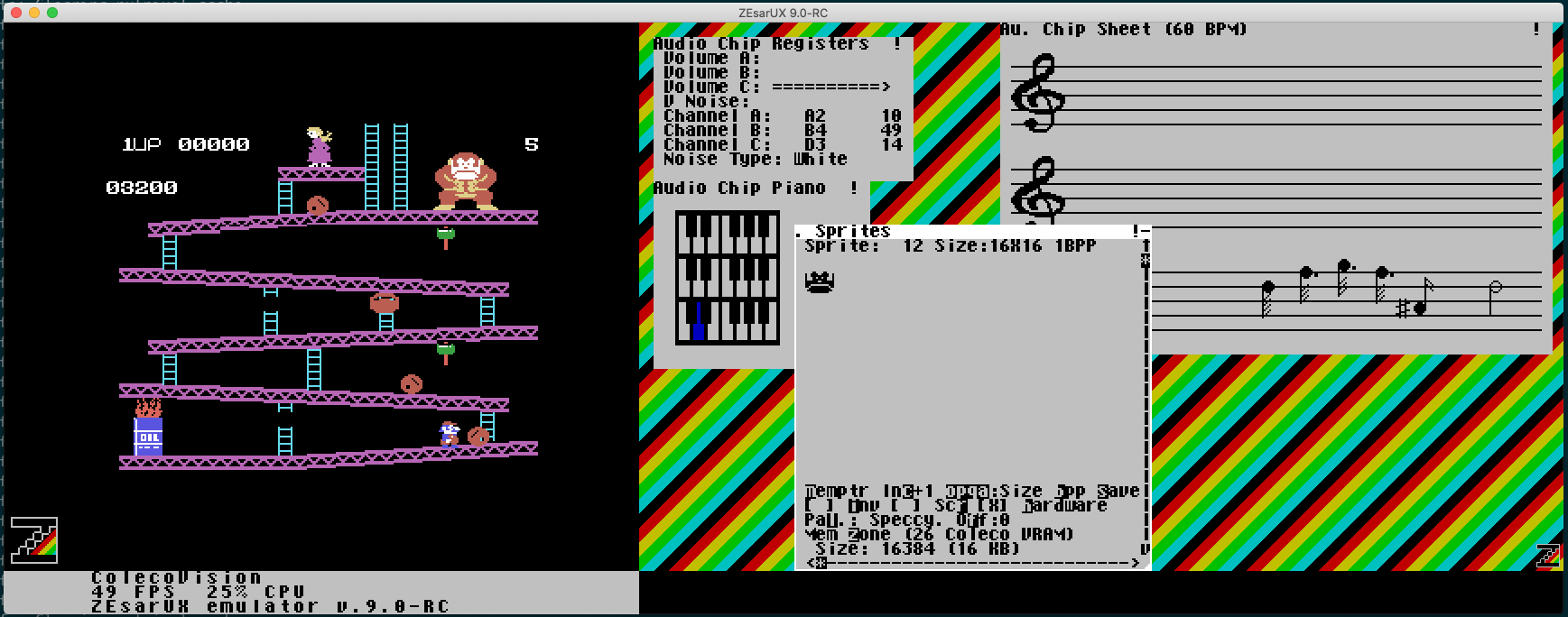
ZXdesktop dans ZEsarUX La Colecovision dans ZEsarUX