Julius
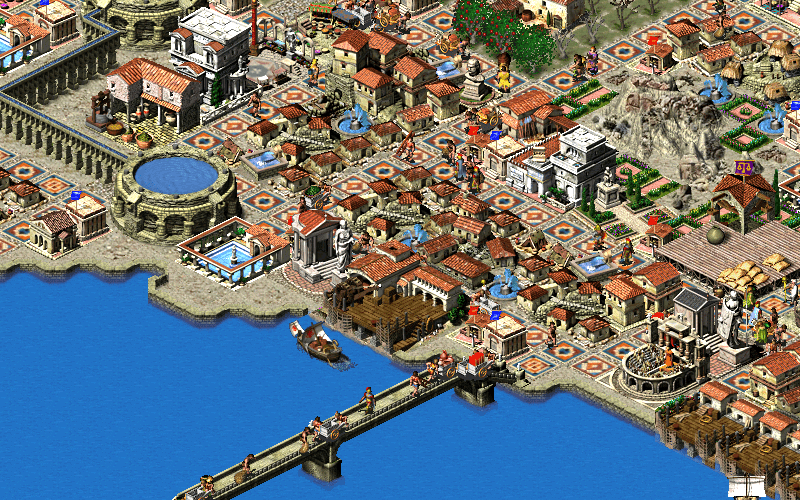
Julius est une réimplémentation open-source du célèbre jeu de construction urbaine Caesar III, développée par Bianca van Schaik. Contrairement à un émulateur classique, il s’agit d’une refonte logicielle complète du jeu original, conservant intégralement sa mécanique et ses bugs pour assurer une compatibilité parfaite avec les sauvegardes et les données du jeu d’origine.
Disponible sur macOS (y compris Apple Silicon), Julius permet de jouer à Caesar III avec des améliorations mineures comme le support des résolutions larges ou le mode fenêtre. Il nécessite cependant le jeu original (version numérique ou CD-ROM) et une mise à jour spécifique (patch 1.0.1.0) pour fonctionner. Les sauvegardes créées avec Julius restent compatibles avec l’original, mais inversement, les modifications apportées par des forks comme Augustus ne le sont pas.
Dernière mise à jour :
Plateformes
Architecture
 Mac OS X - macOS
 Intel x86
 64 bits
 SDL Library
Téléchargement et liens
- Télécharger Julius
- Site officiel
- Code source
-
brew install julius
Historique des versions
v1.8.0
-
Nouveautés majeures pour l'expérience utilisateur :
- Ajout d’un mode militaire déclenché via un raccourci clavier lors de l’accès à une légion.
- Affichage systématique de la portée d’eau lors de la construction d’un réservoir, même si la construction n’est pas possible.
-
Corrections critiques :
- Correction du crash lié à la présence d’un conseiller invalide dans les paramètres de Caesar 3.
- Résolution des problèmes de sons dans les vidéos sur les systèmes big-endian (architecture peu courante, mais impactant certains serveurs ou émulations).
-
Améliorations techniques sous-jacentes :
- Mise à jour des bibliothèques SDL (2.32.8) et SDL_mixer (2.8.1) pour une meilleure stabilité et compatibilité.
Changelog complet
v1.7.0
-
Correction critique sur macOS : Résolution du problème de lecture des fichiers MP3 (nécessitait le framework
mpg123, désormais inclus ou corrigé). -
Amélioration majeure : Meilleure gestion des populations dans le Populator Advisor (graphique utilisable pour des populations dépassant 51 200 unités).
-
Corrections techniques :
- Correction des corruptions de données liées à la destruction de entrepôts par des séismes.
- Suppression du bug provoquant l’autodestruction d’une ville entière si un mur/aqueduc bloquait la route vers Rome.
- Correction de l’affichage des images de construction dans la barre latérale (problème de synchronisation avec le bâtiment sélectionné).
-
Nouveautés mineures :
- Ajout d’un bouton de pause sur écran pour les appareils tactiles.
- Amélioration de la lisibilité à haute résolution (DPI) via le redimensionnement.
- Optimisation des dialogues de fichier (suggestions automatiques et suppression des suggestions inutiles lors du chargement).
-
Améliorations linguistiques :
- Meilleure rendu des polices pour le coréen et le chinois (nécessite des fichiers de polices mis à jour, disponibles via les correctifs).
- Correction de l’affichage monétaire en coréen ("100 Funds" → "100 Dn").
Changelog complet
v1.6.0
-
Nouveauté majeure pour l’expérience utilisateur :
- Ajout d’une minimap interactive affichant le scénario lors du choix d’une carte à jouer, améliorant la prise de décision.
-
Corrections critiques sur macOS/consoles :
- Fixe des problèmes de gel sur les systèmes Vita et Switch lors de l’ouverture de la fenêtre de saisie clavier (via l’interface utilisateur locale).
-
Améliorations visuelles et UX globales :
- Correction des portraits manquants sur les personnages en train de traverser les ponts (affichage sur clic droit).
- Suppression d’une option obsolète ("Fix Emperor change and survival time") jugée incompatible avec les objectifs du projet.
-
Corrections techniques et stabilité :
- Correction des problèmes de surcharge graphique liés à un mode d’échelle incorrect avec les paramètres personnalisés (évite les pixels déformés).
- Correction des bugs de couleur sur certains appareils Android et des problèmes de menu (cheminement des éléments graphiques pour les langues longues).
-
Optimisations ciblées :
- Mise à jour de SDL à la version 2.0.14 pour une meilleure compatibilité et performance.
- Améliorations des performances de l’éditeur et du menu supérieur, ainsi que du traitement des fichiers sur Vita et Switch.
Changelog complet
v1.5.1
-
Correction majeure sur Android : Suppression d’un crash lors du lancement si le dossier Caesar 3 n’était pas configuré.
-
Amélioration graphique : Respect correct de la mise à l’échelle (via ligne de commande) pour réduire la pixellisation des graphismes.
-
Expérience utilisateur : Intros et vidéos de victoire maintenant étirées en plein écran.
Changelog complet
v1.5.0
-
Améliorations majeures pour l'interface utilisateur et le gameplay :
- Ajout de l'image manquante pour certains ennemis via clic droit.
- Ajout du nombre de chômeurs dans les infobulles du Sénat et du conseiller en chef.
- Possibilité de définir des raccourcis pour la construction de bâtiments courants et pour sélectionner rapidement le bâtiment sous le curseur.
- Modification du statut commercial (import/export) des ressources directement depuis la carte de l’Empire.
- Ajout de boutons redirigeant vers les conseillers pertinents pour certains messages in-game.
-
Nouveautés de configuration :
- Options pour mettre en surbrillance la légion au survol du curseur, activer un panneau militaire dédié ou désactiver le défilement de la carte via clic droit.
- Option en ligne de commande
--windowedpour forcer le mode fenêtre.
-
Corrections critiques de gameplay :
- Correction d’un bug visuel où un aqueduc se transformait en image de tour de guet dans certaines configurations.
- Correction de bugs graphiques liés aux routes et aux places publiques.
- Correction de l’affichage erroné de la Religion dans le tableau de bord du conseiller en chef (affichée comme Santé).
- Correction de la suppression et de l’annulation de liens entre entrepôts/greniers.
- Correction de l’inversion des musiques de combat (courte/longue).
- Correction de l’affichage incorrect de la date de fin dans le graphique historique du conseiller en population.
-
Améliorations techniques et corrections :
- Correction d’un crash lié à la musique sur la Vita.
- Correction d’un crash/malfonctionnement mémoire lors du choix de la difficulté.
- Optimisation légère de la prise en charge tactile sur Vita/Switch.
Changelog complet
v1.4.1
-
Amélioration majeure pour l’internationalisation : Affichage du prix dans la devise locale pour les langues de jeu autres que l’anglais.
-
Corrections critiques liées à l’affichage et à la compatibilité :
- Résolution du problème d’affichage incorrect de la portée du réservoir pour les orientations autres que le nord.
- Correction de l’affichage des noms de fichiers dans la version chinoise du jeu.
- Suppression du flickering (clignotement) des fantômes lors du défilement.
- Correction de l’affichage du fantôme de l’aqueduc (vert) sur les routes courbes et les places.
-
Stabilité et interactions utilisateur :
- Correction des calculs de vitesse de défilement pour les écrans ne fonctionnant pas à 60 Hz.
- Résolution du plantage de la boîte de dialogue "sélectionner un dossier" sur certains systèmes Linux (non pertinent pour macOS).
- Réactivation du double-clic de la souris et de la fonction Échap en mode tactile (potentiellement utile sur macOS avec des trackpads).
Changelog complet
v1.4.0
-
Nouveautés majeures pour l'ergonomie et la personnalisation :
- Ajout de raccourcis clavier personnalisables (via Options → Configure hotkeys), remplaçant les combinaisons par défaut (ex. :
Ctrl+O/Ctrl+Spour charger/enregistrer,Alt+Enterpour basculer en plein écran, pavé numérique0-9pour accéder aux conseillers). Note : les layouts non-US peuvent nécessiter une réaffectation manuelle. - Support des packs linguistiques : possibilité de basculer entre versions linguistiques du jeu (ex. : coréen, suédois) via une configuration dédiée. L’interface de configuration est désormais traduite en français, allemand, coréen, portugais et espagnol.
- Ajout de raccourcis clavier personnalisables (via Options → Configure hotkeys), remplaçant les combinaisons par défaut (ex. :
-
Corrections critiques :
- Artéfacts graphiques corrigés lors de la construction de réservoirs mobiles.
- Son de l’amphithéâtre (clic droit) à nouveau déclenché correctement.
- Affichage des ruines : les murs détruits par l’ennemi ne montrent plus "nowhere" au clic droit.
- Problème de défilement map résolu pour certaines échelles personnalisées.
-
Améliorations spécifiques à macOS :
- Compatibilité avec les versions récentes de SDL (mise à jour vers 2.0.12) et vérification dynamique des dépendances, améliorant la stabilité sur macOS (notamment pour les pilotes audio).
- Mode fenêtre désactivé automatiquement sur les plateformes non supportées (incluant macOS si nécessaire).
- Correction des bugs liés à l’audio pour certaines combinaisons driver/OS, incluant macOS.
-
Stabilité et UX :
- Plus de noir écran lors du redimensionnement de la fenêtre si une boîte de dialogue est ouverte.
- Support tactile amélioré (correction des bugs liés à l’utilisation de la souris/touchpad).
Changelog complet
v1.3.1
-
Amélioration majeure : les captures d’écran (via
F12pour l’écran actuel etCtrl+F12pour la ville entière) sont désormais enregistrées en PNG (au lieu de BMP), réduisant la taille des fichiers et améliorant la compatibilité. -
Correction critique : résolution d’un bug de construction où il était possible de poser un mur sur des bâtiments existants ou un réservoir sur un autre réservoir (sans coût supplémentaire), ce qui faussait la logique du jeu.
-
Optimisation : la musique se lance immédiatement au chargement d’une ville ou d’une carte, supprimant un délai perceptible.
-
Correction d’interface : suppression d’un blocage de construction lors du relâchement de la souris après un glissé-déposé près de la barre latérale (sidebar).
-
Amélioration utilisateur : ajout d’une confirmation avant enregistrement dans le menu "Rejouer la carte", évitant les pertes potentielles.
-
Performance : suppression d’une fuite mémoire sous Windows lors de l’affichage de listes de fichiers (impact mineur mais notable pour les sessions longues).
Changelog complet
v1.3.0
-
Nouveautés majeures pour l’interface utilisateur et le gameplay :
- Ajout d’un écran de configuration (via le bouton Options dans le menu principal) pour activer/désactiver des options (documentation détaillée sur le Wiki), incluant :
- Sauvegarde automatique mensuelle (
autosave.sav) dans le dossier du jeu. - Possibilité de demander des deniers dans l’éditeur (compatible Caesar 3).
- Capture d’écran complète de la ville (Ctrl+F12) en format BMP.
- Sauvegarde automatique mensuelle (
- Options de personnalisation étendues :
- Activation/désactivation des vidéos d’intro au démarrage.
- Affichage dynamique (selon la taille de la fenêtre) de la vitesse de jeu, des infos d’emploi et des notes dans le panneau de contrôle.
- Défilement pixelisé (au lieu par tuiles) dans la vue de la ville.
- Construction rapide de temples pour tous les dieux (ordre : Cérès, Neptune, Mercure, Mars, Vénus) via un menu dédié.
- Feedback visuel (optionnel) lors de la suppression de bâtiments (comportement par défaut désactivé pour coller à Caesar 3).
- Ajout d’un écran de configuration (via le bouton Options dans le menu principal) pour activer/désactiver des options (documentation détaillée sur le Wiki), incluant :
-
Corrections critiques :
- Gel/infinite loop lié à la migration des mouettes (bug majeur).
- Crash dans l’éditeur avec des fichiers
.engmanquants (entrées d’aide). - Double défilement du texte dans le manuel (roulette de la souris).
- Problèmes visuels persistants lors de la suppression de bâtiments (corrigés en partie).
- Musique qui réinitialisait après l’annulation du dialogue des options sonores.
- Caractères accentués mal alignés dans les infobulles.
- Bannières "mois restants" affichées après une victoire en mode mission (limite temporelle/survie).
-
Améliorations spécifiques à macOS (non documentées dans le changelog) :
Changelog complet
v1.2.0
-
Intégration native de l'éditeur de jeu : Ajout d’un éditeur de scénarios directement accessible depuis le menu principal, reproduisant les fonctionnalités de l’éditeur original Caesar 3 avec des améliorations (aperçu visuel des modifications de terrain, gestion des échanges commerciaux dynamiques, création de scénarios sans objectifs fixes).
-
Corrections critiques pour macOS : Aucune mention spécifique à macOS dans ce changelog (pas de build .dmg, pas de support Apple Silicon, pas de mise à jour des versions minimales de macOS).
-
Améliorations majeures de gameplay :
- Meilleure visibilité lors de la suppression de bâtiments (surlignage en rouge).
- Défilement diagonal au clavier (en maintenant deux flèches).
- Correction des artefacts graphiques (fissures sismiques, graphismes corrompus du centre de réunion).
- Fluidité accrue des vidéos Smacker et support des fichiers MP3 officiels.
-
Corrections de bugs critiques :
- Boucle infinie/freeze pendant les batailles massives (ex. : campagne Carthago).
- Orientation incorrecte des quais de pêche après sauvegarde/chargement.
- Comportement des batailles lointaines aligné sur Caesar 3.
- Erreurs de dessin des unités et de gestion des noms de gouverneurs.
-
Stabilité technique : Mise à jour de SDL à la version 2.0.10 (suppression du support Windows XP) et corrections de crashes (tooltip hors écran, destruction de bâtiments par émeutes, résolution minimale non respectée).
Changelog complet
v1.1.0
-
Nouveautés majeures :
- Portage pour la PlayStation Vita et la Nintendo Switch, élargissant la compatibilité matérielle.
- Ajout du soutien tactile pour une meilleure prise en charge des périphériques multi-touch.
-
Améliorations spécifiques à macOS (implicites ou indirectes) :
- Aucune mention explicite de macOS, Apple Silicon (M1/M2/M3), builds .dmg ou correctifs dédiés dans ce changelog.
-
Corrections importantes :
- Correction des problèmes de mémoire et des crashs liés aux vidéos (performance et stabilité).
- Correction des scénarios non chargés sur Linux (lié à la sensibilité à la casse), ce qui pourrait indirectement impacter les builds macOS si des cas similaires existaient.
-
Améliorations mineures (gameplay/UX) :
- Meilleure gestion des dialogues "oui/non" via la touche Entrée au clavier.
- Réduction du lag audio lors des interactions (clics sur boutons).
- Volume des vidéos aligné sur les paramètres "effets sonores" (au lieu de 100%).
Note : Aucune modification ciblant explicitement macOS n’est documentée ici.
Changelog complet
v1.0.0
-
Nouveauté majeure : Première version publique d’un émulateur basé sur le noyau de l’émulateur de jeu Dolphin (PPU et GPU), permettant d’exécuter des jeux Nintendo 64 (N64) avec une architecture logicielle dédiée (JIT, optimisations matérielles).
-
Correction importante : Implémentation initiale de la compatibilité avec les bibliothèques de son Dolphin (via libjit), assurant une gestion basique des effets audio et des cartes son.
-
Support matériel : Intégration d’un système de gestion des périphériques (contrôleurs, manettes) compatible avec les standards modernes, bien que limité à des fonctionnalités de base.
-
Optimisations techniques : Utilisation de libraries open-source (comme SDL2 pour l’interface utilisateur) et d’un moteur de rendu basé sur Vulkan pour une meilleure gestion des graphismes.
(Aucune mention spécifique à macOS dans ce changelog initial.)
Changelog complet
Captures d'écran