PCSX, Tutorial on Its Use
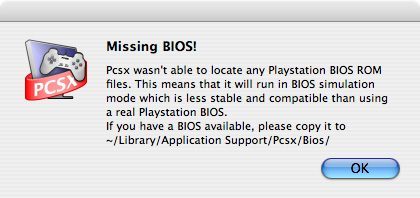
Q1 - Why am I getting the error message "Missing BIOS" when opening the software?

To play, you need a PlayStation BIOS. There are several versions available, here is an incomplete list:
- Scph1000.bin
- Scph1001.bin
- Scph5000.bin
- Scph5500.bin
- Scph5502.bin
- Scph7000.bin
- Scph7001.bin
- Scph7003.bin
- Scph7502.bin
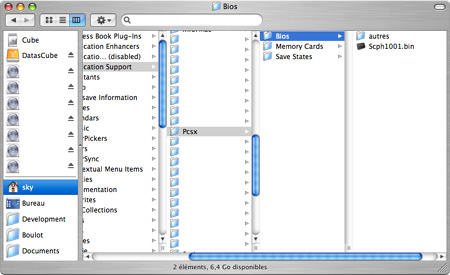
All of them can be easily found online (often grouped in the same .zip file). You need to place a BIOS in a folder named PCSX that you must create in the directory ~/Library/Application Support/
or if you don’t have the Library folder in ~/Bibliothèque/Application Support/.
Note: In this PCSX folder, if you wish, you can create a subfolder to store your other BIOS files (as shown in the image below).
Q2 - Where can I find a BIOS for PCSX?
You won’t find any links on Mac-Emu.net, but they can be found quickly online with a little searching. Google (or another search engine) is a valuable ally that will likely answer this question. It is possible to find them on P2P networks.
Q3 - Do I need to place the PCSX application in a specific folder?
No, you can place it anywhere on your hard drive. Only the BIOS needs to be in a specific location.
Q4 - What is the minimum configuration required to run PCSX?
A G4 800MHz is more than enough to run this emulator. This may vary depending on the game. For example, Gran Turismo will require a bit more power, while 2D games like Worms Armaggedon will suffice with a small G4.
An old, low-performance graphics card is not a problem since emulation is currently fully handled by the central processor. An ATI Radeon or an nVidia GeForce 2MX is more than sufficient to enjoy full-screen mode.
Q5 - How do I launch a game?
This is very simple, just launch PCSX and insert a PlayStation CD into your Mac.
Next, you just need to open the File menu and click on Run CD.
Q6 - Why doesn't my favorite game work?
PCSX is not perfect and some games don't work (or don't work yet). You sometimes have to test different BIOS files to find a better-suited one.
There are compatibility lists for PCSX Mac games. One of them, very well done, was created by a forum member: Zap'. It was available on http://pcsxml.zbmteam.net, unfortunately it seems the site is closed, which is why another one is now open again on this site (don't hesitate to contribute). If you test games not listed, remember to add your contribution to help future visitors. Bugs for each game are also referenced.
Q7 - Why is my favorite game very slow, graphically bugged, has no sound, etc?
The reasons are likely the same as in question 6.
Q8 - Can I save a PlayStation game?
If you have a version of the Toast burning utility for Mac, you can make a backup of a game. To do this, insert the original game CD, launch Toast, and run the "Save Physical Image" function in the File menu (Cmd+D).
To use it in PCSX, simply mount it via the "Mount Physical Image" function in the Utilities menu (Cmd+Shift+M) of Toast, then launch PCSX as if there were a CD in your drive.
Alternatively, instead of mounting the image with Toast, you can use the plugin created by Lamer0 (dead link) which allows you to play with an image.
Warning, this backup is only compatible with Toast and is therefore limited to Mac.
Q9 - Can I run a backup created on PC (.iso, .bin/.cue…) of a PlayStation game?
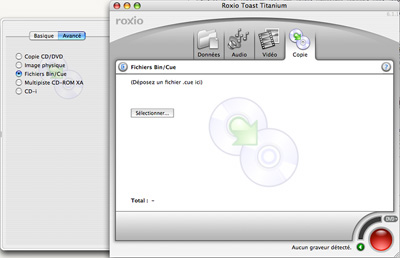
In the same way as for a Mac backup, use Toast (in the "Advanced" tab of the "Copy" mode) or Lamer0's plugin to play.
Q10 - Where can I download a PlayStation game?
You won't find the answer here; you'll have to find it yourself. Like with BIOS files, they are easily and quickly found online or via P2P.
However, PlayStation games can be found at very low prices in some specialized stores. The most popular games are usually around 3 or 5 euros in "loose" version, while the rarest ones are around 10 euros. Only a few collector's items are priced exorbitantly. Games at low prices are negotiable if you buy several at once.
And then, there's the pleasure of having the real game;)
*"loose" version indicates that only the game CD is sold. Otherwise, it will be a bit more expensive in "box" version and even slightly more expensive in "box and manual" version for die-hard fans of a game. As previously mentioned, by negotiating and discussing with the seller, you can get a "manual" version at the price of a "loose" version.
Q11 - How to play with a game controller?
With macOS, you can use GamePad Companion and USB Overdrive to configure your USB devices by assigning a keyboard key to each button on the controller.
From this point, you can configure a controller that resembles a PlayStation controller (such as those from Logitech, MacAlly, and others) to replicate the exact behavior of a PlayStation controller. These are shareware programs, and you will likely need to make a small contribution to avoid unwanted registration prompts.Q12 - What plugins are available for PCSX Mac?
As of today (16/06/2006), the only available plugin is from Lamer0, which allows running games in disk image format.
Q13 - The game freezes on a black screen and nothing happens (for example, in Gran Turismo), what should I do?
Indeed, PCSX is not perfect, and some bugs remain. My solution to bypass these black screens is to freeze just before the rewards (in Gran Turismo, you will need to adapt this for your game), let PCSX continue and stop, then unfreeze the part. Normally, on the second attempt, the screen will not stay black. We have observed that these freezes mainly occur in European games.
Q14 - Where are virtual memory cards saved?
They are located in a folder named "Memory Cards" next to the BIOS folder:
~/Library/Application Support/Pcsx/Memory Cards/When launching the software, if no cards exist, PCSX automatically creates 2.
Q15 - Can I use my old virtual memory cards created with Connectix Virtual Game Station?
Yes, simply place them in the memory cards folder:
~/Library/Application Support/Pcsx/Memory Cards/Q16 - When will there be a new version of PCSX?
We don't know, but there should be one, that is certain. Gil Pederson announced that he will release it when it is finished and suits him. This new version should arrive with some new plugins (including a very promising graphics one).
Q17 - PCSX isn't working or isn't working as I'd like despite all the questions/answers provided in this article, what should I do?
This article, like PCSX, isn't perfect; there are certainly some questions that aren't covered here.
Go to the forum to clearly explain your problem. We'll try to answer there, and we'll update this article accordingly.
For the most well-known games, here's a folder with some tips on PlayStation emulation under macOS.
Related software
Reply on the forum
A question or a hands-on report? Open the discussion on the forum.