Burning Homebrew Games for Dreamcast
Do you know what a Homebrew game is?
If yes, skip to the next paragraph. If not, read on: a Homebrew game is an amateur game that did not receive permission from the manufacturer to be released. The Dreamcast is the console that is arguably the easiest to crack and program. That's why you'll find a wide variety of amateur games on it (Feet of Fury, Beats of Rage, etc.). I therefore invite you to download and burn these games to play them fully on your beloved console.
The Equipment:
- Mac OS X
- Toast (v4 minimum)
- a CD-R
- CDIRip 0.6.2
Download and Extraction
Needless to say, Google is your only ally as well as the site www.dchomebrew.org (an American site that once offered a multitude of Homebrew games but is now defunct). For the rest of the tutorial, I'll be working with Beats of Rage, a Beats Them All game created by the Senile Team (http://senileteam.segaforums.com/bor_download.php broken link). Download it.
After downloading the file, I unzip it. I generally obtain a .cdi file. You may also get a .nrg or .sbi file. However, these files will be handled later.
Now you'll need to extract the files from the .cdi, since in its current state, Toast can't help you. Open CDIRip, click on "Rip" and select bordc.cdi as well as the destination folder. The time it takes for the software to extract the file depends entirely on the file size.
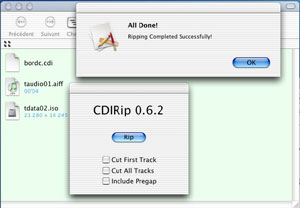
.cdi file.
Analysis of the Obtained Files
Generally, after this operation, you'll obtain a taudio01.aiff file (4 sec, 692 ko) as well as a tdata02.iso file. However, this may vary; you can obtain two ISOs, one of which is 692 ko. If you have more than one audio file and the total duration of these files exceeds 6 seconds, discard them immediately—they won't be burnable on mac.
Try to find a friend with a PC to burn the game for you.
The Burning (and not the "gravage" :p)
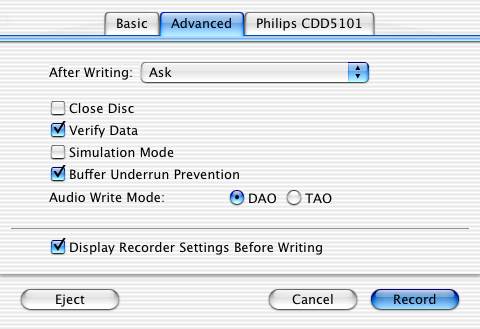
You will first burn the smallest file (usually it's an audio file and its number is 01). Open Toast, select Audio, and drag the audio file. For optimal and trouble-free burning, the file must be 4 seconds long with a 2-second pause for a total of 6 seconds, no more, no less. Why is this so important? Because here we "crack" the Dreamcast to make it launch the game directly (autoboot). If you mess this up, even Utopia won't be able to help you. Then click on the big red button but do not start burning yet! You need to set the burn speed to 8x, in the Advanced tab, uncheck the "Close Disc" box (since we perform the first session), check Buffer Underrun Prevention and DAO (disc-at-once, I believe under older versions of Toast). Burn!

In the case where the smallest file is an ISO and not an AIFF, you need to go to CD-Rom multi-track XA and burn this ISO with the same parameters.
Quit Toast and relaunch it, go to CD-Rom multi-track XA and select the ISO file (usually taudio02.iso; if there are several, add them in sequence). Click on the big red button and keep the same preferences except for Close Disc (close/finalize the disc), which must be checked! No more sessions will be performed on this CD.
Play!
Place the CD in the Dreamcast and turn it on; the CD is autoboot! Have fun ;-)
Tips
Never burn above 8x. To damage the optical block of the Dreamcast as little as possible, preferably buy Verbatim blue discs, or better, black ones! You may have heard about dummy files? Know that it is currently impossible on Mac (unless you know the terminal well) to insert them into CDIs, which is why I recommend, if there is a choice, taking the Plain File or SBI version of the file.
These will be covered in a future tutorial. I will also talk about Mac Dream Tool and Mac Pack, two very useful software packages for everything related to Dreamcast burning.
The case of .nrg files
These files are designed to be burned with Nero. On Mac, there is only one solution to extract these files: Gumby. Once this software is launched, open the "Bin" tab and select the .nrg file. You will then need to retrieve a 4-second audio file from another ISO.
Some links to the software used in this article:
-> CDIRip 0.6.2
-> Gumby (dead link: http://gumby.misplacedmac.com/)
Reply on the forum
A question or a hands-on report? Open the discussion on the forum.