Getting Started with MAME on macOS - Part 3 - Video Game Memory

As I mentioned in the introduction, MAME aims to be the memory of video games. An active memory, since, in addition to remembering each of the games released since video games existed, the application also allows you to play them.
For MAME, an arcade cabinet is much more than just hardware to emulate and a game to run. The emulator aims to go much further and proposes to remember everything that revolves around and inside the arcade cabinets.
Thus, in addition to ROMs, it is possible to go further and store a wide variety of artwork related to each game/machine.
If the history of video games interests you, I invite you to continue. However, it is important to know that this can take up a lot of storage space. On my very incomplete setup, I have about 11GB of artwork for MAME, which is nothing compared to nearly 700GB of ROMs.
If, on the other hand, your goal is simply to access the games, don't waste your time with this article and wait for the next one!
Game Images
Among the many types of images supported by MAME, there are mostly in-game images. They allow you to get a better preview of what to expect when starting a game. The advantage of these folders is that it is possible to create your own images. You just need to take a screenshot at the right moment and place the image in the correct folder.
Here are the relevant folders.
- Bosses: Screenshot against one of the game's bosses, simply.
- Ends: Certainly the most complicated screenshots to take, since their purpose is to show what the player sees when they win.
- Gameovers: Here it's the opposite, you need to show what the player sees when they lose. Much easier!
- How-to: Shows explanations of how to play the game, but this is not always available.
- Logos: Game logo screen.
- Previews: A preview of what the game can offer.
Cabinet Photos
This section is certainly the most important for arcade game memory, as it involves photos related to the arcade cabinet. Unfortunately, to take these photos, you need to have the arcade cabinet available.
- Cabinets: Photo of the complete arcade cabinet.
- Control panels: Photo of the game controllers.
- Marquees: Photo of the panel located above the screen.
- PCB: Photo of the arcade cabinet's motherboard.
Other Photos
There are two folders that do not fit into either of the previous categories. Here they are.
- Flyers: Quite original, it involves storing advertisements for arcade cabinets. Unfortunately, they are quite rare, partly because there were never tons of advertisements for arcades, and also because few people thought to keep a copy of these advertisements.
- Icons: The most appreciated folder to complete, as it allows improving MAME's graphical interface by adding an icon to each game.
Finally, there is one more particular folder, more utilitarian than cosmetic, but which could be useful to you.
- Snapshots: This will be the folder where MAME will save the screenshots taken by its dedicated tool.
Folder Configuration
To configure these folders, you need to modify the files mentioned in the previous article.
In the configuration file mame.ini, you can specify the "Snapshots" folder, which will allow you to retrieve the screenshots taken during gameplay. On line 81, you will find
snapshot_directory "$HOME/Library/Application Support/mame/snaps"Next, the configuration of all folders for storing cosmetic elements is found in the configuration file ui.ini. Each has its own line accessible at the beginning of the file.
In my example, all folders are grouped in a artworks folder, directly in the MAME data folder, but you can choose your own folders.cabinets_directory /Volumes/Data/ROMs/MAME/artworks/cabinets
cpanels_directory /Volumes/Data/ROMs/MAME/artworks/cpanel
pcbs_directory /Volumes/Data/ROMs/MAME/artworks/pcb
flyers_directory /Volumes/Data/ROMs/MAME/artworks/flyers
titles_directory /Volumes/Data/ROMs/MAME/artworks/titles
ends_directory /Volumes/Data/ROMs/MAME/artworks/ends
marquees_directory /Volumes/Data/ROMs/MAME/artworks/marquees
artwork_preview_directory /Volumes/Data/ROMs/MAME/artworks/previews
bosses_directory /Volumes/Data/ROMs/MAME/artworks/bosses
logos_directory /Volumes/Data/ROMs/MAME/artworks/logos
scores_directory /Volumes/Data/ROMs/MAME/artworks/scores
versus_directory /Volumes/Data/ROMs/MAME/artworks/versus
gameover_directory /Volumes/Data/ROMs/MAME/artworks/gameovers
howto_directory /Volumes/Data/ROMs/MAME/artworks/howto
select_directory /Volumes/Data/ROMs/MAME/artworks/select
icons_directory /Volumes/Data/ROMs/MAME/artworks/icons
covers_directory /Volumes/Data/ROMs/MAME/artworks/covers
Displaying Images in MAME
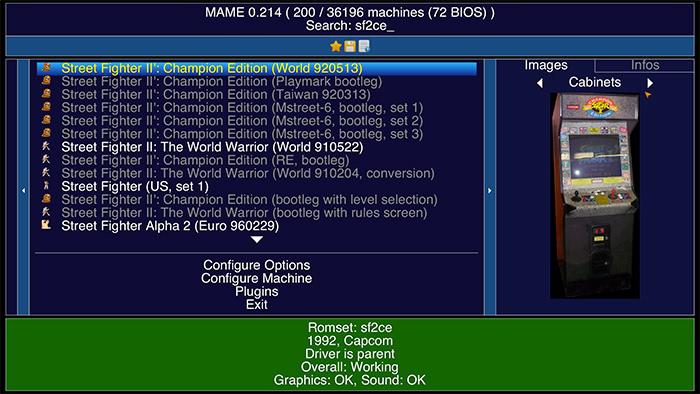
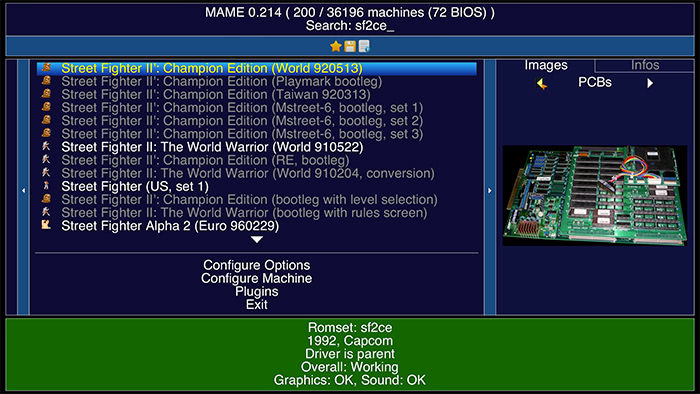
Once everything is configured and if everything is properly set up in MEWUI, you should directly see the icons applied to the games. Then, to find all the other images, you need to go to the panel on the right, then to the Images tab. Finally, you can navigate through all the images using the right and left arrow keys. Nothing more complicated.
Finding the Images
Configuring all these folders is one thing, filling them is another. Gathering all these images for nearly 40,000 games, many of which are rare or unknown, is a monumental task.
Fortunately for you, I searched the web and I share with you my best find.
This is an Italian site offering an enormous database of images for all categories.
Feel free to share your own useful resources (no ROM links, please), or even your own images.
Related software
Reply on the forum
A question or a hands-on report? Open the discussion on the forum.