Getting Started with MAME on macOS - Part 1 - Introduction
Twelve years ago, I wrote an article for you about all the solutions to use MAME on Mac. Unfortunately, that article is completely obsolete. Out of all the solutions, only one remains viable, and it is the only one without a graphical interface. Fortunately, MAME has included since version 0.170 a rudimentary graphical interface, but perfectly sufficient. But before diving into all that, let's start from the beginning...
What is MAME?
MAME is a multi-arcade emulator, as its name suggests. Indeed, MAME stands for Multiple Arcade Machine Emulator. Its purpose is to reproduce arcade cabinets as faithfully as possible, regardless of their age or origin.
Thus, MAME knows nearly 40,000 arcade cabinets, though it doesn't necessarily emulate all of them perfectly. While many games use the same hardware, that still makes for a huge number of cabinets whose functioning needs to be reproduced with code.
Moreover, it often happens that games use the same hardware with however minor variations. This can be the use of a different co-processor, network management, or support for different game peripherals.
Arcade cabinets became popular with the traditional joystick accompanied by a few buttons, as was the case for classic games like Street Fighter 2, World Rally, or Metal Slug. However, each cabinet can include whatever controller it wishes.
For example, the arcade cabinet for PONG, one of the earliest games in history and considered the ancestor of video games, featured a screen and two knobs, one for each player.
The game Terminator 2, on the other hand, allowed players to control two machine guns, one per player, fixed in front of the screen. While other games allowed players to hold a pistol to aim at the screen, like Virtua Cop Police Trainer.
And finally, my favorites! Arcade driving simulators were so successful because they often allowed players to actually take the wheel of the cars they were driving.
The 90s, especially with SEGA, was the golden age for these cabinets.
In 1992, SEGA revolutionized the genre with Virtua Racing, the arcade cabinet already allowing players to drive the Formula 1 cars featured. Daytona USA (1993) and SEGA Rally Championship (1995) completely revitalized the genre. These were the first games to offer pleasant 3D visuals thanks to the Model2 chips. They were followed by Scud Race (1996) and Le Mans 24 (1997). Finally, rounding off a decade of joy, Daytona USA 2 (1998) and the masterful SEGA Rally 2 (1998) were released, all utilizing the power of the Model3 processors. All these games offered a unique experience, providing a full driving cabin with steering wheel, pedals, gear shift (manual or sequential), and even a handbrake in SEGA Rally 2.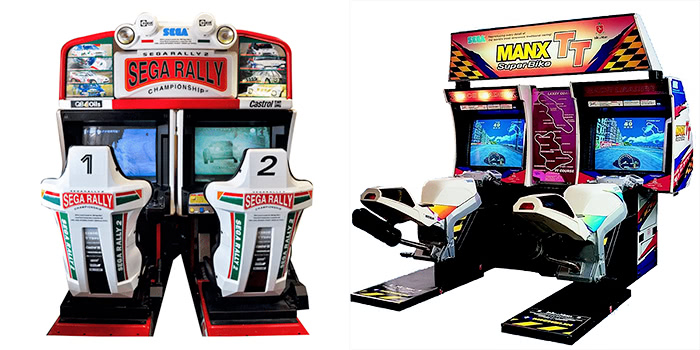
ROMs
Like with every emulator, you’ll need the corresponding programs. And as usual, these ROMs are not included with the emulator. However, they are relatively easy to find online. Be careful, though: since MAME supports nearly 40,000 games, you’ll need at least that many ROMs. If you want all available ROMs, you’ll need to plan for a disk of over 1 TB.
To save space, MAME uses a cloning system, and there are many clones. For example, Street Fighter II: Champion Edition, a classic in its genre, has numerous clones. However, not all contain the full game. The ROM sf2ce contains the original version, and the clones only include the elements that differ from the original version.
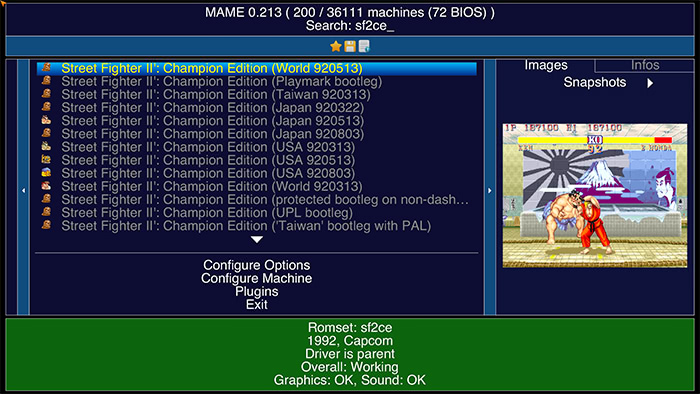
This requires that you have both the clone ROM and the parent ROM to play the modified version.
In its interface, MAME will indicate whether the selected game is a parent or a clone.
Some machines require the use of a BIOS, so you will need to find these files and place them in the MAME ROMs folder. They contain the functions of the systems that hosted the games.
The ROMs (Parents, clones, or BIOS) are a set of files bundled into a single ZIP file. It is necessary to keep the ZIP file as is. MAME will decompress and read the contents of the archive on the fly.
Originally, games were simply stored on chips, and our ROMs are essentially dumps of these chips. However, over the years, some games became larger, requiring more storage space. Developers began integrating hard drives or CDs/DVDs into the cabinets. It is still possible to obtain dumps of these games, but they are no longer in ZIP format. Here, they are in CHD format, for Compressed Hunks of Data (Compressed Data Segments). These are often additional data that complement the main program present in the ROMs. Therefore, to launch a game with CHD, you will need both the ZIP format ROM and the CHD format file.
Compatibility
Like all emulators, game compatibility is an important aspect. And since MAME aims to emulate all the arcade cabinets created since arcade games existed, compatibility varies greatly. The oldest games are obviously the best emulated, while the most recent ones pose the most problems.
The advantage of MAME, unlike another emulator that would attempt to emulate any game given to it for the platform of choice, is that it knows all the games. And it also knows its ability to emulate each game.
For example, here, when attempting to launch Sega Rally Championship, the emulator returns a nice but rather unpleasant "NOT WORKING". It simply cannot launch this game.
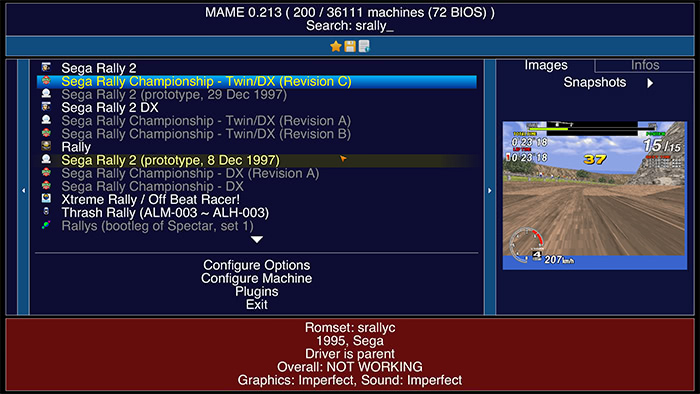
Other games may be functional but imperfect, and the emulator will also indicate this.
You will be able to play, but with a few minor issues that you have been warned about.If a game is marked as functional but you cannot launch it, it means you are missing a ROM or part of a ROM. The emulator has a feature that allows you to test a ROM or all of your ROMs to ensure they match the version expected by the emulator. If not, MAME will indicate the missing or defective elements.
Update Frequency
With each update of the emulator, support for new ROMs is added, while others improve. However, beware, this can also happen, though it is rarer: as MAME seeks the most faithful emulation, it is possible that a game that previously worked no longer does.
With each release, it is necessary to update your ROM pack. Either you will update only the ROMs you are looking for, or you will find a differential update allowing you to keep your entire collection up to date. You just need to merge the two folders as indicated in this article.
MAME is updated every last Wednesday of each month. This results in 12 versions released each year.
What Has Become of All the Interfaces Mentioned in the Previous Article?
Twelve years ago, I spoke to you about MAME OS X and MacMAME, two graphical interfaces dedicated to MAME for macOS.
MacMAME was the historical software of our platform. It was released on February 18, 1997, with version 0.4 of MAME. MacMAME was, by far, one of my favorite emulators in the late 1990s. I used it on MacOS 9 and my old G4 Sawtooth, a wonderful time. Unfortunately, support has stopped for a few years now, and it seems the last available version is 0.177 (August 2016). Since then, the port is no longer available on the website.
MAME OS X arrived much later, in 2006, and carried all the hopes of having a modern MAME on Mac OS X. While MacMAME had evolved very little, apart from its evolution in the versions of MAME, from its first version, it supported the technologies of Mac OS such as Core Video and Core Image.
It also came with a more user-friendly interface tailored to the spirit of macOS, better suited to the large screens of modern Macs. Unfortunately, after just a few versions, and exactly 3 years after the first release, the application was no longer updated and is now stuck at version 0.135, dated November 2009.
Why did these two software projects suddenly stop? Likely due to the time investment required for maintenance. With every new version of MAME, the software would need updating, while also accounting for macOS advancements—quite a laborious task.
How to Run an Arcade Game on Mac Today?
That will be the focus of Part 2 of this article. I’ll guide you through installing MAME via two different methods first, then attempt to explain the built-in interface introduced in MAME version 0.170.
See you soon for the next part!
Related software
Reply on the forum
A question or a hands-on report? Open the discussion on the forum.