VirtualC64
Émulateur de Commodore 64.
Dernière mise à jour :
Plateformes
Architecture
 Mac OS X - macOS
 Intel x86
 Apple Silicon
 64 bits
Téléchargement et liens
- Télécharger VirtualC64
- Site officiel
- Code source
-
brew install --cask virtualc64
Historique des versions
v6.1
This maintenance release primarily addresses issue #851, which prevented the app from running on the upcoming macOS 27 Golden Gate. It also includes internal code changes required to make the core compatible with the architecture of the upcoming Silicium emulator.
Changelog complet
This maintenance release primarily addresses issue #851, which prevented the app from running on the upcoming macOS 27 Golden Gate. It also includes internal code changes required to make the core compatible with the architecture of the upcoming Silicium emulator.
v6.0
Removing beta status, as no significant bugs have been reported for some time.
Changelog complet
Removing beta status, as no significant bugs have been reported for some time.
v6.0b2
Fixed a crash in the file system importer when importing excessively large folders (#841)
Fixed a bug in the VIC inspector that prevented selecting individual sprites in Tahoe (#840)
This beta release introduces substantial changes to the underlying code base. As part of the development of the RetroVault app, a new **RetroVault** library has been created. This library is now responsible for managing:
In addition, the new **utlib** library has been introduced. All utility functions previously embedded in vAmiga and VirtualC64 have been refactored into this more powerful shared library. This makes it easier for me to share common functionality among the different emulators.
Fixed a bug in the VIC inspector that prevented selecting individual sprites in Tahoe (#840)
This beta release introduces substantial changes to the underlying code base. As part of the development of the RetroVault app, a new **RetroVault** library has been created. This library is now responsible for managing:
In addition, the new **utlib** library has been introduced. All utility functions previously embedded in vAmiga and VirtualC64 have been refactored into this more powerful shared library. This makes it easier for me to share common functionality among the different emulators.
Changelog complet
## Refactoring
This beta release introduces substantial changes to the underlying code base. As part of the development of the RetroVault app, a new **RetroVault** library has been created. This library is now responsible for managing:
- File systems
- Devices
- All supported image formats
RetroVault is designed as a standalone library and is also used in the latest version of vAmiga for the same purpose.
In addition, the new **utlib** library has been introduced. All utility functions previously embedded in vAmiga and VirtualC64 have been refactored into this more powerful shared library. This makes it easier for me to share common functionality among the different emulators.
## Enhancements
- The disassembler now supports symbol files (#837)
## Bug Fixes
- Fixed a crash in the file system importer when importing excessively large folders (#841)
- Fixed a bug in the VIC inspector that prevented selecting individual sprites in Tahoe (#840)
v6.0b1
Originally, I had planned to release VirtualC64 versions 5.4, 5.5, and so on, gradually migrating the latest code changes from vAmiga step by step. However, I’ve changed plans and recently ported nearly all of vAmiga’s new features at once. Given the scale of these changes, I decided to bump the version number to 6.0, especially because this release introduces workspaces as the new document format for the emulator. Main Changes:
- **Workspaces
**
A workspace is a bundle containing ROMs, media files, and configuration scripts. When a workspace is loaded, the ROMs are automatically installed, disks and cartridges are mounted, and the configuration script is executed before the emulator reboots. Essentially, it represents a complete working environment that restores itself automatically.
Since the configuration script syntax is relatively stable, workspaces avoid the compatibility issues of snapshots, whose format often changes between releases, making older snapshots unusable after updates. Snapshots remain available, though, and can still be saved and loaded from the File menu.
- **Unified Settings
**
Until now, settings were split into Preferences (shared among emulator instances) and Virtual Machine Configurations(unique to each instance). In version 6.0, all settings are unified into a single settings dialog, simplifying configuration management.
- **Enhanced RetroShell
**
The RetroShell parser has been replaced by vAmiga’s latest version, offering more flexible command parsing and support for more complex syntax variants. Note that some command syntaxes have changed, so older configuration scripts may no longer be fully compatible.
- **Adaptive Sample Rate (ASR)
**
VirtualC64 6.0 features improved sample rate adjustment, significantly reducing buffer underflows and overflows. This allowed for a smaller audio buffer, which in turn decreases the delay between video and audio output.
- **GamePad Database
**
Version 6.0 now uses the SDL GamePad database to recognize connected controllers. This feature, borrowed from vAmiga, improves overall gamepad compatibility and support.
- **Redesigned Toolbars**
All window toolbars are now created manually to improve compatibility with macOS Tahoe. However, Tahoe is still not officially supported, as I prefer not to invest time fixing issues on what I still consider one of Apple’s biggest missteps.
v5.3.1
Fixed a bug that prevented media files from being processed correctly when attached by methods other than drag and drop (#835).
Fixed an issue where an incorrect error message was shown for unsupported cartridges (#836).
Added fingerprints for Japanese and Croatian ROMs (#833).
Fixed an issue where an incorrect error message was shown for unsupported cartridges (#836).
Added fingerprints for Japanese and Croatian ROMs (#833).
Changelog complet
Bug fixes:
- Fixed a bug that prevented media files from being processed correctly when attached by methods other than drag and drop (#835).
- Added fingerprints for Japanese and Croatian ROMs (#833).
- Fixed an issue where an incorrect error message was shown for unsupported cartridges (#836).
v5.3
Compiled in release mode
Replaced binary by a notarized build
Replaced binary by a notarized build
Changelog complet
Changes to the latest beta:
- Compiled in release mode
Edit 9.8.25:
- Replaced binary by a notarized build
v5.3b3
Fixed the parallel cable, which was broken since 5.1 (#830)
Changelog complet
Bug fixes:
- Fixed the parallel cable, which was broken since 5.1 (#830)
v5.3b2
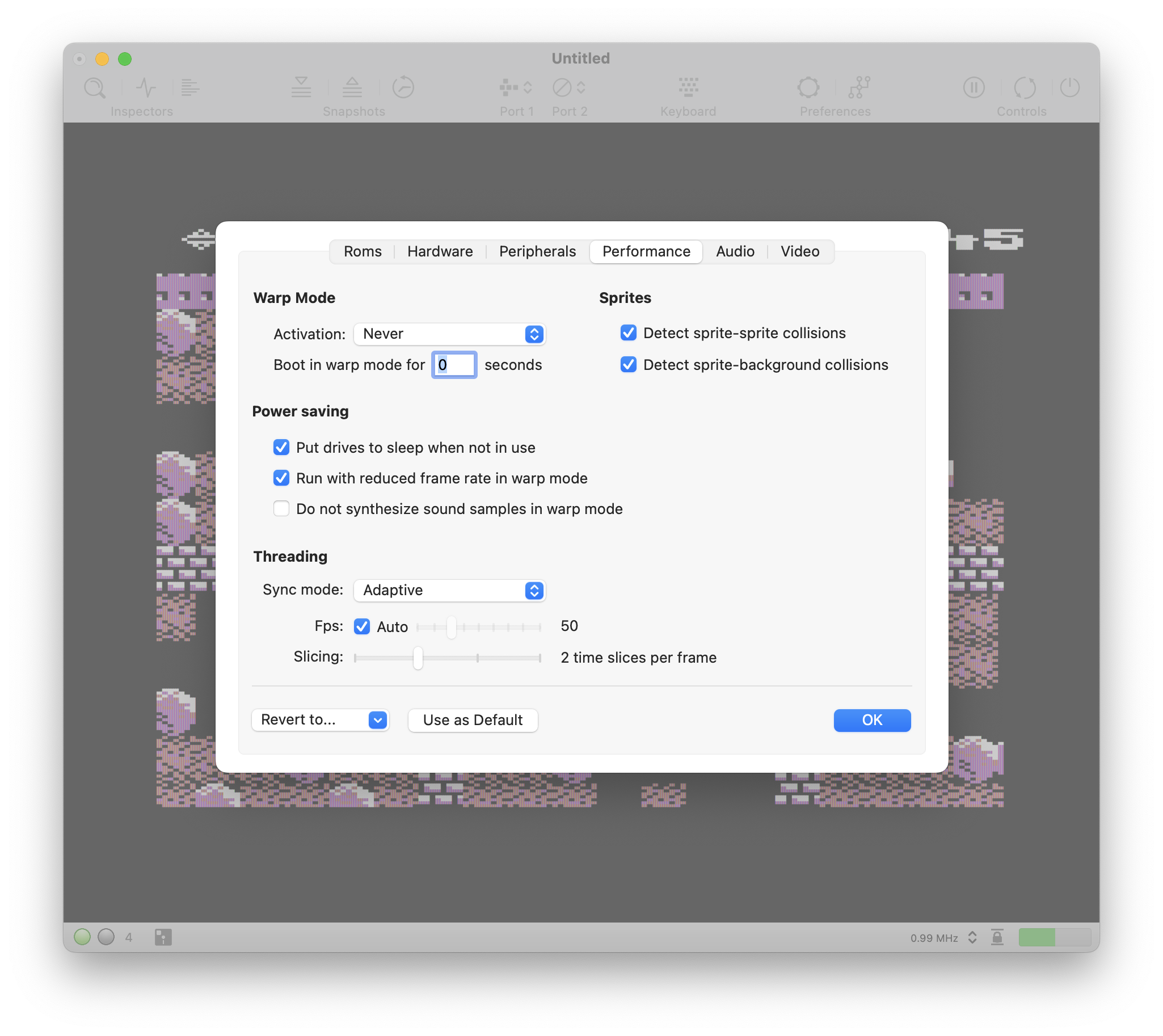
Snapshots can be compressed with more capable encoders (GZIP, LZ4). The compressor can be selected in the performance panel in the virtual machine settings.
Added *run-behind* support (see [this thread](https://github.com/dirkwhoffmann/vAmiga/issues/879) in the vAmiga repo for details about this technique).
Added *run-behind* support (see [this thread](https://github.com/dirkwhoffmann/vAmiga/issues/879) in the vAmiga repo for details about this technique).
Changelog complet
Enhancements:
- Added *run-behind* support (see [this thread](https://github.com/dirkwhoffmann/vAmiga/issues/879) in the vAmiga repo for details about this technique).
- Snapshots can be compressed with more capable encoders (GZIP, LZ4). The compressor can be selected in the performance panel in the virtual machine settings.
v5.2.1
Fixed a UTType issue that crashed the emulator on some machines.
Changelog complet
Bug fixes
- Fixed a UTType issue that crashed the emulator on some machines.
v5.3b1
Fixed a critical UTType bug that crashed the emulator on some machines.
Changelog complet
Bug fixes:
- Fixed a critical UTType bug that crashed the emulator on some machines.
Internal changes:
- Continued to port code from the more mature and polished vAmiga code base.
v5.2d
This is a basically a debug build of v5.2, intended for tracking down a crash.
It already contains the new suspend / resume mechanism (ported from vAmiga) which is on the todo list for v5.3.
It already contains the new suspend / resume mechanism (ported from vAmiga) which is on the todo list for v5.3.
Changelog complet
This is a basically a debug build of v5.2, intended for tracking down a crash.
It already contains the new suspend / resume mechanism (ported from vAmiga) which is on the todo list for v5.3.
v5.2
Improved inspector panel (#824)
New dashboard panel (#824)
New dashboard panel (#824)
Changelog complet
Enhancements:
- Improved inspector panel (#824)
- New dashboard panel (#824)
- Ported latest RetroShell code from vAmiga (#823)
- Internal code cleanup
v5.1.1
Fixed some inconsistencies in the UTType definitions of the supported file types.
Changelog complet
Bug fixes:
- No disk was inserted when dragging a D64 file onto the app icon (#819).
- Fixed some inconsistencies in the UTType definitions of the supported file types.
v5.1
Fixed bugs #812, #813, #814, #816
Changelog complet
Changes since the latest beta:
- Fixed bugs #812, #813, #814, #816
v5.1b2
Improved REU accuracy. Passing most VICE REU tests now.
The speed stepper icon did not disappear in fullscreen mode in the first beta.
The speed stepper icon did not disappear in fullscreen mode in the first beta.
Changelog complet
Bug fixes:
- The speed stepper icon did not disappear in fullscreen mode in the first beta.
Enhancements:
- Improved REU accuracy. Passing most VICE REU tests now.
- RetroShell commands can be passed in as command line arguments (`-"`*Some command*`"`).
v5.1b1
Improved RetroShell
Added speed adjust buttons to the status bar
Commander and Debugger are two separate consoles now
Added speed adjust buttons to the status bar
Commander and Debugger are two separate consoles now
Changelog complet
**Bug fixes**
- The virtual keyboard did not highlight pressed keys correctly
**Enhancements**
- Improved RetroShell
- Commander and Debugger are two separate consoles now
- RetroShell can be used via a (telnet) remote connection (why? I don’t know)
- Implemented timing-accurate REU
- Snapshots are now run-length encoded for a lower memory footprint
- Added speed adjust buttons to the status bar
- Code cleanup (ported latest architectural changes from vAmiga)
- More stuff that I didn’t write down and forgot about
v5.0.1
SID: Sampling mode RESAMPLING was broken in 5.0.
The SID inspector did not report audio buffer underflows / overflows correctly.
The SID inspector did not report audio buffer underflows / overflows correctly.
Changelog complet
Changes:
- SID: Sampling mode RESAMPLING was broken in 5.0.
- The SID inspector did not report audio buffer underflows / overflows correctly.
v5.0
Some minor bug fixes
Changes to the latest beta release:
Compiled on release mode
Changes to the latest beta release:
Compiled on release mode
Changelog complet
Changes to the latest beta release:
- Compiled on release mode
- Some minor bug fixes
v5.0b7
Fixed crash on shutdown that happened when run-ahead was active (#798)
Changelog complet
Changes:
- Fixed crash on shutdown that happened when run-ahead was active (#798)
- Restoring a snapshot via the open menu no longer resets the emulator.
v5.0b6
Fixed a crash related to saving user defaults (#799).
Fixed some issues related to WebAssembly compatibility.
Fixed some issues related to WebAssembly compatibility.
Changelog complet
Changes:
- Fixed a crash related to saving user defaults (#799).
- Disks are no longer ejected after a reset.
- Fixed some issues related to WebAssembly compatibility.
- Minor API changes to ease WebAssembly integration.
v5.0b5
Fixed USB device crash (#796, #797)
Changelog complet
Changes:
- Fixed USB device crash (#796, #797)
- Reworked the shutdown procedure (#798)
v5.0b4
Compiled with debug symbols included
Changelog complet
Changes:
- Compiled with debug symbols included
- Some more code cleanup
v5.0b3
(Hopefully) fixed a random crash I experienced on my machine on shutdown.
Fixed a bug that caused audio to stutter (#794).
Fixed a bug that caused audio to stutter (#794).
Changelog complet
Changes:
- Fixed a bug that caused audio to stutter (#794).
- (Hopefully) fixed a random crash I experienced on my machine on shutdown.
- Some more internal code cleanup.
v5.0b2
This is the second beta of VirtualC64 5.0. In addition to fixing several bugs that sneaked into v5.0b1, the inspector panel now features a memory heatmap. Moreover, the public API has been cleaned up further.
Changelog complet
This is the second beta of VirtualC64 5.0. In addition to fixing several bugs that sneaked into v5.0b1, the inspector panel now features a memory heatmap. Moreover, the public API has been cleaned up further.
v5.0b1
The main innovation in this release is run-ahead support. In addition, the internal code base has been completely overhauled, and many other minor changes were made.
Changelog complet
First beta of VirtualC64 5.0.
The main innovation in this release is run-ahead support. In addition, the internal code base has been completely overhauled, and many other minor changes were made.
v4.7
Improved thread management (#780)
Changelog complet
Changes to v4.7b1
- Improved thread management (#780)
v4.7b1
Fixed a bug in the CPU reset routine (#778).
Fixed a bug that prevented some snapshots from being restored when a cartridge was attached.
Added a new menu option for simulating the execution of a BRK instruction (#773).
In debug builds, debug variables can be switched on and off dynamically in RetroShell.
Memory can now be read or modified inside the RetroShell debugger.
IEC bus updates are now triggered via events (#766).
Fixed a bug that prevented some snapshots from being restored when a cartridge was attached.
Added a new menu option for simulating the execution of a BRK instruction (#773).
In debug builds, debug variables can be switched on and off dynamically in RetroShell.
Memory can now be read or modified inside the RetroShell debugger.
IEC bus updates are now triggered via events (#766).
Changelog complet
Licensing:
- All files of the core emulator, except reSID, are now dual-licensed. In addition to the existing GPL license, they are licensed under the Mozilla Public License v2. The GUI code is still published under GPL only (#777).
Enhancements:
- Added a new menu option for simulating the execution of a BRK instruction (#773).
- Memory can now be read or modified inside the RetroShell debugger.
Bug fixes:
- Fixed a bug in the CPU reset routine (#778).
- Fixed a bug that prevented some snapshots from being restored when a cartridge was attached.
- The CPU’s processor port values were not written into snapshot files.
- PET strings extracted from P00 files got the wrong padding character (#769).
- The CIA inspector panel always shows the contents of CIA 1 (#779).
- The saved dot mask setting did not get restored on startup (#775).
Internal changes:
- Large data structures are now created on the heap rather than the stack (#811).
- In debug builds, debug variables can be switched on and off dynamically in RetroShell.
- The internal run loop has been simplified.
- CIAs are now executed by the event scheduler (like in vAmiga).
- IEC bus updates are now triggered via events (#766).
v4.6
Fixed a CRT emulation bug (Barry McGuigan World Championship Boxing, #760)
Fixed some smaller display issues of the virtual keyboard
F6 and F7 are no longer mapped to debugger actions (#765)
Fixed some smaller display issues of the virtual keyboard
F6 and F7 are no longer mapped to debugger actions (#765)
Changelog complet
Bug fixes:
- F6 and F7 are no longer mapped to debugger actions (#765)
- Fixed a CRT emulation bug (Barry McGuigan World Championship Boxing, #760)
- Fixed some smaller display issues of the virtual keyboard
v4.6b2
Fixed some issues that were introduced when portions of the latest vAmiga code had been merged in.
Changelog complet
Fixed some issues that were introduced when portions of the latest vAmiga code had been merged in.
v4.6b1
Added REU support (Sonic, Vision Basic) (#735).
Added VSYNC support (#747).
Added a fifth drop zone for flashing programs into memory (#748).
RetroShell has gotten a special debug mode (#746).
Emulation speed can be adjusted continuously (slow motion / time lapse) (#751).
Added VSYNC support (#747).
Added a fifth drop zone for flashing programs into memory (#748).
RetroShell has gotten a special debug mode (#746).
Emulation speed can be adjusted continuously (slow motion / time lapse) (#751).
Changelog complet
Enhancements:
- Added REU support (Sonic, Vision Basic) (#735).
- Added VSYNC support (#747).
- Emulation speed can be adjusted continuously (slow motion / time lapse) (#751).
- Audio buffer fill level can be displayed in the status bar (#750).
- Added a fifth drop zone for flashing programs into memory (#748).
- RetroShell has gotten a special debug mode (#746).
- Both Command keys can be mapped to C64 keys individually (#737).
Coding:
- Ported the event scheduler from vAmiga ( #749).
v4.5.1
Fixed another crash (#740)
Changelog complet
- Fixed another crash (#740)
v4.5
The emulator does no longer crash when a media file is dropped outside a drop zone.
Changelog complet
Differences to the latest beta:
- The emulator does no longer crash when a media file is dropped outside a drop zone.
v4.5b1
Fixed a bug that created a faulty BAM when inserting a new blank disk (#705)
Fixed an issue with the raster IRQ not being triggered in some cases (#698).
The emulator no longer crashes when opening the keyboard preferences panel (#701).
Added on option to disconnect the datasette (#694)
Added additional Rom fingerprints (#707)
Removed support for macOS 10.14 and earlier.
Fixed an issue with the raster IRQ not being triggered in some cases (#698).
The emulator no longer crashes when opening the keyboard preferences panel (#701).
Added on option to disconnect the datasette (#694)
Added additional Rom fingerprints (#707)
Removed support for macOS 10.14 and earlier.
Changelog complet
Bugs:
- The emulator no longer crashes when opening the keyboard preferences panel (#701).
- Fixed an issue with the raster IRQ not being triggered in some cases (#698).
- Fixed a bug that created a faulty BAM when inserting a new blank disk (#705)
Enhancements:
- The path to the FFmpeg executable is customisable now (#718)
- Added on option to disconnect the datasette (#694)
- Added additional Rom fingerprints (#707)
- Screensaver should no longer activate when the emulator is running (#709)
Refactoring:
- Sharing more code with vAmiga.
Deprecation:
- Removed TouchBar support.
- Removed support for macOS 10.14 and earlier.
v4.4
Added support for VC1451C drives.
Added support for Dolphin DOS 3.
Added more Drive ROM fingerprints.
Added support for Dolphin DOS 3.
Added more Drive ROM fingerprints.
Changelog complet
- Added support for VC1451C drives.
- Added support for Dolphin DOS 3.
- Added more Drive ROM fingerprints.
- Drive configuration has been simplified by adding an auto-config option.
- Now the CPU load of the emulator thread is measured and displayed in the status bar.
- The internal thread management has been reworked from ground up.
- The speed of the C64 is customizable now. Besides a "native" option that lets the C64 run at its original speed, there are two slow motion modes and two overdrive modes. The first two let VICII output the video signal at 25Hz and 30Hz respectively. The latter two output the video signal at 100Hz or 120Hz. There are also true 50Hz and true 60Hz modes that allow smooth output on 50Hz monitors or 60Hz TFTs.
v4.3
Multiple power-saving options have been added that can considerable increase emulation speed.
Support for hardware-based floppy accelerators has been added (SpeedDOS+, Dolphin DOS V2).
Support for hardware-based floppy accelerators has been added (SpeedDOS+, Dolphin DOS V2).
Changelog complet
Enhancements
- Multiple power-saving options have been added that can considerable increase emulation speed.
- Support for hardware-based floppy accelerators has been added (SpeedDOS+, Dolphin DOS V2).
v4.2
Fixed a VICII canvas drawing bug in the vertical border area.
Fixed a VICII sprite drawing bug in cycle 63.
A new option has been added to configure the power supply (50Hz or 60Hz).
Fixed VICE test C64/autostart/test.crt.
Some controls for configuring the cut layers feature were not working properly.
The new versions comes with a built-in screen recorder (similar to the one in vAmiga).
The Edit menu has a new option for performing a soft reset.
VICII emulation has been accelerated significantly (emulator runs up to 55% faster).
Fixed a VICII sprite drawing bug in cycle 63.
A new option has been added to configure the power supply (50Hz or 60Hz).
Fixed VICE test C64/autostart/test.crt.
Some controls for configuring the cut layers feature were not working properly.
The new versions comes with a built-in screen recorder (similar to the one in vAmiga).
The Edit menu has a new option for performing a soft reset.
VICII emulation has been accelerated significantly (emulator runs up to 55% faster).
Changelog complet
Bugs
- Fixed a VICII canvas drawing bug in the vertical border area.
- Fixed a VICII sprite drawing bug in cycle 63.
- Disabling sprite-sprite collisions in the GUI had no effect.
- Some controls for configuring the „cut layers“ feature were not working properly.
Compatibility
- The shift-lock detection trick is working now (cia/ciaports.prg).
- Fixed VICE test C64/autostart/test.crt.
Enhancements
- The new versions comes with a built-in screen recorder (similar to the one in vAmiga).
- A new option has been added to configure the power supply (50Hz or 60Hz).
- The „Edit“ menu has a new option for performing a soft reset.
- VICII emulation has been accelerated significantly (emulator runs up to 55% faster).
v4.1
Fixed a bug in the bank mapping logic of Ocean cartridges.
Fixed a bug that made it impossible to enable or disable individual channels in the DMA debugger.
Fixed a bug that kept the emulator in warp mode after reset.
The new version offers a command-based debug console and scripting support.
Fixed the write protection checkbox in the disk importer dialog. It had no effect before.
Drives can be marked as drop target to speedup disk changes via drag and drop.
Fixed a bug that made it impossible to enable or disable individual channels in the DMA debugger.
Fixed a bug that kept the emulator in warp mode after reset.
The new version offers a command-based debug console and scripting support.
Fixed the write protection checkbox in the disk importer dialog. It had no effect before.
Drives can be marked as drop target to speedup disk changes via drag and drop.
Changelog complet
Compatibility
- Reworked the raster interrupt logic.
- Replaced the old RAM power-up patterns by more compatible ones.
- Disk change delays have been doubled to emulate a more realistic environment.
Bugs
- Fixed a bug in the bank mapping logic of Ocean cartridges.
- Fixed a bug that made it impossible to enable or disable individual channels in the DMA debugger.
- Fixed a bug that kept the emulator in warp mode after reset.
- Fixed the “write protection“ checkbox in the disk importer dialog. It had no effect before.
Enhancements
- The new version offers a command-based debug console and scripting support.
- Drives can be marked as „drop target“ to speedup disk changes via drag and drop.
- Better game pad support.
v4.0.1
The emulator does no longer crash with D64 files containing extra tracks (#638).
Changelog complet
- The emulator does no longer crash with D64 files containing extra tracks (#638).
v4.0
Fixed an issue with the virtual keyboard in "sticky mode".
Added support for Game Killer cartridge.
Added support for Game Killer cartridge.
Changelog complet
- Fixed an issue with the virtual keyboard in "sticky mode".
- Added support for Game Killer cartridge.
- Removed Sparkle framework.
v4.0b5
Fixed a crash in the snapshot loader (#631, #632).
Fixed an issue with the virtual keyboard (#630).
Fixed an issue with keys that were pressed in combination with modifier keys (#629).
Fixed an issue with the virtual keyboard (#630).
Fixed an issue with keys that were pressed in combination with modifier keys (#629).
Changelog complet
- Fixed a crash in the snapshot loader (#631, #632).
- Fixed an issue with the virtual keyboard (#630).
- Fixed an issue with keys that were pressed in combination with modifier keys (#629).
v4.0b4
The game pad handler has been replaced by the one in vAmiga. This fixes several issues related to joystick emulation (#623).
Changelog complet
- When a window was closed, the underlying emulator instance did not terminate correctly (#624).
- The game pad handler has been replaced by the one in vAmiga. This fixes several issues related to joystick emulation (#623).
- The emulator no longer supports the control key as joystick emulation key (#623).
- Virtual keys on MBPs with a Touch Bar are working again.
- The selected mouse model is saved in the user default storage now.
v4.0b3
SID sample stream overflows do no longer crash the emulator.
Changelog complet
- Auto-warp mode was broken in v4.0b2.
- SID sample stream overflows do no longer crash the emulator.
v4.0b2
- Fixed a crash in the SID sample generation code (#604, #617).
- The border texture in full screen mode has been cleaned up (#605).
- „Save snapshot“ is no longer greyed out in the Machine menu (#608).
- Flashing an item from a D64 file does no longer crash the emulator (#609).
- Changed settings in the Peripherals configuration panel are now saved (#610).
- If the emulator is started with a PRG or D64 file, the document remains "Untitled" (#611).
- The auto-warp condition has been reworked (#615).
v4.0b1
VirtualC64 4.0 Beta 1
Changelog complet
VirtualC64 4.0 Beta 1
v3.4
Some smaller bug fixes.
Added support for iNNEXT gamepads.
Added support for MikroAss and ISEPIC cartridges.
Added more Rom fingerprints.
Updated reSID to version 3.4.
Added support for iNNEXT gamepads.
Added support for MikroAss and ISEPIC cartridges.
Added more Rom fingerprints.
Updated reSID to version 3.4.
Changelog complet
Added support for MikroAss and ISEPIC cartridges.
Added support for iNNEXT gamepads.
Added more Rom fingerprints.
Updated reSID to version 3.4.
Some smaller bug fixes.
v3.4b1
Aucun détail pour cette version.
Captures d'écran