CocoaMSX
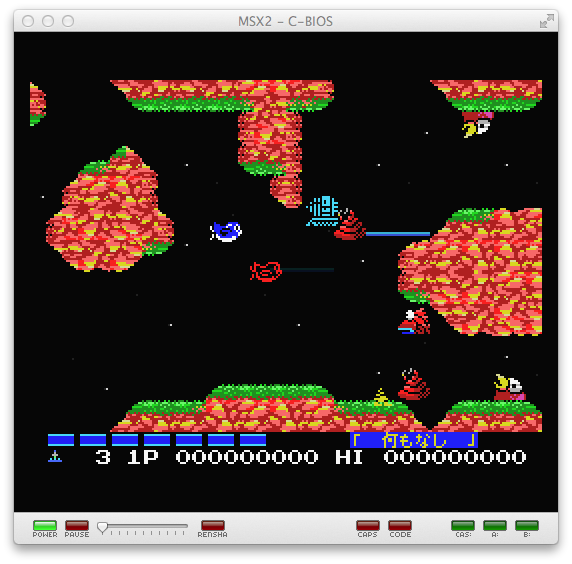
CocoaMSX est le portage sur Mac OS X de blueMSX, un des meilleurs émulateurs MSX.
Dernière mise à jour :
Plateformes
Architecture
 Mac OS X - macOS
 Intel x86
 64 bits
Téléchargement et liens
Historique des versions
v1.61
Updated to C-BIOS v0.28 (fixes brackets, #44)
Changelog complet
Updated to C-BIOS v0.28 (fixes brackets, #44)
v1.60
New feature - #41 - Save state on exit
Bug fix - #38 - Copy/paste buggy
Bug fix - #42 - http downloads disallowed by OS
Bug fix - #38 - Copy/paste buggy
Bug fix - #42 - http downloads disallowed by OS
Changelog complet
- New feature - #41 - Save state on exit
- Bug fix - #38 - Copy/paste buggy
- Bug fix - #42 - http downloads disallowed by OS
v1.56
Moves the in-application feeds (update and machine manifests) to a new location
Adds a new application icon (#39)
This is a small release that primarily addresses two issues:
Adds a new application icon (#39)
This is a small release that primarily addresses two issues:
Changelog complet
This is a small release that primarily addresses two issues:
- Adds a new application icon (#39)
- Moves the in-application feeds (update and machine manifests) to a new location
v1.55
New features in this release:
Option to insert a new blank cassette (#25)
Updated to the latest version of Sparkle
Gamepads/joysticks can now be remapped (#35). Gamepad/joystick support has also been completely redesigned
Minimum version of OS X supported is now 10.7
Option to insert a new blank cassette (#25)
Updated to the latest version of Sparkle
Gamepads/joysticks can now be remapped (#35). Gamepad/joystick support has also been completely redesigned
Minimum version of OS X supported is now 10.7
Changelog complet
Most important change in this release is that this is the first version that will no longer work on OS X 10.6. This and subsequent releases require 10.7 and higher - partly to address security concerns in older libraries, and partly to reduce the amount of compatibility code that needs to be written.
New features in this release:
- Proper support for CAS files for non-generic systems (#34)
- Option to insert a new blank cassette (#25)
- Automatic hiding of the mouse cursor after a period of inactivity, if the cursor is over the screen
- Can now flip between tabs in Preferences by using shortcuts (⌘+{/})
- Gamepads/joysticks can now be remapped (#35). Gamepad/joystick support has also been completely redesigned
Bug fixes:
- Removed file type registration for unsupported (non-MSX) systems
- System shortcuts (e.g. CTRL+RIGHT) should no longer interfere with game controls (#36). An unfortunate side-effect of this is that it affects all system shortcuts - including ⌘+TAB
- Escape key should no longer cancel full screen mode
Maintenance stuff:
- **Minimum version of OS X supported is now 10.7**
- Updated to the latest version of Sparkle
- Switched to the native JSON library (NSJSON)
- Migrated to ARC
- Code cleanup
v1.55rc
New features in this release:
Option to insert a new blank cassette (#25)
Updated to the latest version of Sparkle
Please create issues for anything you might come across via [GitHub](https://github.com/pokebyte/CocoaMSX/issues/new) or notify me via [Twitter](https://twitter.com/pokebyte).
Gamepads/joysticks can now be remapped (#35). Gamepad/joystick support has also been completely redesigned
Minimum version of OS X supported is now 10.7
Option to insert a new blank cassette (#25)
Updated to the latest version of Sparkle
Please create issues for anything you might come across via [GitHub](https://github.com/pokebyte/CocoaMSX/issues/new) or notify me via [Twitter](https://twitter.com/pokebyte).
Gamepads/joysticks can now be remapped (#35). Gamepad/joystick support has also been completely redesigned
Minimum version of OS X supported is now 10.7
Changelog complet
This is a release candidate for version 1.55. Most important change in this release is that this is the first version that will no longer work on OS X 10.6. This and subsequent releases require 10.7 and higher - partly to address security concerns in older libraries, and partly to reduce the amount of compatibility code that needs to be written.
New features in this release:
- Proper support for CAS files for non-generic systems (#34)
- Option to insert a new blank cassette (#25)
- Automatic hiding of the mouse cursor after a period of inactivity, if the cursor is over the screen
- Can now flip between tabs in Preferences by using shortcuts (COMMAND+L/R BRACE)
- Gamepads/joysticks can now be remapped (#35). Gamepad/joystick support has also been completely redesigned
Bug fixes:
- Removed file type registration for unsupported (non-MSX) systems
- System shortcuts (e.g. CTRL+RIGHT) should no longer interfere with game controls (#36). An unfortunate side-effect of this is that it affects all system shortcuts - including COMMAND+TAB
- Escape key should no longer cancel full screen mode
Maintenance stuff:
- **Minimum version of OS X supported is now 10.7**
- Updated to the latest version of Sparkle
- Switched to the native JSON library (NSJSON)
- Migrated to ARC
- Code cleanup
Please create issues for anything you might come across via [GitHub](https://github.com/pokebyte/CocoaMSX/issues/new) or notify me via [Twitter](https://twitter.com/pokebyte).
v1.45
Fixed network error introduced by El Capitan's new security features
Added option to insert new blank disk to File menu
Fixed support for Xbox 360 controller, simplified the joystick configurator (no longer need to specify axis range)
Bug fixes, Github issues #20, #31
Fixed joystick range detection
Fixed slow startup due to `recentDocumentURLs` taking up longer than it should
Added option to take auto-numbered screenshot to File menu (can still Save As by holding down Alt)
Added option to open folders in Read/Write mode (will create a disk image with folder contents and load the image)
Added option to insert new blank disk to File menu
Fixed support for Xbox 360 controller, simplified the joystick configurator (no longer need to specify axis range)
Bug fixes, Github issues #20, #31
Fixed joystick range detection
Fixed slow startup due to `recentDocumentURLs` taking up longer than it should
Added option to take auto-numbered screenshot to File menu (can still Save As by holding down Alt)
Added option to open folders in Read/Write mode (will create a disk image with folder contents and load the image)
Changelog complet
- Fixed network error introduced by El Capitan's new security features
- Fixed joystick range detection
- Added option to take auto-numbered screenshot to File menu (can still Save As by holding down Alt)
- Added option to insert new blank disk to File menu
- Added option to open folders in Read/Write mode (will create a disk image with folder contents and load the image)
- Updated to C-BIOS 0.27
- Switched to native C semaphores and threading
- Project updated to Xcode 7
- Fixed slow startup due to `recentDocumentURLs` taking up longer than it should
- Added manual retina screen rendering
- Fixed support for Xbox 360 controller, simplified the joystick configurator (no longer need to specify axis range)
- Removed superfluous mouse clicks generated by cursor locking/unlocking
- Bug fixes, Github issues #20, #31
v1.43beta
Hopefully fixed a bug causing the emulator to crash on exit in El Capitan (10.11) and Yosemite (10.10)
25 - Option to insert a new blank disk
25 - Option to insert a new blank disk
Changelog complet
#25 - Option to insert a new blank disk
#25 - Option to insert a disk folder in R/W mode
Updated C-BIOS
Hopefully fixed a bug causing the emulator to crash on exit in El Capitan (10.11) and Yosemite (10.10)
v1.42
Small bug fix release:
Preferences window will no longer crash the emulator in 10.6/Snow Leopard
Hardware OpenGL support is no longer required - emulator will fall back to software if hardware rendering is not available. Among other things, this makes it possible to run the emulator in virtual environments such as VMware
Preferences window will no longer crash the emulator in 10.6/Snow Leopard
Hardware OpenGL support is no longer required - emulator will fall back to software if hardware rendering is not available. Among other things, this makes it possible to run the emulator in virtual environments such as VMware
Changelog complet
Small bug fix release:
- Preferences window will no longer crash the emulator in 10.6/Snow Leopard
- Hardware OpenGL support is no longer required - emulator will fall back to software if hardware rendering is not available. Among other things, this makes it possible to run the emulator in virtual environments such as VMware
v1.42rc
This is a small bugfix release which addresses the following:
Fixes the Systems tab in Preferences - it should no longer crash on Snow Leopard (10.6.x)
Removes the hardware OpenGL rendering requirement (hardware rendering will be used if available, software if not) - emulator now runs in VMware on Snow Leopard Server
Fixes the Systems tab in Preferences - it should no longer crash on Snow Leopard (10.6.x)
Removes the hardware OpenGL rendering requirement (hardware rendering will be used if available, software if not) - emulator now runs in VMware on Snow Leopard Server
Changelog complet
This is a small bugfix release which addresses the following:
- Fixes the Systems tab in Preferences - it should no longer crash on Snow Leopard (10.6.x)
- Removes the hardware OpenGL rendering requirement (hardware rendering will be used if available, software if not) - emulator now runs in VMware on Snow Leopard Server
v1.41
Fixed #21 - Preferences crash when new machines are available
Minor bugfix release. Changes:
Fixed #17 - Window title doesn't properly update when launched from command line
Minor bugfix release. Changes:
Fixed #17 - Window title doesn't properly update when launched from command line
Changelog complet
Minor bugfix release. Changes:
Fixed #17 - Window title doesn't properly update when launched from command line
Fixed #21 - Preferences crash when new machines are available
v1.40
New and Improved Features:
Improved machine selector, with filtering by Install status, Family and Search
Fixed crash when launched with file
Added LED's to the status bar for the following: Power, Pause, Ren-Sha Turbo (Joystick auto-fire), Caps Lock, Code (International char mode), Cassette I/O, FDD0 and FDD1 I/O -- #15
Added Ren-Sha slider to the status bar -- #15
Updated to latest version of blueMSX emulation core
Emulator window now displays name of running machine in the title bar -- #17
16 -- Preferences don't open when machine is shut down
Improved machine selector, with filtering by Install status, Family and Search
Fixed crash when launched with file
Added LED's to the status bar for the following: Power, Pause, Ren-Sha Turbo (Joystick auto-fire), Caps Lock, Code (International char mode), Cassette I/O, FDD0 and FDD1 I/O -- #15
Added Ren-Sha slider to the status bar -- #15
Updated to latest version of blueMSX emulation core
Emulator window now displays name of running machine in the title bar -- #17
16 -- Preferences don't open when machine is shut down
Changelog complet
New and Improved Features:
- Recent Disks and Recent Cassettes options no longer available for systems without disk and cassette support
- Emulator window now displays name of running machine in the title bar -- #17
- QuickSave/QuickLoad last saved state - Press Option+Command+S and Option+Command+L to re-save and re-load last loaded state -- #14
- Added LED's to the status bar for the following: Power, Pause, Ren-Sha Turbo (Joystick auto-fire), Caps Lock, Code (International char mode), Cassette I/O, FDD0 and FDD1 I/O -- #15
- Added Ren-Sha slider to the status bar -- #15
- Improved machine selector, with filtering by Install status, Family and Search
- Updated to latest version of blueMSX emulation core
- Frames-per-second counter is now optional, can be enabled in the View menu
Bug Fixes:
- #11 -- International and older versions of OSX should use the same location for App Data as all others
- #13
- #16 -- Preferences don't open when machine is shut down
- #19 -- Caps Lock implementation, Insert key is now usable
- Fixed crash when launched with file
v1.40rc1
New and Improved Features:
Improved machine selector, with filtering by Install status, Family and Search
Added LED's to the status bar for the following: Power, Pause, Ren-Sha Turbo (Joystick auto-fire), Caps Lock, Code (International char mode), Cassette I/O, FDD0 and FDD1 I/O -- Issue #15
Added Ren-Sha slider to the status bar -- Issue #15
Updated to latest version of blueMSX emulation core
Emulator window now displays name of running machine in the title bar -- Issue #17
Issue #16 -- Preferences don't open when machine is shut down
Improved machine selector, with filtering by Install status, Family and Search
Added LED's to the status bar for the following: Power, Pause, Ren-Sha Turbo (Joystick auto-fire), Caps Lock, Code (International char mode), Cassette I/O, FDD0 and FDD1 I/O -- Issue #15
Added Ren-Sha slider to the status bar -- Issue #15
Updated to latest version of blueMSX emulation core
Emulator window now displays name of running machine in the title bar -- Issue #17
Issue #16 -- Preferences don't open when machine is shut down
Changelog complet
New and Improved Features:
- Recent Disks and Recent Cassettes options no longer available for systems without disk and cassette support
- Emulator window now displays name of running machine in the title bar -- Issue #17
- QuickSave/QuickLoad last saved state - Press Option+Command+S and Option+Command+L to re-save and re-load last loaded state -- Issue #14
- Added LED's to the status bar for the following: Power, Pause, Ren-Sha Turbo (Joystick auto-fire), Caps Lock, Code (International char mode), Cassette I/O, FDD0 and FDD1 I/O -- Issue #15
- Added Ren-Sha slider to the status bar -- Issue #15
- Improved machine selector, with filtering by Install status, Family and Search
- Updated to latest version of blueMSX emulation core
- Frames-per-second counter is now optional, can be enabled in the View menu
Bug Fixes:
- Issue #11 -- International and older versions of OSX should use the same location for App Data as all others
- Issue #13
- Issue #16 -- Preferences don't open when machine is shut down
- Issue #19 -- Caps Lock implementation, Insert key is now usable
v1.35
Improved joystick stability
Changelog complet
Improved joystick stability
Option to disable the file filter in the Insert Media dialogs
Cartridge type selection for the Insert Cartridge dialogs
"Insert Recent Media" menu items for Cartridge, Disk and Cassette
Screensaver suppression while the emulator window is in focus
Option to perform a hard system reset - hold down Option while the MSX menu is open
v1.0
First public release
Changelog complet
- First public release
v1.2
Improved mouse support (press Cmd+Click to disengage mouse mode), as well as new mouse configuration options
Improved machine selector - now on a separate tab in Preferences. Download, install and uninstall machines automatically. Special thanks to the blueMSX team for providing server hosting
Lots of bug fixes
Improvements to the keyboard editor, including automatic layout detection and more intelligent key editing
Improved machine selector - now on a separate tab in Preferences. Download, install and uninstall machines automatically. Special thanks to the blueMSX team for providing server hosting
Lots of bug fixes
Improvements to the keyboard editor, including automatic layout detection and more intelligent key editing
Changelog complet
- Removed the black side borders from the main emulator window
- Improved mouse support (press Cmd+Click to disengage mouse mode), as well as new mouse configuration options
- Option to enable/disable status bar (now off by default)
- Improved machine selector - now on a separate tab in Preferences. Download, install and uninstall machines automatically. Special thanks to the blueMSX team for providing server hosting
- Improvements to the keyboard editor, including automatic layout detection and more intelligent key editing
- Limited gameplay capture and recording
- Mixer configuration options - control volume and balance of all six channels
- Ability to paste text into the MSX computer (by simulating keystrokes)
- Lots of bug fixes
v1.3
Improved error handling for downloadable systems
Mac gamepad support - connect one or two USB controllers to use them as joystick 1 and 2
Mac gamepad support - connect one or two USB controllers to use them as joystick 1 and 2
Changelog complet
- Mac gamepad support - connect one or two USB controllers to use them as joystick 1 and 2
- Support for compressed system ROM sets
- Improved error handling for downloadable systems
- Bug fixes
Captures d'écran